
ScoreStudio — Sheet Music
Read, hear and practice scores
Designed for iPhone, iPad
Free
- Age rating4+
- CategoryMusic
- DeveloperGuangzhou Microwood Technology Co., Ltd.
- LanguagesEnglish+ 1 more
- Size19.1 MB
Links to the official App Store page
Download.org hosts no file of ScoreStudio — Sheet Music. The button opens its official App Store page, published by Guangzhou Microwood Technology Co., Ltd. Listing last checked on Nov 23, 2026.
Screenshots



About
` Open scores - all three MusicXML formats (.xml / .musicxml / compressed .mxl),
plus direct parsing of vector PDFs exported by notation software (experimental)
` Open and convert score files: open `.mscz` / `.mscx` scores, and convert/export between the two formats and MusicXML
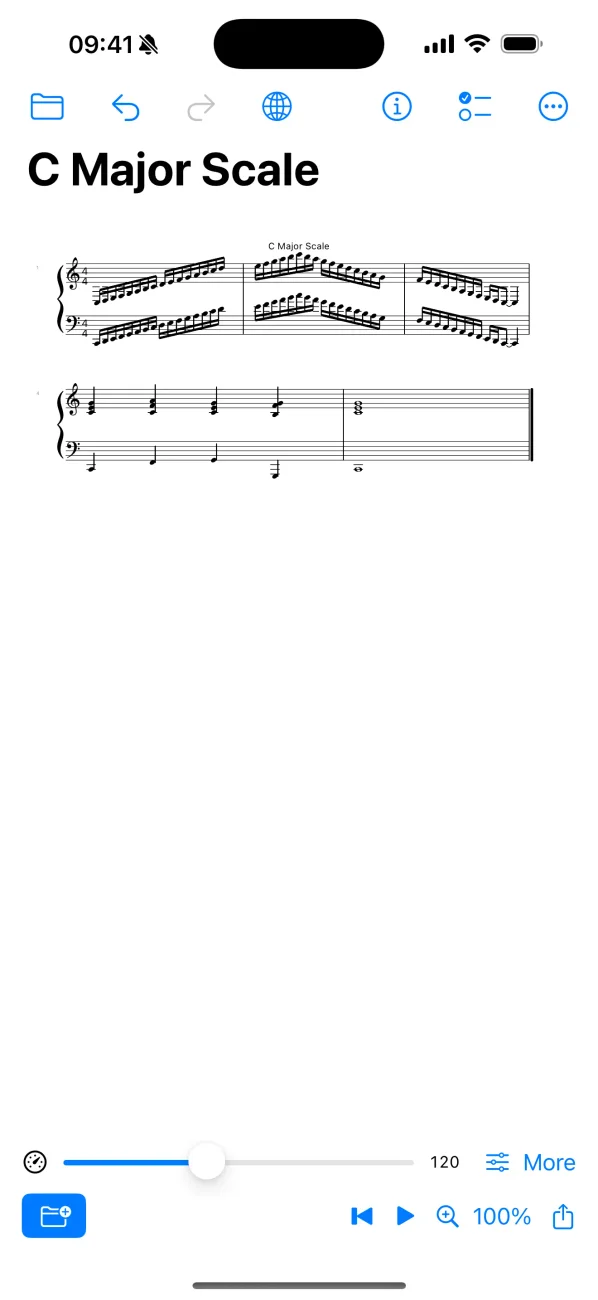
` Real engraving - drawn with the professional Bravura music font: noteheads, stems, beams, slurs,
ornaments, chord symbols, repeats and multi-voice rests follow engraving conventions
` Sound out of the box - a built-in GM sound bank means playback works immediately, with no download;
dynamics, crescendo, pedals, staccato, fermata, trill/turn/mordent and grace notes are all performed.
When a score carries chord symbols they play along underneath - you can switch that off and give
the chord symbols their own volume
` Handy transport - return to start, play / pause / resume (resume picks up exactly where it stopped);
select a note first and playback starts from that measure
` Repeats handled properly - repeat barlines, voltas, D.C. / D.S. al Fine and To Coda are followed
during playback, and the play cursor moves through rests and tied notes just like the printed page
` Note details + Music classroom - tap any note to see its pitch, duration, voice and staff, position,
lyrics and chord symbols. At the bottom, the "Music classroom" explains every mark on that note,
grouped by kind (grace notes, ornaments, articulation, slurs, breath and pauses, dynamics, pedals,
tempo, repeats and jumps...), each drawn with the same music font as the score, with its Chinese ` English
name and a one-line explanation - so a beginner can look up any unfamiliar symbol immediately.
Tapping any notehead of a chord shows the same marks, plus a "Sounding together" row for the rest of it
` Transposing instruments explained - on a Bb trumpet or sax part the details panel reads
"written B4 - sounds as A4"; if the written score (chord names included) is a whole tone away
from what you hear, the app tells you right after import
` Practice tools - metronome, tempo, loop, swing, and a piano roll that numbers the measures in
playing order and marks repeated ones "take 2"; scale, arpeggio and chord exercises in C / F / G major
and their relative minors (up / down, 1-3 octaves, optional cadence written the way graded tutors
do it - ten exercise types in all)
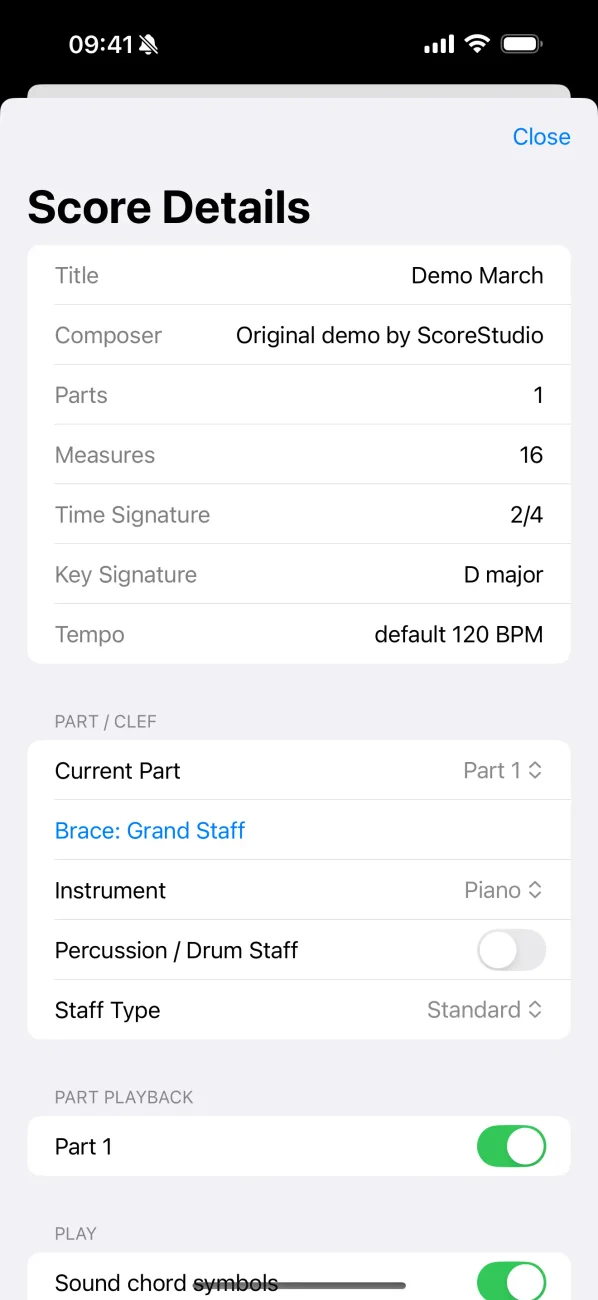
` Built-in examples - the demo score "Demo March" plus two practice scores: G major (3 octaves) and
A harmonic minor (2 octaves) with cadences, shipped as the original MusicXML files
` Jianpu view (experimental) - switch any score to numbered notation with one tap: melody only
by default, or chord-stacked
` Coverage-score practice (experimental) - four single-theme scores that drill repeats and jumps:
repeats & endings / measure & beat repeats / D.S. & Coda / D.C. & Fine
` Score library - scores you open are collected automatically, with favourites, rename and delete
` Export - PDF / PNG / MIDI / WAV / MusicXML through the system share sheet
` Fully offline ` Chinese and English interface - no account, no network, no permissions of any kind
(camera, photos, ...) and no data collected. The notation is read-only so nothing is changed by
accident; playback settings (instrument, volume, mute, staff type) can be adjusted anytime
Notes:
` This version does not include image-based OMR. PDF import supports vector PDFs that contain music-font
glyphs only, and durations are approximate - please verify after import.
` The bundled FluidR3 GM sound bank is MIT licensed; the Bravura music font is SIL OFL 1.1.
Both license texts ship with the app.
` iPhone and iPad only (Apple Watch is not supported).
` Voluntary donations: the support page lists the developer's email - entirely optional;
the app contains no payment of any kind.
What’s new
Version 1.2 · Nov 16, 2026
What's new in 1.2:
· Cross-staff arpeggios: an arpeggio shared by both staves (piano, harp) is now drawn as one
continuous wavy line spanning both staves; downward arpeggios, two arpeggios on the same beat
and the "do not roll" bracket are fixed as well
· Open and convert score files**: open `.mscz` / `.mscx` scores, and convert/export between the two formats and MusicXML
· Arpeggios roll by default: a cross-staff arpeggio plays from the lowest note up to the highest
with staggered starts and a common release; it can be switched off under Settings ▸ Arpeggio
(off keeps all chord tones sounding at once); speed comes in slow / medium / fast / custom,
where custom takes the gap per note (0.01–2.0 beats)
· Key at a glance: a new "Key C major" line under the title, with the number of key changes;
practice scores now state their mode
· Tempo-mark panel: with several tempo marks you can drag each one, scale all proportionally,
set all to one BPM, or delete a single mark
· New example "Cross-Staff Arpeggio": twelve measures on one part with two staves, changing
instrument mid-score — harp → piano with sustain pedal → celesta, each change announced by a
bold label on the score; explained entry by entry in Music classroom
· Music classroom: two new entries — "Cross-staff arpeggio" and "Non-arpeggiate" — plus a new
Bends group (scoop / plop / fall / doit / guitar bend with pre-bend, release and whammy-bar
variants) and explanations for trill extension lines, pizzicato / stopped / open string,
artificial harmonics, half pedal, cue notes and drum notes
· Engraving fixes: staff sizes above 100% now scale horizontal spacing (noteheads no longer
collide); a grace group at the start of a measure no longer pushes the last beat past the barline
· All bends now sound: falls, scoops, plops, doits and guitar bends (pre-bend and release included)
are performed as written; marks at the end of a tied note work too (they were printed but silent)
· Engraving and playback calibration: per-staff clef changes, octave lines that persist per staff,
multi-voice rests stepping aside, five-line drum staves and mixed drum notes, beam grouping;
octave lines across system breaks hook only at the true end
· Fixes: the percussion clef in .mscz files now shows two bars, key signatures are redrawn after
a clef change, native string/fret data no longer appears as tiny numbers, octave lines survive
an export round trip, reopening .mscz and picking a score from the library both work
· Still fully offline — no account, no ads, no purchases; tips are on the support page only,
the app contains no payment of any kind
App privacy
What Guangzhou Microwood Technology Co., Ltd. declares on the App Store about how this app handles data.
-
Data not collected
The developer does not collect any data from this app.
Privacy practices may vary, for example with the features you use or your age.
Information
- Seller
- Guangzhou Microwood Technology Co., Ltd.
- Category
- Music
- Version
- 1.2
- Updated
- Nov 16, 2026
- Released
- Sep 29, 2026
- Size
- 19.1 MB
- Requires
- iOS 16.0 or later
- Age rating
- 4+
- Price
- Free
- Languages
- English, Simplified Chinese
- Copyright
- © 蔡裕城
You might also like
-
 Auris: Ear Training & TheoryPerfect Pitch, Chords & Tuner
-
 RiffAlly Chord ExplorerSee how guitar chords move
-
 RiffAlly ScalesGuitar scales made visual
-
 RiffAlly Jam: Guitar PracticeSolo with scales & live chords
-
 FrankenJazzJazz Progression Workshop
-
 SlowSoloSlow down and loop any solo
-
 MS-12: 12bit Beat Sampler12-bit sampler & sequencer
-
 Vectorscope 2AUv3 stereo & phase analyzer
-
 apeCsoundCsound 7 AUv3 synth & effects
-
 Nidra - Binaural BeatsMusic