
ScreenRide for Tesla
Mirror & extend to car screen
Designed for iPhone
Free · In-app purchases
- Age rating4+
- CategoryProductivity
- DeveloperLYU LLC
- LanguagesEnglish+ 2 more
- Size12.3 MB
Links to the official App Store page
Download.org hosts no file of ScreenRide for Tesla. The button opens its official App Store page, published by LYU LLC. Listing last checked on Nov 26, 2026.
Screenshots


About
Turn your Tesla into a mobile office. ScreenRide puts your Mac and iPhone on the big Tesla touchscreen: a second display for your MacBook with touch control, plus iPhone mirroring with sound. Built for freelancers, developers and anyone who works on the road — write code, review documents, take calls or present while you charge, wait or park.
YOUR MOBILE OFFICE: SECOND SCREEN FOR MAC (free Mac companion app)
• Extended display: use the Tesla screen as a second monitor for your MacBook, and split your work across both screens — editor on one, docs or terminal on the other
• Touch control: tap, drag and scroll on the car screen to control your Mac, just like an iPad
• Or simply mirror your Mac to the big screen
• Sharp text and low latency; connect the Mac to your iPhone with a USB cable for the most stable picture
IPHONE MIRRORING
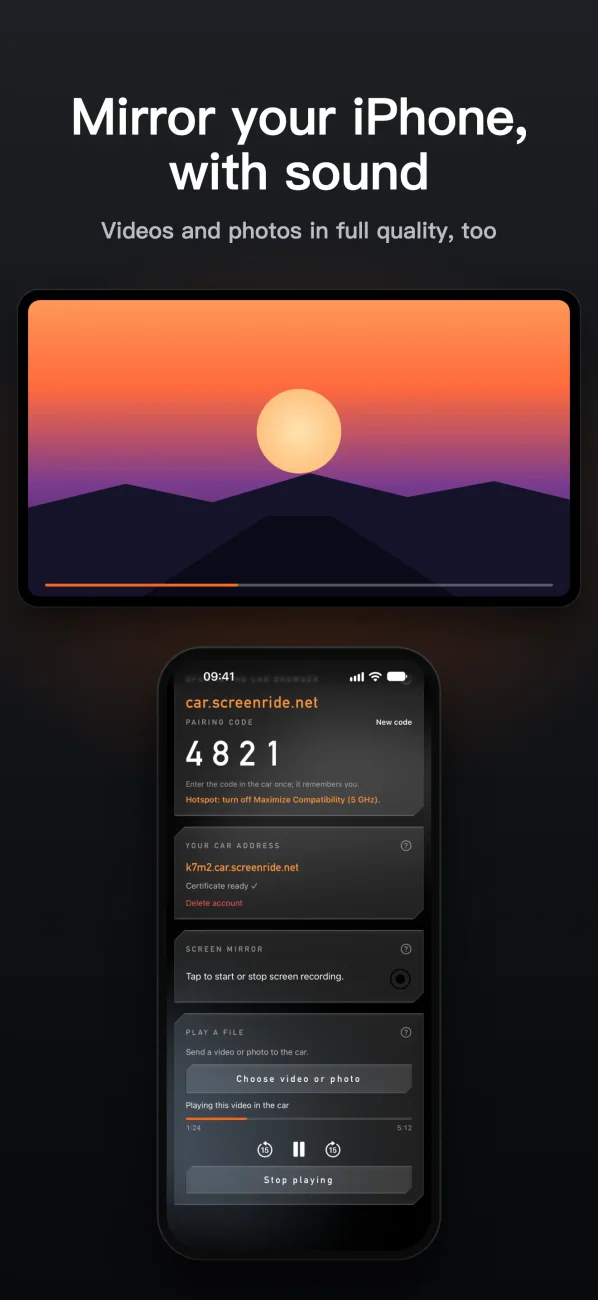
• Mirror anything on your iPhone, with sound, in portrait or landscape
• Content mode: play videos and photos from your library directly on the car screen, in full quality
EASY TO OPEN IN THE CAR
• Works over your iPhone's own hotspot: no adapter, no cables to the car, no account required
• Mirroring uses no cellular data: the picture and sound stay on the hotspot between your devices and the car
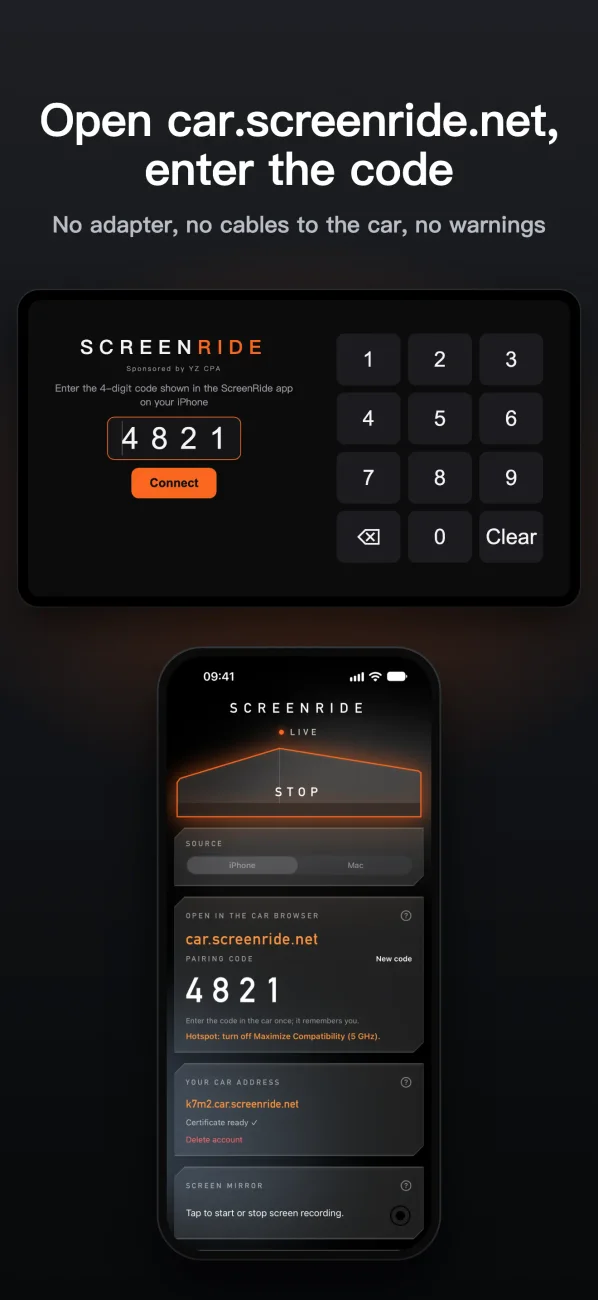
• Type car.screenride.net in the car browser and enter the 4-digit code shown on your iPhone
• Optional Sign in with Apple gives you your own secure car address with no security warning; your car remembers it
PRIVATE BY DESIGN
• Your screen, sound, photos and videos go straight from your device to your car. They never pass through our servers, so client work and code stay with you
• No analytics, no tracking
SCREENRIDE PRO
Free: 3 hours of iPhone mirroring a week, used whenever you like, plus content mode. Pro lets you color ScreenRide like your car, removes the limit and unlocks the Mac extended display, touch control and Mac mirroring. Pro is available as a monthly or yearly subscription (each with a 7-day free trial) or a one-time lifetime purchase. Subscriptions renew automatically unless cancelled at least 24 hours before the end of the current period; manage them in your Apple Account settings.
Works with Tesla Model 3, Model Y, Model S, Model X and Cybertruck, and other cars whose touchscreen has a modern web browser. Use only while parked or by passengers; follow local laws. Tesla is a trademark of Tesla, Inc. ScreenRide is not affiliated with or endorsed by Tesla or any other car maker.
Terms of Use: https://www.apple.com/legal/internet-services/itunes/dev/stdeula/
Privacy Policy: https://screenride.net/privacy/
What’s new
Version 1.1.6 · Nov 15, 2026
Pick several photos and videos at once and choose what plays right on the car's screen: a grid of your picks, previous and next, and back to mirroring. Videos get ready faster.
App privacy
What LYU LLC declares on the App Store about how this app handles data.
-
Data linked to you
May be collected and linked to your identity.
- Identifiers
Privacy practices may vary, for example with the features you use or your age.
Information
- Seller
- LYU LLC
- Category
- Productivity
- Version
- 1.1.6
- Updated
- Nov 15, 2026
- Released
- Nov 13, 2026
- Size
- 12.3 MB
- Requires
- iOS 17.0 or later
- Age rating
- 4+
- Price
- Free
- In-app purchases
- Yes
- Languages
- English, Simplified Chinese, Traditional Chinese
- Copyright
- © 2026 ScreenRide
You might also like
-
 Arafat Business CenterProductivity
-
 PatternBankSpaced Repetition for Coding
-
 Campus XProductivity
-
 OfficeRnD Workplace RoomsProductivity
-
 LeadHunterLocal service, find jobs
-
 OfficeRnD RoomsMeeting Rooms Display app
-
 Dazzle: Personal AI AssistantPut your camera roll to work!
-
 STEM Girl Day at UT AustinProductivity
-
 Plotten: Writing AppWrite novels, screenplays