
- Age rating4+
- CategoryProductivity
- DeveloperBCLG APPS PTY LTD
- LanguagesEnglish
- Size5.9 MB
Links to the official App Store page
Download.org hosts no file of Shelfie. The button opens its official App Store page, published by BCLG APPS PTY LTD. Listing last checked on Nov 10, 2026.
Screenshots


About
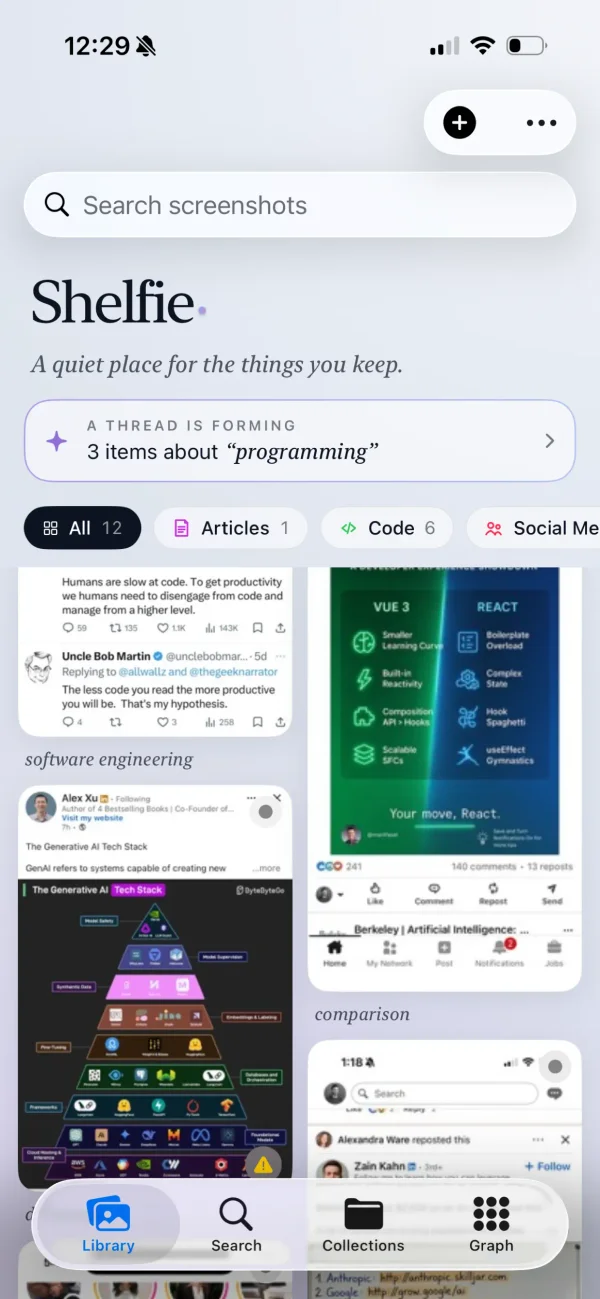
Shelfie turns your screenshot and photo chaos into an organized, searchable library — powered entirely by on-device Apple Intelligence. Nothing ever leaves your iPhone.
Every image you import is automatically analyzed, tagged, and categorized using Apple's Vision, Natural Language, and Foundation Models frameworks. Screenshots, photos, receipts, whiteboards, documents, signs, handwritten notes — Shelfie knows what it's looking at and makes it instantly findable.
INTELLIGENT ORGANIZATION
• Works on both screenshots and regular photos — the picker defaults to screenshots but you can toggle to your full photo library
• Auto-categorization into 19 smart categories: Receipts, Conversations, Articles, Code, Maps, Social Media, Email, Calendar, Settings, Shopping, Travel, Health, Finance, Food, Documents, Entertainment, Education, Music, and Other
• AI-generated tags, one-sentence summaries, and key highlights (prices, dates, action items)
• Entity extraction — people, places, and organizations pulled automatically
• Tappable detected data — URLs open Safari, phone numbers dial, addresses jump to Apple Maps
POWERFUL SEARCH
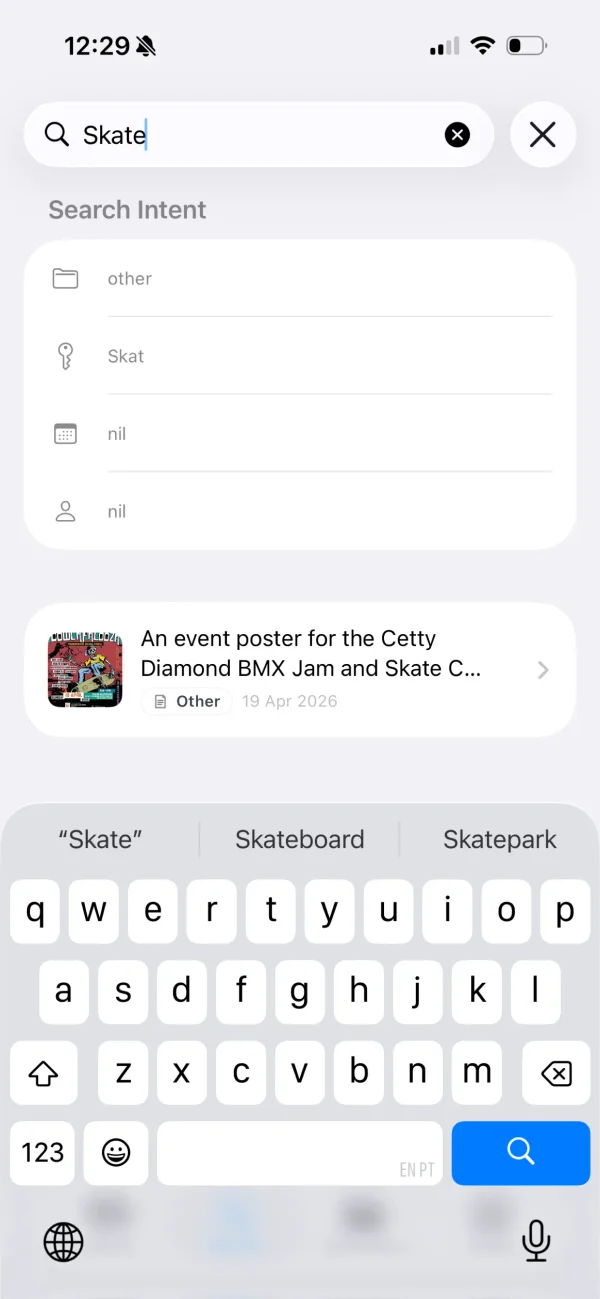
• Full-text search across every pixel of OCR-extracted text — screenshots, signs, receipts, handwriting
• Smart AI search understands natural language: "receipts from last week", "photos of whiteboards", "messages from John"
• Spotlight integration — find any image straight from your Home Screen
• Siri Shortcuts: "Search images in Shelfie", "Find image in Shelfie"
VISUAL DISCOVERY
• Similar images surface automatically using visual fingerprinting
• Content Graph — explore your library as a constellation of related ideas
• Auto-generated Collections plus custom Groups for manual organization
PRODUCTIVITY TOOLS
• Your Context — tell Shelfie about yourself (work, hobbies, life) and Apple Intelligence writes tags, descriptions, and group names that actually fit you. Stays on your device, syncs only via your private iCloud
• Combine multi-page screenshots into a single item — drag to reorder, Apple Intelligence suggests the right top-to-bottom order, and overlapping OCR text is deduplicated. Originals are kept and back-linked
• Multi-select mode to summarize several images into a single AI briefing with themes and action items
• Quote Card Generator creates shareable image cards in five styles and three sizes
• Share Sheet support — send screenshots and photos to Shelfie from any app
• Editable personal notes on every image
• Import up to 50 images at once from the photo library, take a new one with the camera, paste from the clipboard, or share up to 10 at a time. After importing from Photos, Shelfie can offer to delete the originals so you free up space
• Automatic screenshot detection (optional) — Shelfie spots new screenshots on your phone, shows how many are waiting, and adds them in one tap. A gentle notification can remind you when a few have piled up
• Imports are fast: images appear immediately and AI analysis continues in the background while you browse
PRIVACY FIRST
All image analysis happens on-device. No cloud AI. No ads. No cross-app tracking. Your images — and everything Shelfie learns about them — stay yours. Your library syncs across your Apple devices through your own private iCloud container, which only your devices can read. Shelfie collects anonymous, non-tracking usage analytics — which features get used, never your images or their contents — to guide what we improve next.
REQUIREMENTS
• iOS 26 or later
• Apple Intelligence-capable device (iPhone 15 Pro or newer) for summaries, smart search, and quote generation
• OCR, categorization, and similarity features work on all supported devices
• No account required
Stop scrolling through Photos looking for that one image. Let Shelfie find it for you.
What’s new
Version 1.9 · Jul 8, 2026
Never miss a screenshot.
Shelfie can now spot new screenshots on your phone and bring them in with one tap.
• Turn it on from the banner in your Library (or any time in About → Screenshot Detection).
• When new screenshots appear, the Library shows how many are waiting — one tap adds them all.
• Optionally, a gentle notification reminds you when screenshots have piled up, so they stop getting lost in Photos.
• Detection runs entirely on your device, like everything else in Shelfie.
Imports got faster, too.
• Adding images no longer waits for the AI. Your images land on the shelf immediately and analysis carries on quietly in the background while you browse — watch the progress banner fill in.
• If an image can't be loaded (an iCloud original that hasn't downloaded, say), Shelfie now tells you instead of silently skipping it.
Focus the analysis.
• Select a region of any screenshot to focus Shelfie's analysis on just that part — the description, tags, and details are rebuilt from the area you choose. Reset to the full image whenever you like.
Plus the usual round of polish.
App privacy
What BCLG APPS PTY LTD declares on the App Store about how this app handles data.
-
Data not linked to you
May be collected but is not linked to your identity.
- Identifiers
- Usage data
Privacy practices may vary, for example with the features you use or your age.
Information
- Seller
- BCLG APPS PTY LTD
- Category
- Productivity
- Version
- 1.9
- Updated
- Jul 8, 2026
- Released
- Apr 28, 2026
- Size
- 5.9 MB
- Requires
- iOS 26.0 or later
- Age rating
- 4+
- Languages
- English
- Copyright
- © 2026 BCLG Apps PTY LTD
You might also like
-
 Capture ItCapture it!!
-
 Stage Cards: Speech Cue CardsPresent, pause & find your cue
-
 CaptainShot Screenshot LibraryScreenshots, finally useful
-
 Captured!Your box for everything shared
-
 Skiii NoteIdeas, Brain Dump & Writing
-
 Safolio: Private VaultFiles, photos & expiry alerts
-
 Due Pal: ADHD Visual TimerTime Blindness Countdown Clock
-
 AllSwipe: Swipe Photo CleanerClean Contacts & Camera Roll
-
 Clockulator - Time CalculatorTime math, 40+ tools, history
-
 FlashTranslate: AI TranslatorBring Your Own LLM · 5 Styles