
Shopping Supporter
Inventory & Recipe Manager
Designed for iPhone, iPad, iPod touch
- Age rating4+
- CategoryUtilities
- DeveloperYuuki Shimizu
- LanguagesJapanese+ 1 more
- Size43.3 MB
Links to the official App Store page
Download.org hosts no file of Shopping Supporter. The button opens its official App Store page, published by Yuuki Shimizu. Listing last checked on Nov 12, 2026.
Screenshots


About
Tired of writing or typing the same items over and over when making shopping lists?
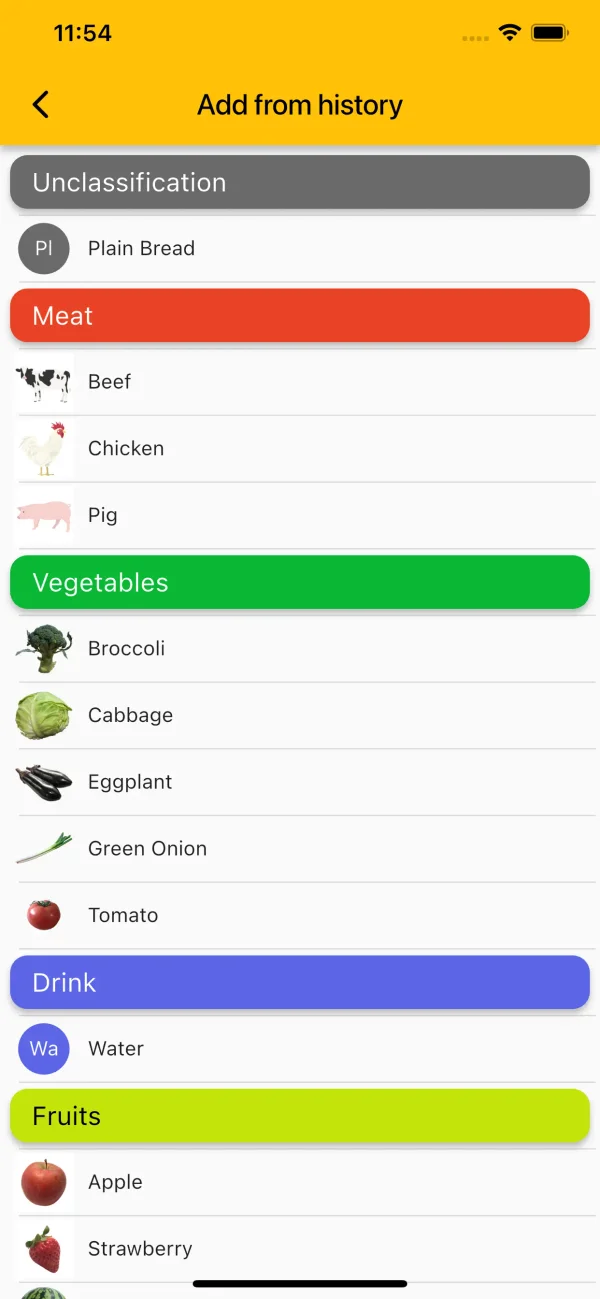
Shopping Supporter saves everything you've entered before, so you can easily add items again from your history. Once you add an item to your Shopping List, a simple swipe moves it to your Inventory—no need to retype purchased items. Similarly, when something runs out in your Inventory, just swipe to move it back to your Shopping List.
For staples like beverages and breakfast items, register them once and simply move them between Inventory and Shopping List—no repeated typing required.
Shopping Supporter goes beyond inventory management with Recipe List features for managing recipes and recording your daily meals.
The app integrates with your Inventory and Shopping List, so you can see at a glance whether recipe ingredients are in stock or need purchasing—just check the icon status. Tap icons to add items to lists or remove them. As you register ingredients for dishes you want to cook, you'll instantly see what you have and what you need to buy. Missing items can be added to your Shopping List with a single tap.
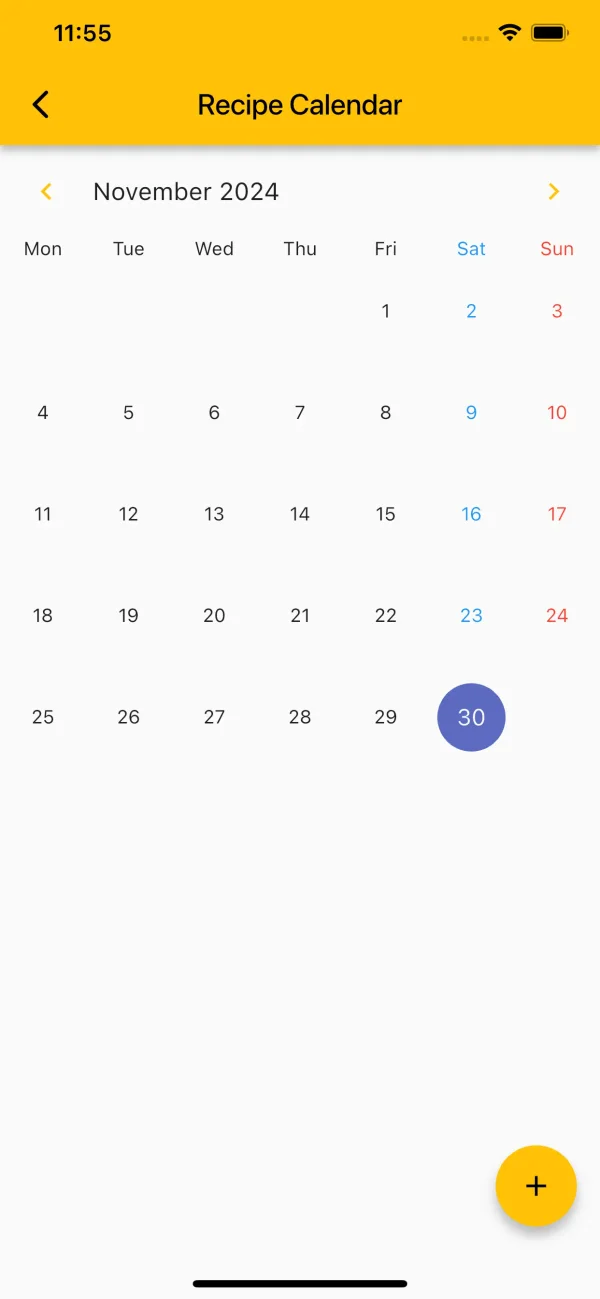
The Recipe Calendar lets you record dishes you've cooked each day. Plan ahead by deciding what to cook and identifying what to buy, or look back to ensure you're not repeating similar meals too often.
Additional Features:
■ Group Management
Create unlimited groups like "Vegetables," "Beverages," "Seasonings," and "Household Items." Customize display order—we recommend organizing groups by shopping order (produce section, meat counter, fish counter, etc.). Assign custom colors to each group for easy visual organization.
■ Adding Items
Record name, group, icon, quantity, unit, price, purchase date, expiration date, URL, and notes. Quantity accepts both numbers and text, so you can use descriptions like "a little left" or "plenty" for items that are hard to quantify. Units can be customized and reordered just like groups.
■ Best & Worst Prices
When you enter prices, the app tracks the lowest and highest prices for each item. If quantity and unit are specified, it displays unit price (e.g., price per gram). Perfect for comparing prices while shopping.
■ Smart Suggestions
When adding to Inventory or Shopping List, the app displays matching items based on what you type. Select one to auto-fill name, icon, group, and unit—making additions quick and easy.
■ Adding Recipes
Record icon, ingredients, cooking instructions, URL, and notes. Add photos to cooking instructions. View cooking history showing when you've made each dish (if added to calendar).
■ Sorting Options
Use the top-right button to sort by Name, Expiration Date, Purchase Date, Added Time, Updated Time, or Custom order. In Custom mode, long-press items to manually arrange them.
■ Search Function
Tap the search icon to display a search box for filtering lists. For recipes, toggle between "Search by Recipe Name" and "Search by Ingredient" using the gear icon.
■ Multi-Select
Long-press an item to enter multi-select mode, allowing you to delete selected items or batch-change their groups. In Inventory and Shopping List, you can also move items between lists. In Recipe List, create calendar meal entries from selected recipes.
■ Delete History
If you accidentally registered something you don't need, delete it from the "Add from History" screen. Note: Items cannot be deleted if they're currently in a list or used as recipe ingredients.
■ Backup & Restore
Back up and restore your database. Use this feature when changing devices. We recommend backing up regularly.
Perfect for:
People who often buy too much or too little
Anyone tired of repeatedly typing the same inventory and shopping notes
Users who want to integrate meal planning with inventory management
WE VALUE YOUR FEEDBACK
Your suggestions help us improve! Contact us anytime via:
- Email: mizuki.naotaka@gmail.com
- X: https://x.com/NaotakaMizuki
- App Store reviews
What’s new
Version 2.2.3 · Nov 8, 2025
Bug Fixes:
- Fixed an issue where the bottom row buttons of the in-app calculator could not be pressed
- Fixed position misalignment that occurred when entering selection mode by long-pressing items in list screens
App privacy
What Yuuki Shimizu declares on the App Store about how this app handles data.
-
Data used to track you
May be used to track you across apps and websites owned by other companies.
- Usage data
-
Data linked to you
May be collected and linked to your identity.
- Usage data
Privacy practices may vary, for example with the features you use or your age.
Information
- Seller
- Yuuki Shimizu
- Category
- Utilities
- Version
- 2.2.3
- Updated
- Nov 8, 2025
- Released
- Oct 1, 2020
- Size
- 43.3 MB
- Requires
- iOS 10.0 or later
- Age rating
- 4+
- Languages
- Japanese, English
- Copyright
- © 2020 Naotaka Mizuki
You might also like
-
 くらべて作れる買い物リストUtilities
-
 Inventory NoteShare home & retail inventory
-
 Daily Todo simple task listUtilities
-
 カイメモ - 買い物リストUtilities
-
 ToDoリスト 買い物リスト&やることリストUtilities
-
 Clean Todo List - Simple To-DoSimple Tasks & Reminders
-
 InstantToDo: Cute and SimpleRecord all wishes and tasks
-
 Stockle - Household StockSee what you need at a glance
-
 TapMemo-Record notes and timeRecord notes and current time
-
 Last Time Tracker: itsuburiDays Since Tracker