
Simple Notepad: Folder Notes
Color notes, folders & widgets
Designed for iPhone, iPad
Free · In-app purchases
- Age rating4+
- CategoryProductivity
- Developernaoto higashiya
- LanguagesEnglish+ 1 more
- Size5.6 MB
Links to the official App Store page
Download.org hosts no file of Simple Notepad: Folder Notes. The button opens its official App Store page, published by naoto higashiya. Listing last checked on Nov 23, 2026.
Screenshots


About
Write. Add a color. Find it again.
Simple Notepad is a simple notepad that lets you organize growing collections of notes your way.
A PLACE FOR EVERY NOTE
Keep notes and folders together on Home. Create nested folders, drag to reorder, or drop a note into a folder. Select multiple notes to move, color, pin or lock them together.
COLORS THAT HELP YOU FIND THINGS
Give the whole note one of six gentle colors. Pin important notes to the top of Home. Search note text across folders, with parent folders and paths kept in view.
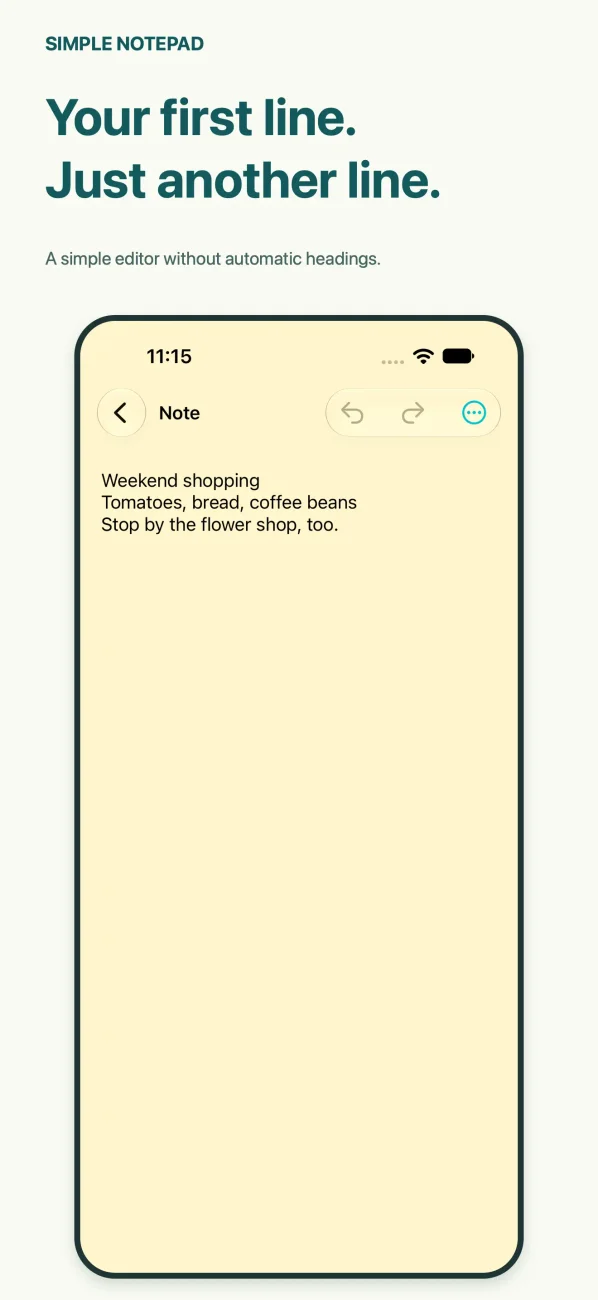
YOUR FIRST LINE STAYS A NORMAL LINE
Write without an automatic heading. Add strikethrough, count selected characters, or copy without formatting. Reorder standard actions such as Copy and Paste alongside custom actions. Extra actions added by iOS, such as Translate and Writing Tools, stay together as a configurable group.
NOTES ON YOUR HOME AND LOCK SCREENS
Display note text in widgets. Choose a folder and then a note, adjust the text size, or hide the content. Locked notes cannot be selected.
PROTECT THE NOTES YOU CHOOSE
Authenticate with Face ID, Touch ID or your device passcode. Search locked notes after authentication. Notes lock again after five minutes without interaction, when the device locks, or when the app exits.
ALSO INCLUDED
• Character counts with and without line breaks
• Creation and last edited dates
• Automatic saving, Undo and Redo
• Recently Deleted for 30 days
• Font size, light and dark themes, Japanese and English
• Side-by-side note list and editor on iPad
All note features are free. Optional one-time ad removal removes banner ads from Home and folder lists. No subscription. Check your local price in Apple’s purchase screen.
Notes are stored on device. The app has no proprietary cloud sync or manual backup. Recovery through iOS backup or device migration depends on your settings and chosen transfer method.
What’s new
Version 1.0.2 · Nov 20, 2026
Updated the App Store listing.
App privacy
What naoto higashiya declares on the App Store about how this app handles data.
-
Data linked to you
May be collected and linked to your identity.
- Location
- Identifiers
- Usage data
-
Data not linked to you
May be collected but is not linked to your identity.
- Diagnostics
Privacy practices may vary, for example with the features you use or your age.
Information
- Seller
- naoto higashiya
- Category
- Productivity
- Version
- 1.0.2
- Updated
- Nov 20, 2026
- Released
- Oct 23, 2026
- Size
- 5.6 MB
- Requires
- iOS 17.0 or later
- Age rating
- 4+
- Price
- Free
- In-app purchases
- Yes
- Languages
- English, Japanese
- Copyright
- © 2026 nanaon
You might also like
-
 ColorPin 色分けメモ帳・付箋ノートカラーノートで予定もチェックリストも
-
 写真メモ - 看板・時刻表を保存して整理Productivity
-
 doneProductivity
-
 シンプル文字数メモ 文字数カウントProductivity
-
 FindMemo - Notepad & SearchFolders and fast search
-
 はしっこ付箋Productivity
-
 ロック付チャットメモ帳Productivity
-
 ぺたっとメモProductivity
-
 カテゴリ別メモ帳Productivity
-
 Local Memo: Offline NotesOffline notes and folders