- Age rating4+
- CategoryHealth & Fitness
- DeveloperMoti Karmona
- LanguagesEnglish
- Size1.8 MB
Links to the official App Store page
Download.org hosts no file of Simple Walker. The button opens its official App Store page, published by Moti Karmona. Listing last checked on Nov 14, 2026.
Screenshots

About
Simple Walker counts your steps and finds your walks. There is nothing to start or stop: it reads what your iPhone already records in Apple Health, so today's steps and walks are there when you open it.
TODAY
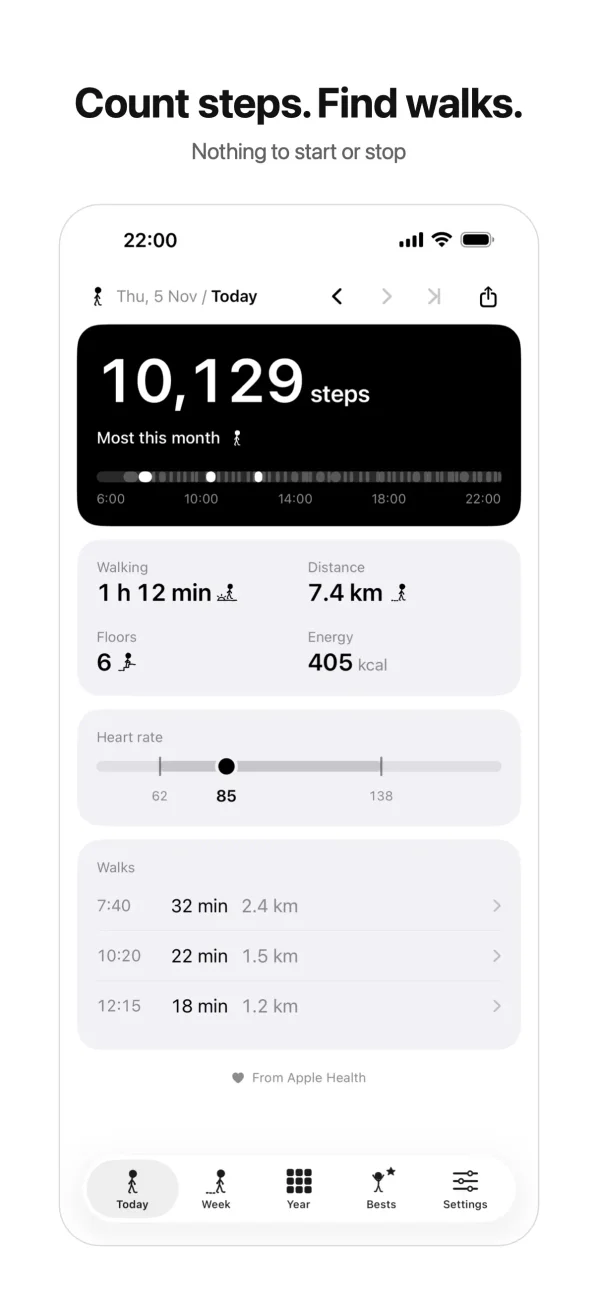
• Your steps today, and how that compares with yesterday by this time.
• When you walked, on a simple day strip.
• Time spent walking, distance, floors and active energy, in plain numbers.
• Your heart rate for the day on one bar: lowest, average and highest.
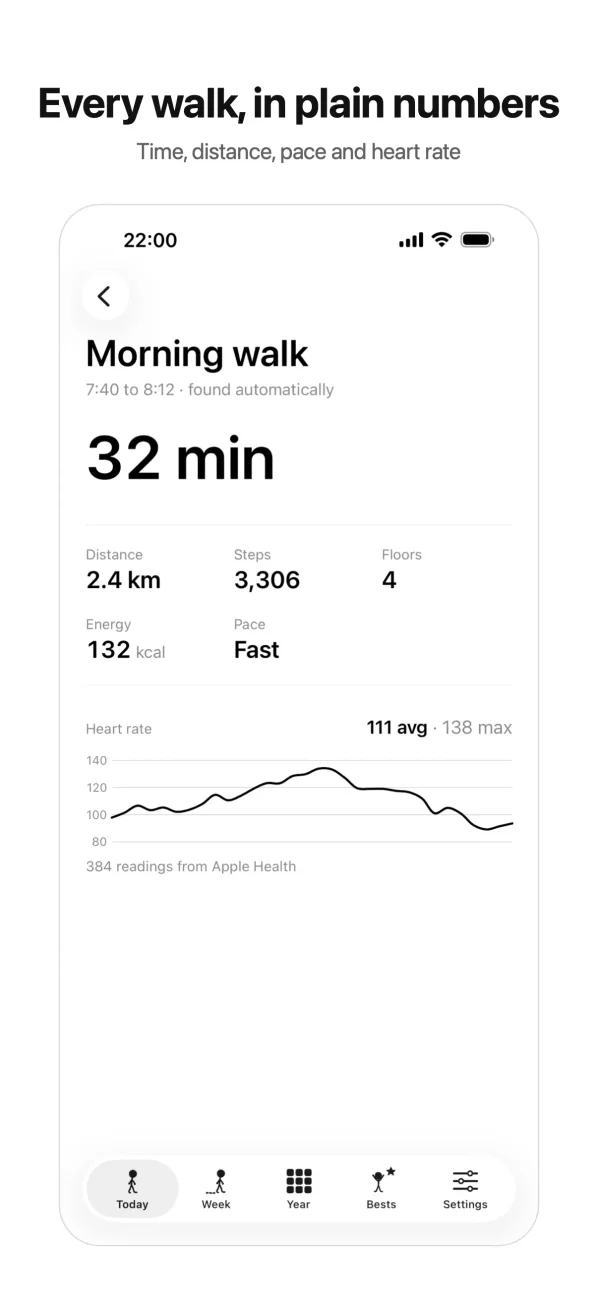
• Each walk the app found, with its time, minutes and distance.
• Step back through earlier days with the arrows or a swipe, and jump straight back to today.
EACH WALK
• Minutes, distance, steps, floors, energy, and its pace in one word: Fast or Easy.
• Heart rate during the walk, when an Apple Watch recorded it.
THE WEEK
• Your steps for the week, and how they compare with the week before.
• One bar per day with its steps. Tap a bar to open that day.
• When you walked, across the whole week, on one strip.
• Step back through earlier weeks.
YOUR YEAR
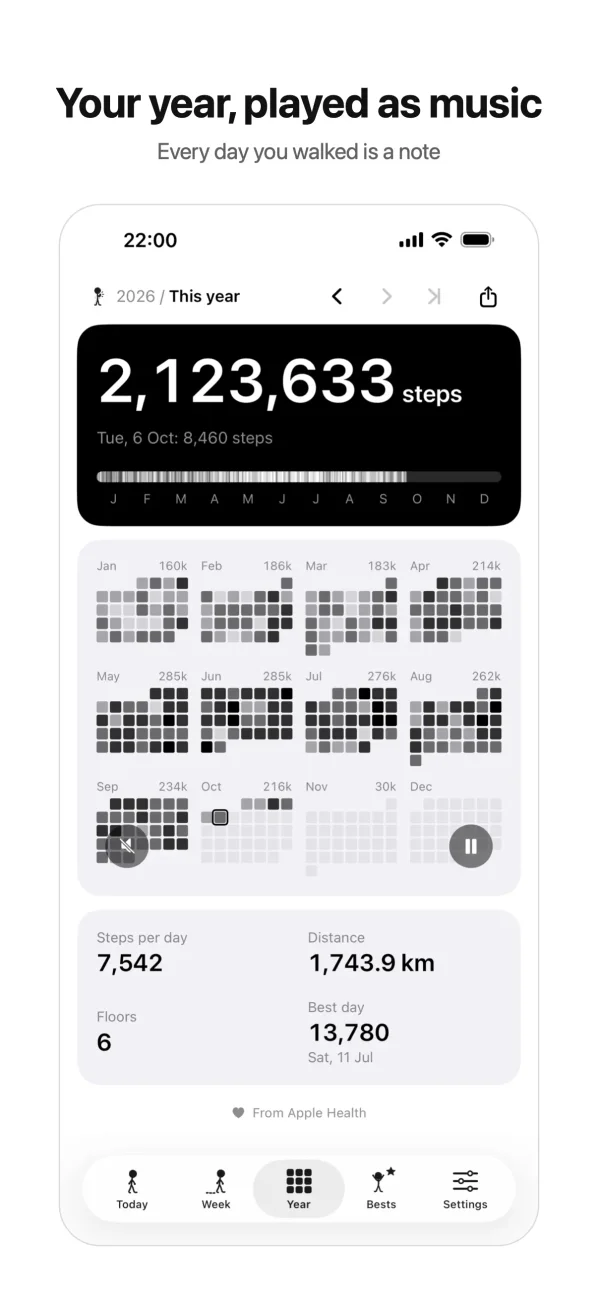
• Every day of the year on one calendar, lit by how much you walked, with your steps for the year.
• Press Play and turn the sound on to hear your year as music, the Step Concerto, while the little walker dances. Each day is a note; busier days ring louder and longer.
• Pick its sound in Settings: Tone, Piano, Keys or Box.
• Go back through every year in Apple Health.
YOUR BESTS
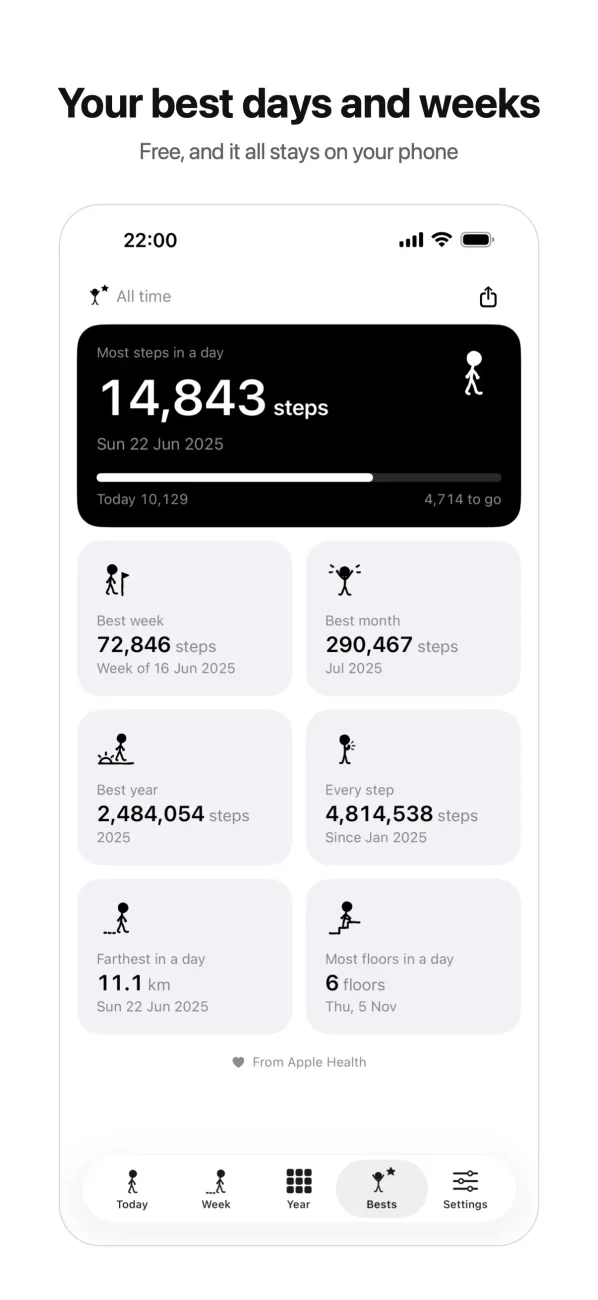
• Most steps in a day, best week, best month, best year, farthest in a day, most floors in a day, and every step you have taken, from all your history in Apple Health.
• See how close today is to your best day.
• Each record with its date. Tap a day or your best week to see it again.
• Nothing to keep up: there are no streaks.
SHARE
• Share Today, the Week or your Bests as a picture.
• Share your year as an animated picture, as a video with its music, or as a picture.
• Send it, or save it to Photos. Everything is made on your iPhone, and you choose where it goes.
WHOLE DAY OR WALKS
Steps, distance, floors, energy and heart rate count your whole day, so they match Apple Health. Walking time counts your walks, and climbing stairs is not counted as a walk.
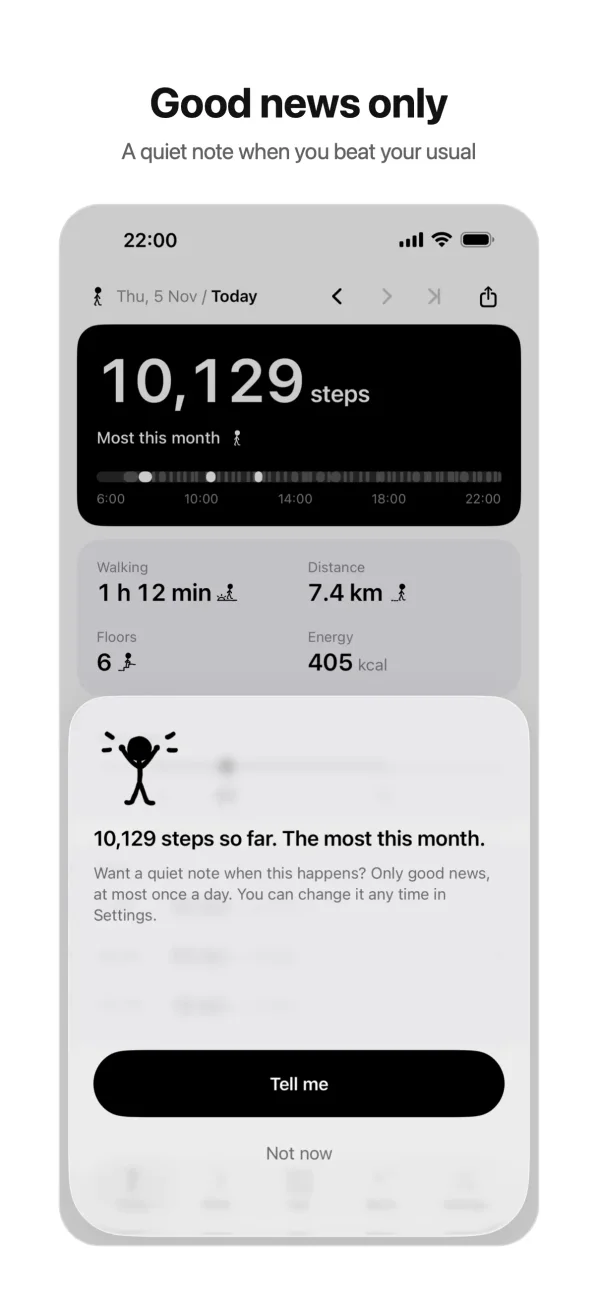
GOOD NEWS ONLY
When a number beats your usual (your last four weeks, up to the same time of day), Simple Walker says so with a small celebration. If you like, it can tell you with a notification: at most one a day, only ever good news, never "less than usual".
PRIVATE BY DESIGN
Simple Walker only reads from Apple Health: steps, distance, floors, heart rate and active energy. It writes nothing to Health. It makes no internet connections and has no account, no ads, no analytics and no tracking. Everything stays on your iPhone.
FREE
No purchases, no subscriptions, no ads.
NOT A MEDICAL DEVICE
Simple Walker is for everyday fitness only. It shows numbers your iPhone and Apple Watch already measured. Don't use it to diagnose, treat or monitor any health condition.
What’s new
Version 1.3 · Nov 10, 2026
• Your year, played as music. The new Year tab lights up every day you walked. Press Play and turn the sound on to hear it as the Step Concerto while the little walker dances, and go back through earlier years.
• Share any tab. Today, the Week and your Bests as a picture; your year as an animated picture, a video with its music or a picture. Save any of them to Photos.
• Bests adds your best year and every step you have taken.
• Spread the word from Settings: tell a friend, or rate the app.
• Every tab says where its numbers come from, and explains how to allow Health access when it has no steps to show.
• After a while away, the app opens on today again.
App privacy
What Moti Karmona declares on the App Store about how this app handles data.
-
Data not collected
The developer does not collect any data from this app.
Privacy practices may vary, for example with the features you use or your age.
Information
- Seller
- Moti Karmona
- Category
- Health & Fitness
- Version
- 1.3
- Updated
- Nov 10, 2026
- Released
- Oct 26, 2026
- Size
- 1.8 MB
- Requires
- iOS 18.0 or later
- Age rating
- 4+
- Price
- Free
- Languages
- English
- Copyright
- © 2026 Simple Walker
You might also like
-
 Stepasaurus: Dino Step TrackerVirtual Pet & Walking Buddy
-
 Weight Loss & Diet FitnessCalorie, Steps & Water Tracker
-
 Patche AI: Workout & Meal PlanWellness You Can Trust™
-
 Walk Your WayWalk with comfort
-
 Time Walk - Activity TrackerStep Counter, Walking Tracker
-
 Global Steps: Walking LeagueWalk Tracker, Step Challenge
-
 Diby: Personal Trainer AppWorkouts, check-ins, progress.
-
 Capacity: Hybrid TrainingRun faster. Get stronger.
-
 FamiStep: Fun Family WalksFun Family Step Counter App
-
 KetoBMMetabolic Health Monitor