
- Age rating4+
- CategoryPhoto & Video
- DeveloperStefan Lux Dr
- LanguagesEnglish
- Size4.4 MB
Links to the official App Store page
Download.org hosts no file of SLImageViewer. The button opens its official App Store page, published by Stefan Lux Dr. Listing last checked on Nov 17, 2026.
Screenshots

About
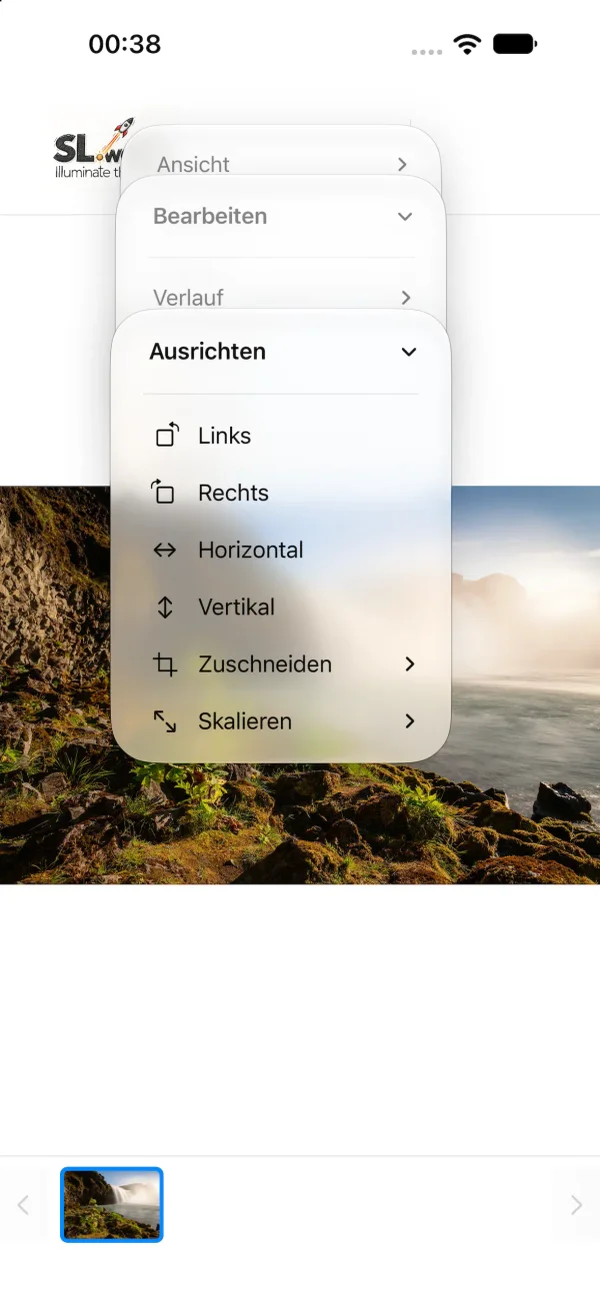
SL.ImageViewer is a fast and straightforward image viewer for iPhone, iPad, and Mac. Open individual images or entire folders, browse your collection with ease, and inspect every detail in full screen, at actual pixel size, or with the built-in magnifier.
SLImageViewer also includes practical image-editing tools. Rotate, flip, crop, and resize your images. Adjust brightness, contrast, and white balance, apply automatic enhancement, or create grayscale and inverted versions.
Image information and camera data are presented in a clear, structured layout. Selected metadata—including the description, photographer, capture date, location, and copyright information—can be edited directly. Images can then be shared or converted to another format.
The responsive ribbon automatically adapts to the available screen size, providing convenient access to every feature across all supported devices.
Key features:
• Open individual images or complete image folders
• Browse quickly using the filmstrip
• Slideshow and full-screen modes
• Pixel-perfect 100% view
• Built-in magnifier for fine details
• Gesture and scroll-wheel navigation
• Rotate and flip images horizontally or vertically
• Freeform cropping and predefined image sizes
• Resize images by percentage
• Adjust brightness, contrast, and white balance
• Automatic image enhancement
• Grayscale and inversion effects
• Undo and redo editing steps
• View file, camera, and EXIF information
• Edit selected image metadata
• Share images and convert between image formats
• Light or dark viewing background
• Thumbnail caching for faster browsing
• German and English interface
• Optimized for iPhone, iPad, and Mac
What’s new
Version 1.41 · Oct 19, 2026
Some bug fixes and an optimized UI for iPhone and iPad: swipe with one finger to turn pages instead of moving them. Zoom and pan gestures now use two fingers.
App privacy
What Stefan Lux Dr declares on the App Store about how this app handles data.
-
Data not collected
The developer does not collect any data from this app.
Privacy practices may vary, for example with the features you use or your age.
Information
- Seller
- Stefan Lux Dr
- Category
- Photo & Video
- Version
- 1.41
- Updated
- Oct 19, 2026
- Released
- Oct 15, 2026
- Size
- 4.4 MB
- Requires
- iOS 26.6 or later
- Age rating
- 4+
- Price
- Free
- Languages
- English
- Copyright
- © SL.works (2026)
You might also like
-
 Frequent PhotosEveryday photos, within reach
-
 VibeRollYour photos, in motion
-
 StereoCardsPhoto & Video
-
 Secret Photo+Folder HDSecret videos on your iPad
-
 Disposable PhotosKeep your main gallery clean!
-
 Culla: Photo OrganizerSwipe to sort your photos
-
 PhotoOrganista: Photo & VideoPowerful Digital Asset Manager
-
 SilkSlide - Photo SlideshowDigital frame Photo slideshow
-
 NitpicRapid photo sorting for pros
-
 PixInfo: Exif Metadata ViewerView & Export Photo Details