
- Age rating4+
- CategoryProductivity
- DeveloperDAMIAN PAUL HELME
- LanguagesEnglish
- Size27.7 MB
Links to the official App Store page
Download.org hosts no file of Snapity App. The button opens its official App Store page, published by DAMIAN PAUL HELME. Listing last checked on Nov 12, 2026.
Screenshots



About
Turn any event into a calendar entry in seconds.
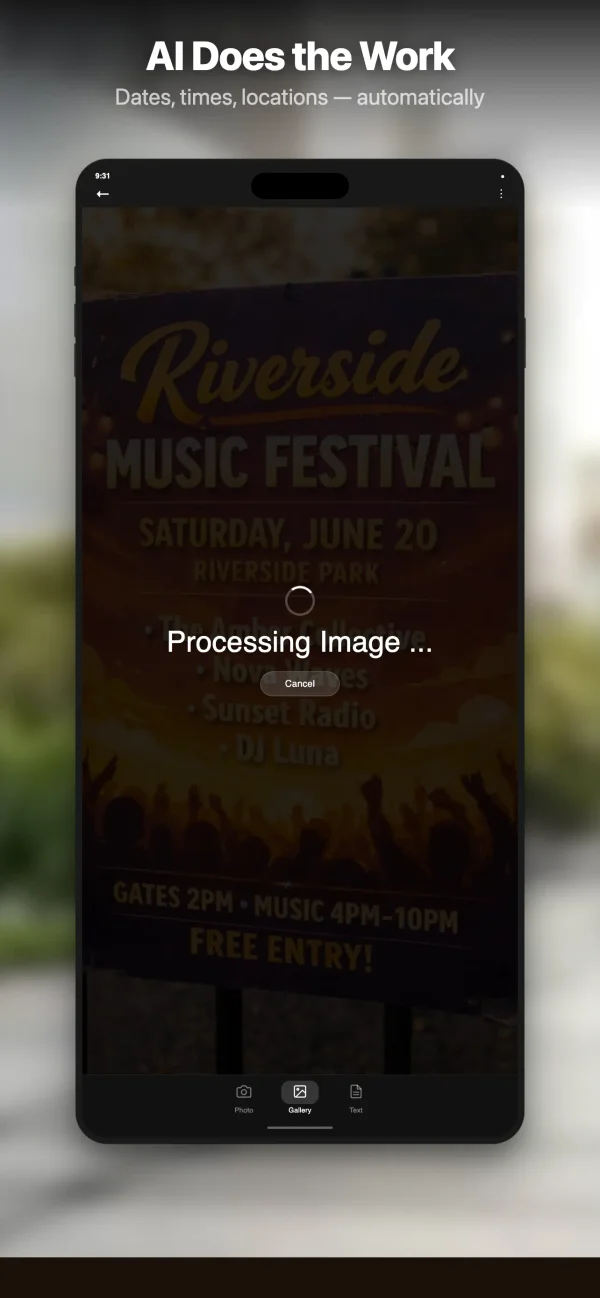
See a concert poster on a lamp post? Got a party invite in WhatsApp? Received meeting details by email? Just snap a photo or paste the text - Snapity's AI extracts the details and creates a calendar event automatically.
TWO WAYS TO CAPTURE EVENTS
SNAP A PHOTO
Point your camera at any poster, flyer, or screenshot. Snapity reads the image and extracts all the event details.
PASTE TEXT
Copy event details from WhatsApp, SMS, email, or any message. Paste into Snapity and let AI do the work. Perfect for casual invites like "Drinks at The Eagle, Friday 7pm".
HOW IT WORKS
1. Snap a photo OR paste text from any message
2. Snapity's AI extracts the title, date, time, and location
3. Review the details and tap to add to your calendar
4. Done. Never miss an event again.
WHAT SNAPITY UNDERSTANDS
From images:
• Concert and festival posters
• Workshop and class flyers
• Conference announcements
• Community event notices
• Screenshots from any app
From text:
• WhatsApp and SMS invitations
• Email event details
• Casual messages ("Dave's birthday, Saturday 3pm at mine")
• Formal invitations
• Any text containing event information
SMART EVENT DETECTION
Snapity handles real-world complexity:
• Different date formats (15/03/2025, March 15th, next Friday)
• Relative dates ("tomorrow", "this Saturday", "next week")
• Time ranges and "doors open" times
• Venue names and full addresses
• Event series with multiple dates
• Recurring events (every Wednesday, weekly classes)
NO ACCOUNT NEEDED
Download and start using immediately. No sign-up, no login, no credit card. Just open the app and capture your first event.
GENEROUS FREE TIER
Get 20 free event extractions every month - whether from photos or text. That's enough for most casual users, forever free.
PRIVACY FIRST
• Photos and text are processed securely and never stored
• No account means no personal data collection
• We only access what you choose to share
• All data transmitted securely via HTTPS
WORKS WITH YOUR CALENDAR
Snapity integrates with your existing calendar apps:
• Apple Calendar
• Google Calendar
• Outlook
• Any calendar app on your device
After extracting event details, you can review and edit before saving. The original content is included in the event description for reference.
PERFECT FOR
• Friends coordinating plans via group chat
• Music lovers discovering gigs on posters around town
• Parents managing kids' school and activity schedules
• Professionals attending conferences and networking events
• Fitness enthusiasts tracking class schedules
• Anyone tired of manually typing event details
TEXT INPUT ADVANTAGES
Pasting text is often faster than taking a photo:
• No OCR errors - direct text is 100% accurate
• Works offline for the input step
• Copy only the relevant part of a conversation
• Edit text before processing if needed
BUILT FOR QUALITY
Developed by Snapity, a company committed to crafting reliable, beautiful software. We focus on doing less, better. Every feature is thoughtfully designed and thoroughly tested.
Download Snapity today and never manually type event details again.
What’s new
Version 1.0.119 · Mar 1, 2026
Streamlined onboarding screens.
App privacy
What DAMIAN PAUL HELME declares on the App Store about how this app handles data.
-
Data not collected
The developer does not collect any data from this app.
Privacy practices may vary, for example with the features you use or your age.
Information
- Seller
- DAMIAN PAUL HELME
- Category
- Productivity
- Version
- 1.0.119
- Updated
- Mar 1, 2026
- Released
- Jan 4, 2026
- Size
- 27.7 MB
- Requires
- iOS 17.0 or later
- Age rating
- 4+
- Languages
- English
- Copyright
- © Damian Helme, 2005
You might also like
-
 Arc - Habit TrackerProductivity
-
 Cambridge Wireless EventProductivity
-
 Image Converter: PNG, JPG, PDFConvert to JPEG, GIF, HEIC SVG
-
 AI Email Writer - QuickMail#1 Email Generator & Composer
-
 AI for School & Teachers - MGQTeacher Tools & Work Assistant
-
 Bhakti Bhav: Mantra & Puja AppNaam Jaap Mala, Shubh Panchang
-
 Herdwatch Livestock ManagementTrusted by 20,000+ producers
-
 CoinsUKProductivity
-
 PDF Compressor-Compress PDFReduce PDF Size & Keep Quality