
- Age rating17+
- CategoryMedical
- DeveloperSonrie AI
- LanguagesEnglish
- Size40.6 MB
Links to the official App Store page
Download.org hosts no file of Sonrie AI. The button opens its official App Store page, published by Sonrie AI. Listing last checked on Nov 19, 2026.
Screenshots


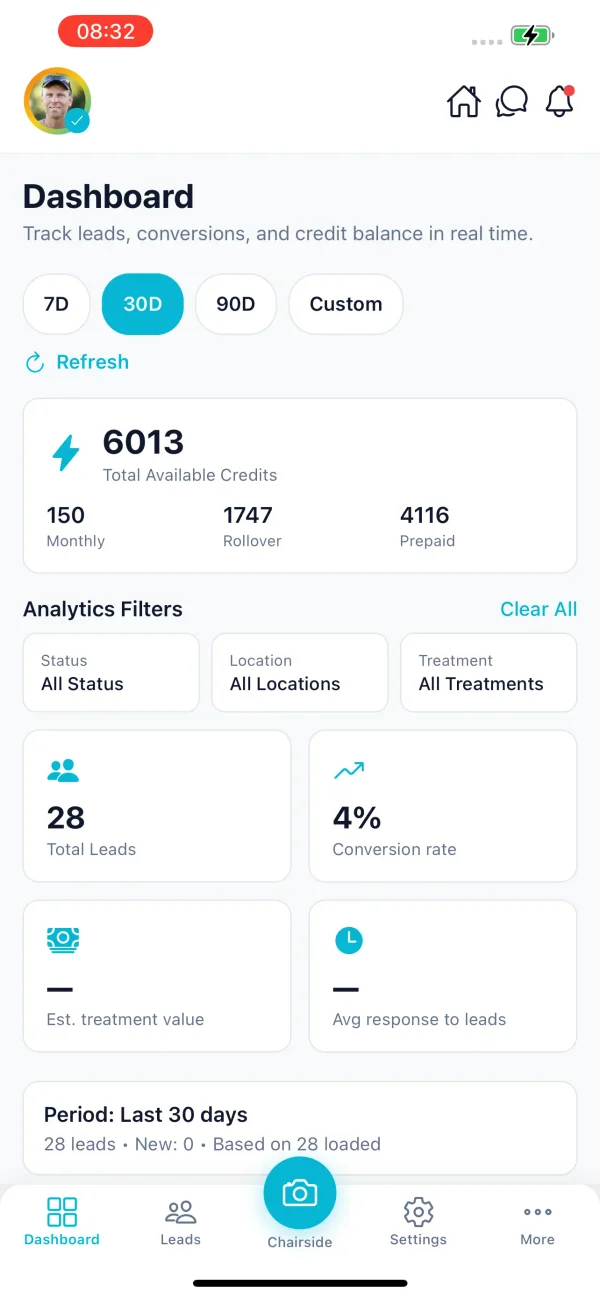

About
Sonrie Chairside helps dental teams create engaging smile consultations and manage follow-up from one app.
Capture or upload a patient photo, generate an AI smile simulation, and present a clear before/after preview during the visit. Then save and share results to keep momentum after the consultation.
Key features:
AI smile simulation from patient photos
Before/after comparison view with zoom and fullscreen preview
AI video generation for treatment previews
Share results by device share sheet, email, or SMS
Lead capture and management with status tracking
Dashboard analytics for leads, conversion trends, and locations
Marketing library with downloadable video assets and email templates
Onboarding tutorials for team training
Built for practice workflows:
Fast chairside intake for new and existing patients
Treatment-focused workflows (such as whitening, veneers, and more)
Staff attribution and filtering for reporting
Easy export/share options to support follow-up conversations
Who it’s for: Sonrie Chairside is designed for dental practices and staff using Sonrie workflows.
Important:
A Sonrie account may be required to access all features.
Camera and photo permissions are used to capture and process patient images for simulations and sharing.
If you want, I can also give you:
a shorter Description version (safer for first submission), and
a keywords list + subtitle suggestion for ASO.
What’s new
Version 1.4.1 · Jul 11, 2026
Version 1.4.0 of Sonrie Chairside for iOS (build 31) is a major update for practices using iPhone and iPad in the operatory, at the front desk, and on the go. It supports iOS 15.1+, iPhone and iPad, and improves lead management, chairside photography, deep linking, agency tools, and iOS reliability.
Lead management is the highlight. Practices can define custom lead statuses from Settings or the sidebar, with names, colors, and icons synced across the app. Status appears in the redesigned Patient Info modal, patient edit forms, and list views with icons, matching the web portal. Leads can be archived without losing history, with an “Archived only” filter and archive controls in edit forms. Export CSV downloads filtered lead data for reporting or CRM use. Phone numbers and emails are tappable in table view for call, WhatsApp, and mail actions on iPhone.
Chairside workflows improve with a Face Alignment Camera: a face outline overlay, front/back flip, gallery pick, and preview-accurate cropping. iOS uses native front-camera mirroring for a correct live preview. Vendors can save branded 5×7 print-ready before/after comparisons to Photos from lead media, with iOS-safe modal handling so print preview opens reliably after closing the image viewer.
Deep linking opens the app from Mail and Safari. Password-reset links use Universal Links and custom schemes, with robust URL parsing on iOS. After Stripe checkout, billing success URLs can route to an in-app confirmation when domain verification is configured. Agency partners get a dedicated login, profile management, and optional agency branding in the vendor sidebar.
Settings add inline practice phone editing, simpler address entry (postal/ZIP or full address), and Lead Statuses in the sidebar. Credit history was removed from Plan Pack; payment history remains. Navigation is cleaner with Chairside and Campaigns removed from the sidebar and the tour guide overlay removed. Keyboard overlap fixes apply across simulation, chairside, settings, widgets, QR codes, chat, and related screens.
Video consult recording fixes iOS play/pause race conditions and explains ReplayKit pause limits. Media permissions were tightened for save and pick flows. Face ID app lock, secure sign-in, and App Store update prompts remain. English, Spanish, Portuguese, German, and French locale support is included.
In daily use, users get stronger leads tools, better photos, print takeaways, in-app reset and payment links, agency features when enabled, cleaner settings, and smoother iOS keyboard, modal, and video behavior—connecting mobile workflows to email, billing, pipeline management, and patient-facing media.
App privacy
What Sonrie AI declares on the App Store about how this app handles data.
-
Data linked to you
May be collected and linked to your identity.
- Health and fitness
- Purchases
- Contact info
- User content
- Identifiers
Privacy practices may vary, for example with the features you use or your age.
Information
- Seller
- SONRIE LLC
- Category
- Medical
- Version
- 1.4.1
- Updated
- Jul 11, 2026
- Released
- Apr 3, 2026
- Size
- 40.6 MB
- Requires
- iOS 15.1 or later
- Age rating
- 17+
- Price
- Free
- Languages
- English
- Copyright
- © 2026 Sonríe. All rights reserved.
You might also like
-
 Dental Guard24/7 Emergency Dentist
-
 Lift Proven: Gym Workout CoachWorkout Planner Built for You
-
 Dental Access 360Best dental office app
-
 SmileVizAI Smile Simulator for Dentist
-
 DentAI: Dental Preview AISmile simulation for dentists
-
 Pikos InstituteDental Education by Experts
-
 NCLEX Review & Prep 2027RN & PN Nursing Exam Practice
-
 SmileSnapMedical
-
 Dentulu ProviderTeledentistry, Telehealth
-
 MouthCAMSee your mouth See your health