
- Age rating4+
- CategoryPhoto & Video
- DeveloperErich Champion
- LanguagesEnglish+ 13 more
- Size12.9 MB
Links to the official App Store page
Download.org hosts no file of SpotmaticMagic. The button opens its official App Store page, published by Erich Champion. Listing last checked on Nov 18, 2026.
Screenshots


About
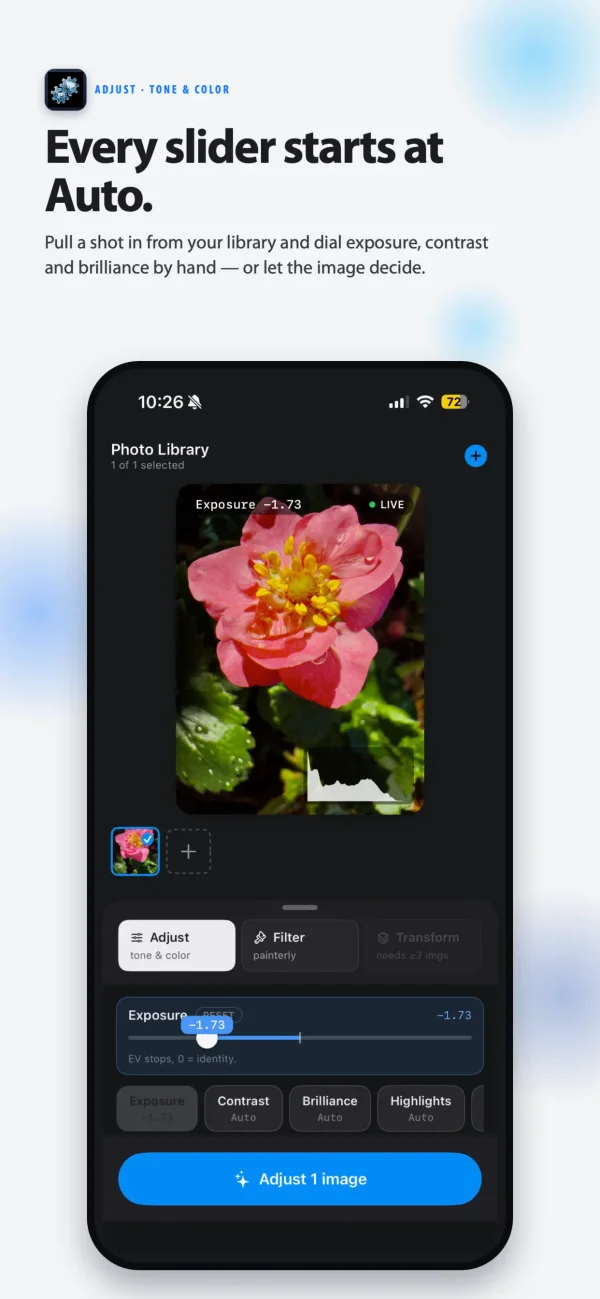
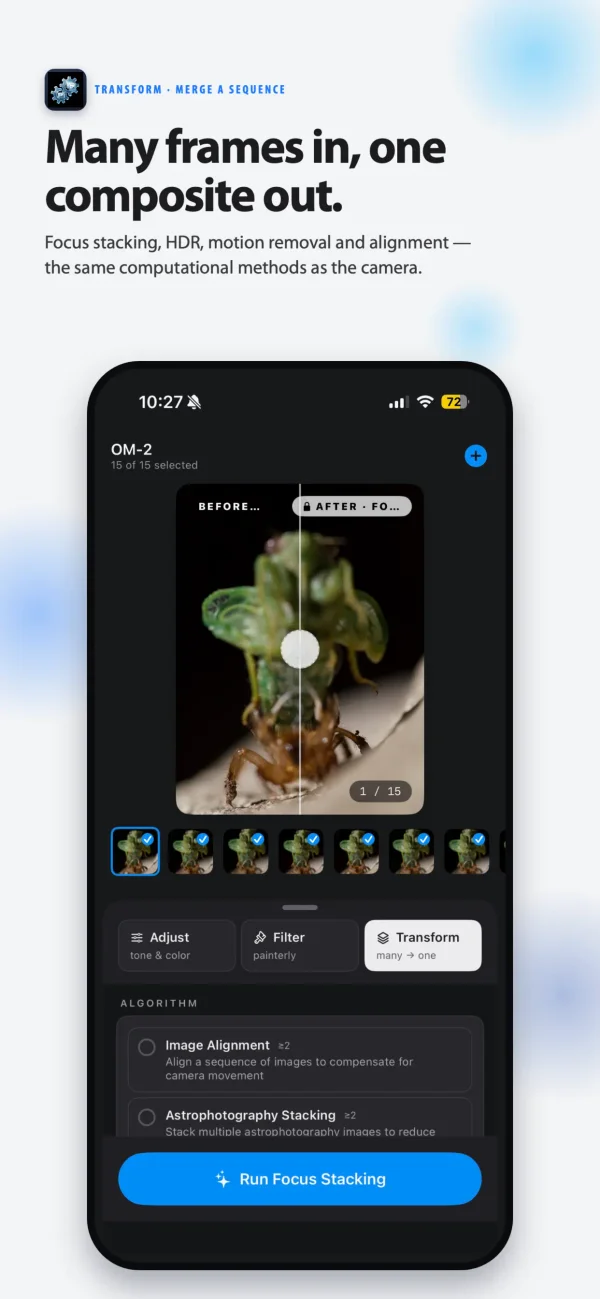
SpotmaticMagic is a complete computational photography studio for iPhone, iPad, and Mac. Three tools in one place — Adjust tone and color with a live preview, apply a creative Filter like Watercolor or a classic film stock, or Transform a whole sequence with algorithms like Focus Stacking, HDR Fusion, and Astrophotography Stacking.
Adjust in Real Time
Fine-tune every image on a live canvas with a luminance histogram. Drag Exposure, Highlights, Shadows, Contrast, Black & White Point, Brilliance, Saturation, Vibrance, Warmth, and Tint — plus a true vignette. Every slider starts on a smart Auto value that solves the whole adjustment chain at once, in true photographic stops; take manual control whenever you like. On RAW files, Adjust also drives the decoder's own Sharpness and Noise Reduction. Nothing is written until you apply.
A Creative Filter Suite
Transform a single photo with hand-built looks. Painterly looks are built on real simulation, not preset stacks — watercolor runs an actual shallow-water fluid solver. The before-and-after split previews most looks live, before you run them.
Painterly: Watercolor (soft bleeds, pooled pigment, granulation, Color Transfer), Oil Painting, Ink Painting, Painterly Media (pastel, gouache, acrylic), and Impressionist brushwork.
Graphic: Cartoon, Line Drawing (pen, pencil, charcoal), and Photo Abstraction. Selective Focus: color splash, background blur, and spotlight, driven by automatic subject detection.
Film: color and black-and-white stock emulation, including Kodak Portra, Ektar, and Kodachrome; Fujifilm Velvia, Provia, and Astia; and B&W stocks like Kodak Tri-X and Ilford HP5 Plus — each with real grain and halation.
Image Size: resize by percent, pixels, centimeters, or inches, and set the resolution.
Pro Stacking & Transform
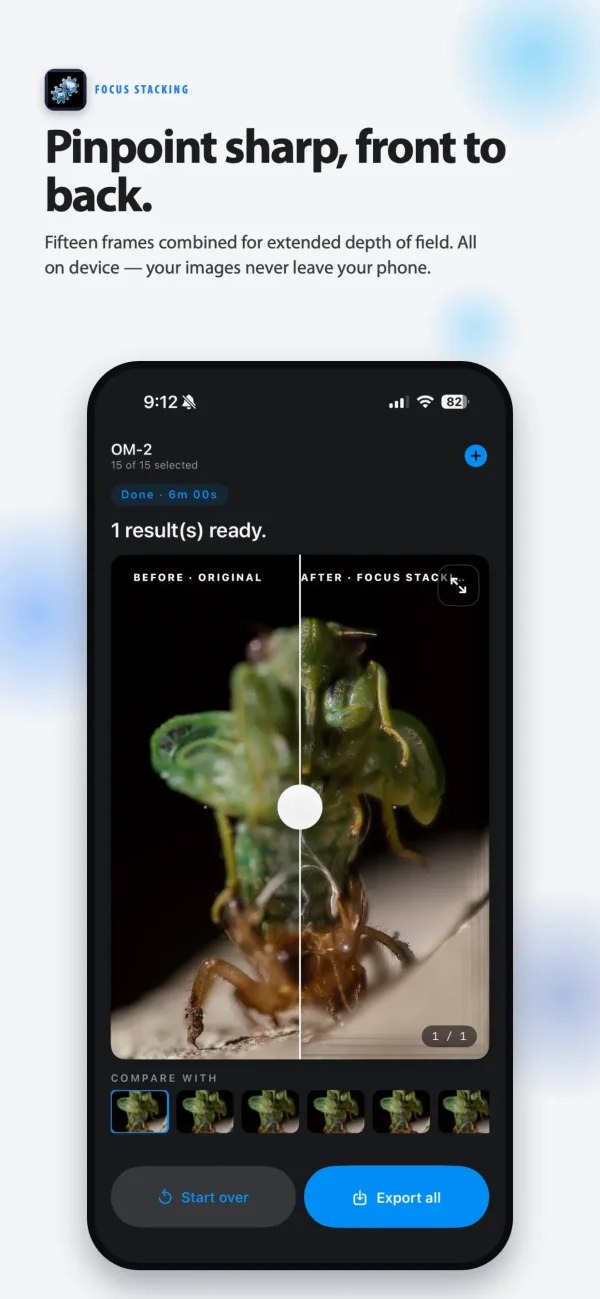
Combine an image sequence with desktop-class algorithms. Hand-Held Hi-Res merges a burst of hand-held shots into one photo with twice the width and height. Focus Stacking merges images shot at different focus distances into one edge-to-edge sharp photo. HDR Fusion (Natural & Vibrant) blends exposure brackets in realistic or punchy styles. Astrophotography Stacking reduces noise and reveals deep-sky detail, with bias, dark, flat, and dark-flat calibration, star alignment that fits even thin-overlap frames, and background matching between frames. Motion Removal erases passing tourists or cars. Long Exposure & Motion Blur simulate silky water and light trails without an ND filter.
Any Camera, Any Format
Import from your Photo Library, choose files or a folder, or open them from Finder or Files, or open folders from Shortcuts. SpotmaticMagic reads full-resolution RAW from every major manufacturer — Canon, Nikon, Sony, Fujifilm, Olympus / OM System, Panasonic, and more, plus universal DNG — on Apple's latest RAW engine, and opens PixInsight XISF files. Export as HEIF, JPEG, PNG, or 16-bit TIFF in Display P3 with your EXIF, GPS, and IPTC metadata preserved, or save results next to your originals.
Your Workflow, Remembered
Save recipes and export settings as named presets, and share your recipes as a file. A window reopens its folder with your selection and settings as you left them, and an interrupted folder run starts again when you reopen it. On iPhone and iPad (iOS 26), filter batches keep going in the background, except Watercolor; shake to cancel. On Mac, a full menu bar and keyboard shortcuts. Photos from ElectroSpotmatic can be sent straight over.
Inspect Every Detail
Open any result in a fullscreen Zoom Inspector, and press and hold to compare against the original.
Desktop-Class Performance on Device
Built on a Metal pipeline. Everything happens on your device — no cloud. Accessible with VoiceOver and Dynamic Type, with Dark Mode and 14 languages, including Simplified and Traditional Chinese.
Who It's For
For macro and landscape shooters, astrophotographers, and anyone who wants real control over how photos look.
What’s new
Version 1.3.0 · Nov 14, 2026
SpotmaticMagic 1.3 — a smoother workflow, and a new way to stack.
Hand-Held Hi-Res
• A new Transform recipe merges a burst of hand-held photos into one image with twice the width and height, with much less noise. Shoot the burst with Burst Shooting (Long-Press Shutter) in ElectroSpotmatic, or with any camera.
Open Anything
• Open images, RAW files, and whole folders from Finder or Files, and folders from Shortcuts. SpotmaticMagic appears in Open With without taking over as your default photo app.
• Open PixInsight XISF files (a common astrophotography format). A file with several images opens like a folder.
• Open Folder in Shortcuts opens a folder in the front window (iOS 18 and macOS 15 or later).
• Send photos from ElectroSpotmatic: turn on Share with Spotmatic Magic in iOS Settings → ElectroSpotmatic, and SpotmaticMagic on iPhone and iPad offers to open your latest capture.
Presets and Saving
• Save recipes as named presets for Adjust, Filter, and Transform, with Vivid, Warm, Cool, and Noir built in. Export your recipe presets to a file and import them elsewhere.
• Save export settings (format, quality, resolution) as presets, with one set as the default.
• Save Next to Originals writes each result into the folder of its first original, and asks before replacing anything.
• A window reopens its remembered folder with your selection, reference, recipe, and settings as you left them.
On the Mac
• A full menu bar with keyboard shortcuts for opening, running, canceling, selecting, saving, and zooming the inspector.
Batches
• On iPhone and iPad with iOS 26 or later, filter batches of more than one image keep running in the background, with a progress card on the Lock Screen. Watercolor batches still need the app open.
• Shake to cancel a run on iOS.
• A folder run interrupted by a quit or a crash starts again when its window reopens the folder.
• In Filter mode, the before-and-after split previews most filters with the current settings, and you can drag it.
New and Improved Tools
• Image Size: resize by percent, pixels, centimeters, or inches, with your choice of resolution and resampling. Image Size also sets the resolution saved in the file.
• Optical Flow Refinement toggles in Image Alignment and Focus Stacking; a Color Transfer slider and palette picker for Watercolor.
• Each Transform recipe now remembers its own alignment method. Long Exposure and Motion offer Automatic.
• Focus Stacking's Advanced Gaussian method keeps more detail next to sharp edges.
• HDR merges show less colored mottling on smooth, near-neutral surfaces.
Astrophotography
• Calibrated stacks are now processed correctly from calibration through the final stretch, which follows the noise in your data and lifts faint nebulosity more reliably.
• Gradient removal follows sky gradients and steep vignetting more faithfully.
• Each frame's sky background is matched to the reference before stacking, which removes steps where frame coverage changes.
• Stacks use far less memory: light frames are opened one at a time. A mismatched frame is placed on the reference instead of stretched.
Fixes
• Watercolor reruns an image that was interrupted by leaving the app, instead of saving a different-looking result.
• Filters fall back to a method that works on older iPhones and iPads whose graphics hardware can't draw certain filters.
• Status and error messages are translated in every supported language.
App privacy
What Erich Champion declares on the App Store about how this app handles data.
-
Data not collected
The developer does not collect any data from this app.
Privacy practices may vary, for example with the features you use or your age.
Information
- Seller
- Erich Champion
- Category
- Photo & Video
- Version
- 1.3.0
- Updated
- Nov 14, 2026
- Released
- Apr 18, 2026
- Size
- 12.9 MB
- Requires
- iOS 17.0 or later
- Age rating
- 4+
- Price
- $34.99
- Languages
- English, Danish, Dutch, French, German, Italian, Japanese, Korean, Norwegian Bokmål, Portuguese, Simplified Chinese, Spanish + 2 more
- Copyright
- © 2026 Erich Champion
You might also like
-
 Pierogi TetherWireless camera tethering
-
 CamoraPhoto & Video
-
 ReCatalog: Fast Photo SearchAI, EXIF & Metadata Organizer
-
 TheEditor photo editorThe Editor
-
 AI MovieVideo Editor & Live Streaming
-
 PLATÉ - AI Food Photo EditorSofra Studio
-
 Film Camera MasterPhoto & Video
-
 Photo Culling: RAW SifterFast culling & triage
-
 LiteSplice: Video EditorKeyframes, effects and color
-
 Photon EnhanceThe Ultimate Photo Editor