
sQRH
Pilot Quick Reference Handbook
Designed for iPhone, iPad
Free · In-app purchases
- Age rating4+
- CategoryReference
- DeveloperPhilippe Le Gall
- LanguagesEnglish
- Size32.1 MB
Links to the official App Store page
Download.org hosts no file of sQRH. The button opens its official App Store page, published by Philippe Le Gall. Listing last checked on Nov 21, 2026.
Screenshots





About
sQRH is an electronic Quick Reference Handbook designed for airline pilots. It provides instant access to emergency procedures, checklists, operational data, deicing holdover times, and flight time limitation calculations -- all in one app.
QUICK REFERENCE AT YOUR FINGERTIPS
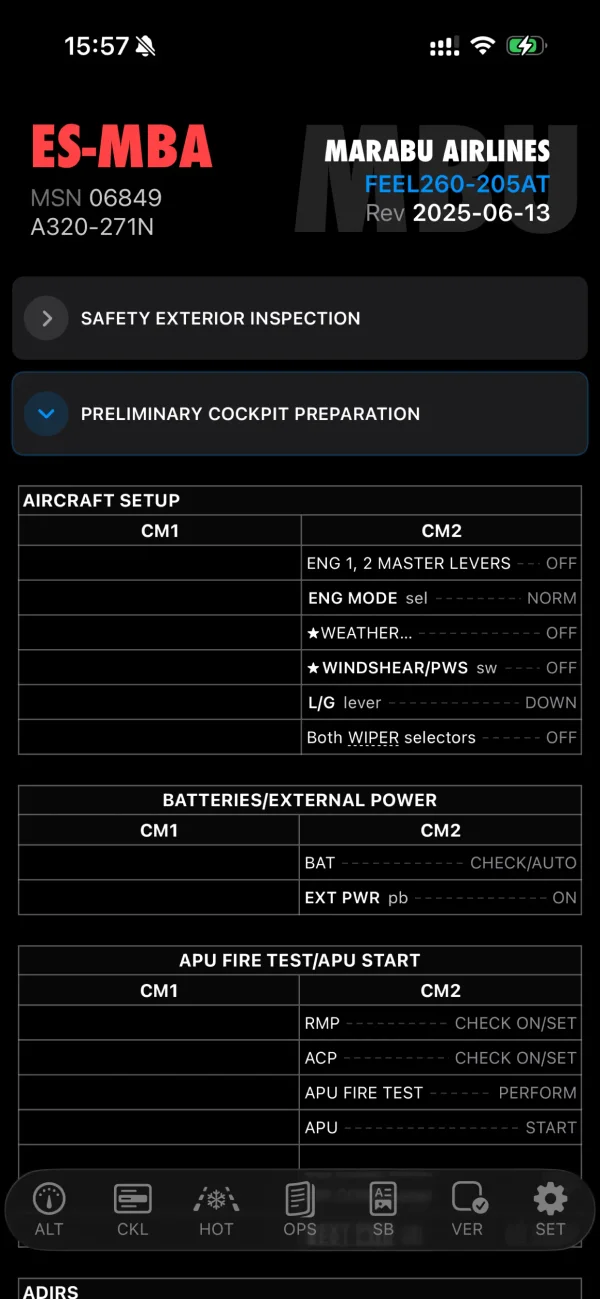
Browse your airline's QRH data with a pilot-optimized interface. sQRH connects to your airline's server to download and keep your aircraft data up to date, including per-MSN applicability. You can also import QRH packages directly from Files -- no server required.
AIRBUS AND ATR
Airbus eQRH packages and ATR 72 QRHs in ATA iSpec 2300 format, from the manufacturer or an airline document system, side by side: the selected tail decides what you see. ATR tails get EMR, NCL, OEB, GEN, PRO, ABN, LIM and PER tabs, charts drawn on the device, and links between procedures.
ONE IMPORT FOR EVERY PACKAGE
A single zip may hold several QRHs, Airbus and ATR, even zips inside zips. Each package is checked on its own and a damaged one never removes a working QRH. Settings lists each installed QRH with its revision and tails, with a report of what was installed, skipped or failed.
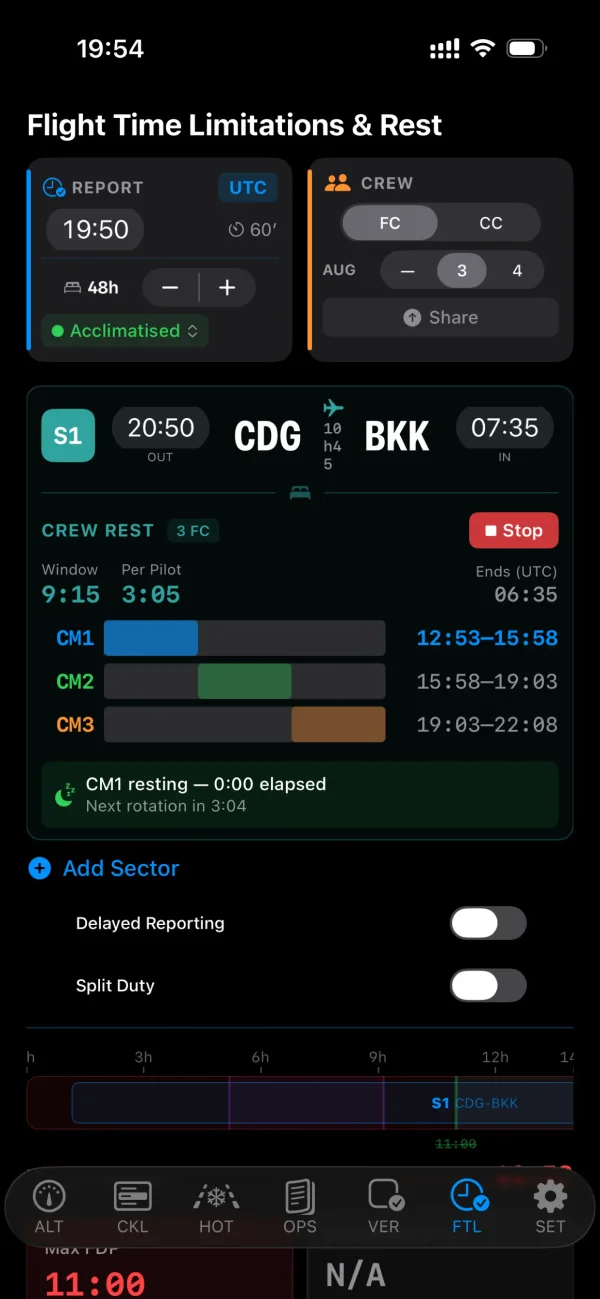
FLIGHT TIME LIMITATIONS AND REST (FTL)
On-the-spot FDP limitation calculator based on EASA ORO.FTL, results first: the latest on-blocks as a clock time, the margin on one status scale, and the extension, split duty and discretion options. FC and CC crews with augmented crew (3 FC / 4 FC). Clock-time timeline with the crew rest window and WOCL. Crew rest card with a cruise timer, rest alarms that ring even with sQRH closed, and a Live Activity (UTC). Share the FTL state with a nearby device over Bluetooth.
COCKPIT CHECKLIST SYNC
Pair two iPads by scanning a QR code -- once paired, they auto-reconnect every session. Checked items, section expansions, and resets sync live via encrypted MultipeerConnectivity (no internet required).
TAKEOFF CG/TRIM CALCULATOR
Enter your CG% on a cockpit-friendly numpad and get the THS trim position on a horizontal gauge. Trim data is read directly from the eQRH files for every aircraft variant.
VERSIONS (VER)
Track your EFB app and system versions in one place. Pull down to check the App Store for updates -- a badge flags outdated entries, with the update's publication date.
EMERGENCY PROCEDURES (EMR)
Instant access to emergency evacuation and landing procedures, with inline illustrations, warnings, cautions, notes, tables, and ECAM references.
OPERATIONAL ENGINEERING BULLETINS (OEB)
OEB procedures with RED, AMBER and WHITE severity tags and complete rendering of tables, graphics, nested lists, and action blocks.
NORMAL CHECKLISTS (NCL)
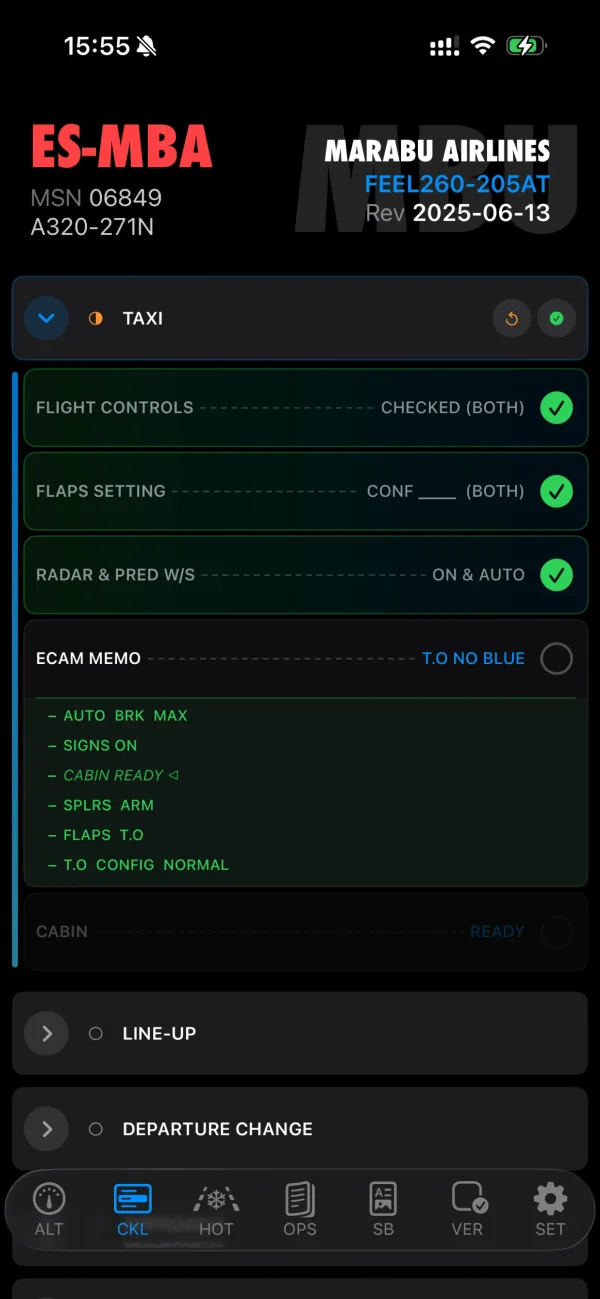
Aircraft checklists with full content rendering and state tracking, hold buttons to complete or reset, synced live with paired devices.
SOP, ABNORMAL PROCEDURES (ABN) AND OPERATIONAL DATA (OPS)
Category sidebar and procedures side by side on iPad, drill-down on iPhone. Custom airline tabs are detected from the loaded data.
ALTITUDE REFERENCE (ALT)
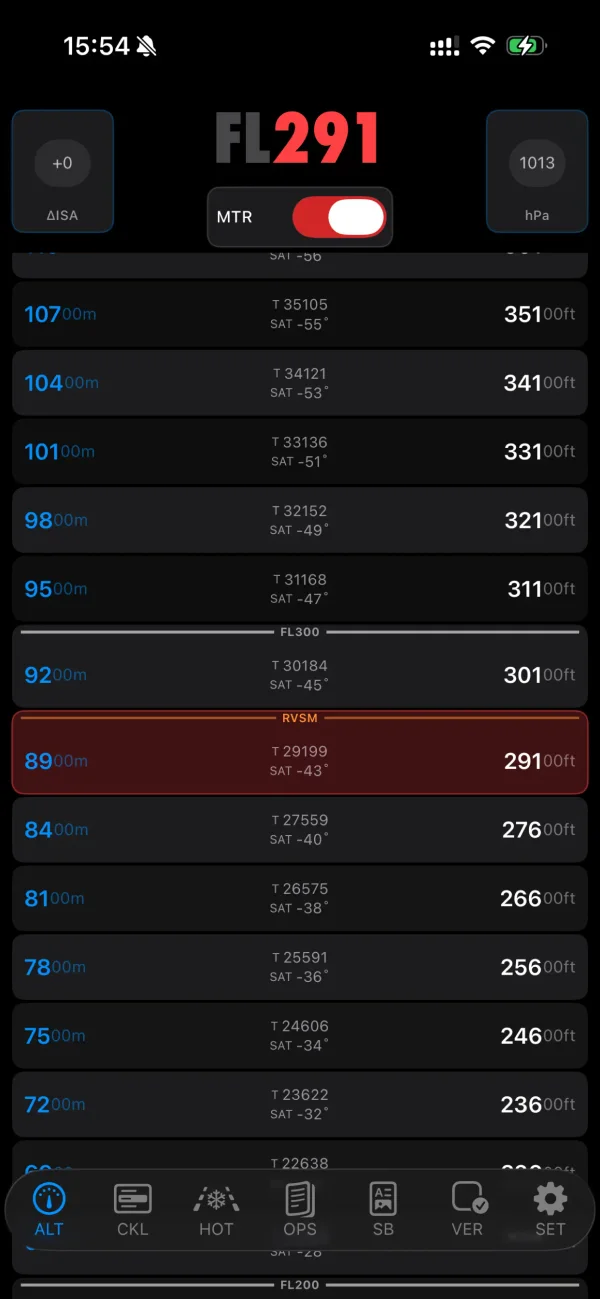
Altitude table with ISA deviation and QNH correction, ICAO and metric flight levels, RVSM markers, and a big m/ft readout with GPS status.
HOLD-OVER TIME (HOT) -- IN-APP PURCHASE
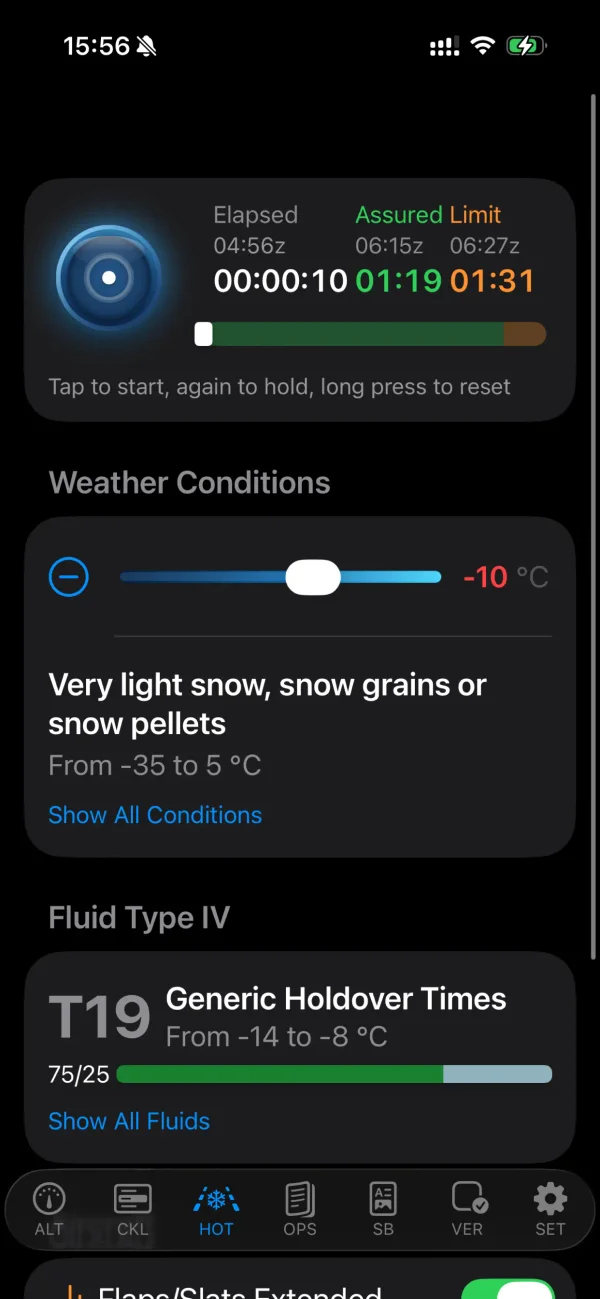
Deicing holdover time calculator with FAA and Transport Canada 2026-27 tables. Countdown timer with Live Activity on lock screen and Dynamic Island. Share the timer and conditions over Bluetooth with a nearby device running sQRH or No-ICE.
BUILT FOR THE FLIGHT DECK
- Flight Deck theme with true-black night and a matching day palette, or Classic
- Appearance (System, Day, Night) and two text sizes
- Two modules side by side: long-press NTE, ALT, HOT, NCL, VER or FTL
- Layouts follow the window width; the tab bar scrolls with EMR and SET pinned
- Drag to reorder and hide tabs; long-press SET to jump to a hidden tab
- Erasing always takes a hold, never a stray tap
- Keep Screen Awake
REQUIREMENTS
- iOS 18 or later
- iPad and iPhone compatible
- Airline server connection or direct ZIP import for data
What’s new
Version 5.0 · Nov 20, 2026
VERSION 5.0
ATR QRH
- ATR 72 QRH in ATA iSpec 2300 format, from the manufacturer or from an airline document system, shown next to Airbus tails: EMR, NCL, OEB, GEN, PRO, ABN, LIM and PER tabs, charts drawn on the device, links between procedures.
- One import for everything: a zip may hold Airbus and ATR QRHs, even zips inside zips. Each package is checked on its own, and a bad one never removes a working QRH.
- Settings > Installed QRH lists each QRH with its revision and tails; hold to remove one. A report says what was installed, skipped or failed, and why.
NEW LOOK
- Flight Deck theme on every screen: true-black night and a matching day palette. Classic keeps a look close to before.
- Appearance (System, Day, Night) and Text size (Standard, Large).
- New app icon.
- Erasing is now a hold: resetting checklists, deleting an FTL sector, stopping a crew rest.
MORE ROOM
- Two modules at once: long-press NTE, ALT, HOT, NCL, VER or FTL to open it beside the current one.
- Layouts follow the window width; the tab bar scrolls with EMR and SET pinned.
- A slimmer header on every tab.
ALSO
- The checklist tab is now NCL; an open checklist has CPL and RST hold buttons.
- VER: app names, dates in your region's format, update publication dates.
- OEB severity tags. HOT follows the theme.
- Server sync keeps the current QRH until the whole download is checked.
- Requires iOS 18.
Fly safe.
App privacy
What Philippe Le Gall declares on the App Store about how this app handles data.
-
Data not collected
The developer does not collect any data from this app.
Privacy practices may vary, for example with the features you use or your age.
Information
- Seller
- FEEL.AERO OU
- Category
- Reference
- Version
- 5.0
- Updated
- Nov 20, 2026
- Released
- Oct 14, 2021
- Size
- 32.1 MB
- Requires
- iOS 18.0 or later
- Age rating
- 4+
- Price
- Free
- In-app purchases
- Yes
- Languages
- English
- Copyright
- © 2026 FEEL.AERO
You might also like
-
 A320 Checklist: Flight LogbookSim pilot QRH, timer & voice
-
 EasyMemoryItem: Pilot TrainerMemory Items & Type Rating
-
 Manual LoadSheetDigital Paper LoadSheet
-
 Memory Items TrainerLearn / customize memory items
-
 A350 FMS Trainer PROEducation
-
 EFB-ProReal Aircraft Performance
-
 A320 CFDS TrainerThe Ultimate A320 CFDS Trainer
-
 Airbus A320 Family SystemQuiz, Review & Flashcards
-
 Airline Pilot Test PrepThe Ultimate App for Pilots
-
 iAIRBUS A320 Type Rating PrepAirbus A320