- Age rating4+
- CategoryLifestyle
- DeveloperMOUSSA FARHOUD
- LanguagesEnglish
- Size2.9 MB
Links to the official App Store page
Download.org hosts no file of Studio Days. The button opens its official App Store page, published by MOUSSA FARHOUD. Listing last checked on Nov 20, 2026.
Screenshots
About
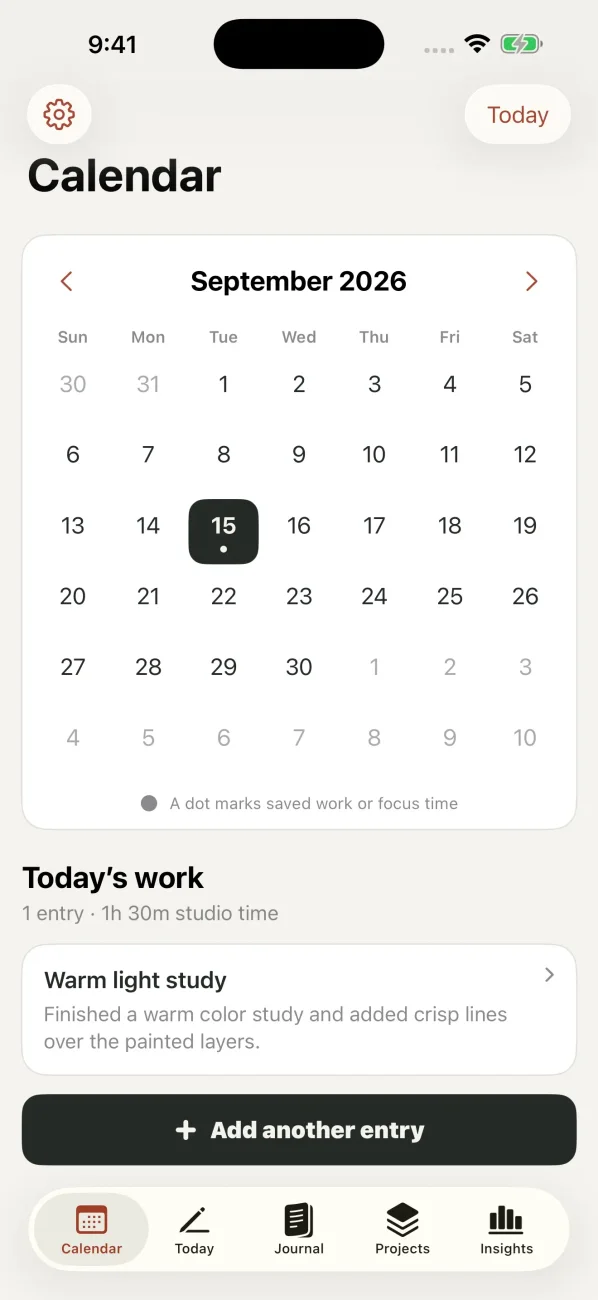
Studio Days is a private calendar and daily art logbook made for working artists, on iPhone and Mac.
Record what you made with a few quick choices. Start with a date, choose an artwork or project, select what you worked on and your mediums, then add approximate time. Review your entry and save. Notes, a title, photos, and other details are optional and can be added later.
Keep your native journal together through your private iCloud account. With Studio Days 1.3 or later on both devices and the same Apple Account, work logs, artwork photos, projects, and saved focus sessions sync between iPhone and Mac. Keep working offline, then let iCloud send changes when a connection is available. Updates may take time.
On Mac, use a sidebar to move between your calendar, daily log, journal, projects, and insights. View the month beside the selected day's work in a wide window. Type longer reflections on your keyboard, choose artwork image files, and use familiar shortcuts to create and save entries.
Choose charcoal, pencil, graphite, acrylic, oil, spray paint, ink, watercolor, mixed media, acrylic marker, oil pastel, or pastel. Combine mediums or enter your own. Recent choices appear first without automatically selecting details from another day.
Features:
- Calendar of daily artwork and studio sessions
- Quick activity and time choices, plus exact hours and minutes
- Multiple mediums and custom medium descriptions
- Optional artwork photos, materials, mood, energy, influences, reflections, tags, and next steps
- Projects with goals, status, target dates, progress, and recorded studio time
- Searchable journal and practice insights
- Focus timer with saved session totals
- Private iCloud sync between supported native iPhone and Mac apps
- Local offline journal access
- JSON backup and restore, including artwork photos
- Optional local reminders and Light, Dark, or Match Device appearance
- No ads or tracking in the native apps
iCloud sync requires the same Apple Account, iCloud access for Studio Days, and available iCloud storage. Preferences and reminders are independent on each device. No separate Studio Days account is required for the native apps.
Export a backup before restoring or changing iCloud accounts. Restore replaces your journal and propagates those changes to other synced devices. The optional Studio Days website has a separate account and journal; it does not automatically sync with the native apps.
Make something. Remember it.
What’s new
Version 1.3.0 · Oct 20, 2026
- Keep work logs, artwork photos, projects, and saved focus sessions together on iPhone and Mac through your private iCloud account. Use version 1.3 or later and the same Apple Account on both devices.
- Work on your laptop with a sidebar, a calendar and day log that fit a wider window, keyboard shortcuts, and image-file import.
- See iCloud account access, recent transfers, and errors in Settings. Keep working offline while changes wait for a connection.
- Keep appearance, preferences, and reminders independent on each device.
- Find clearer backup and restore guidance. Restore replaces the journal and sends those changes to other synced devices. Export a backup before restoring or changing iCloud accounts.
The separate browser journal still uses its own account and storage.
App privacy
What MOUSSA FARHOUD declares on the App Store about how this app handles data.
-
Data not collected
The developer does not collect any data from this app.
Privacy practices may vary, for example with the features you use or your age.
Information
- Seller
- MOUSSA FARHOUD
- Category
- Lifestyle
- Version
- 1.3.0
- Updated
- Oct 20, 2026
- Released
- Aug 27, 2026
- Size
- 2.9 MB
- Requires
- iOS 17.0 or later
- Age rating
- 4+
- Price
- Free
- Languages
- English
- Copyright
- © 2026 Moussa Farhoud