
- Age rating17+
- CategoryProductivity
- DeveloperEZO Labs Inc.
- LanguagesEnglish
- Size118.2 MB
Links to the official App Store page
Download.org hosts no file of superbot.gg. The button opens its official App Store page, published by EZO Labs Inc. Listing last checked on Nov 23, 2026.
Screenshots


About
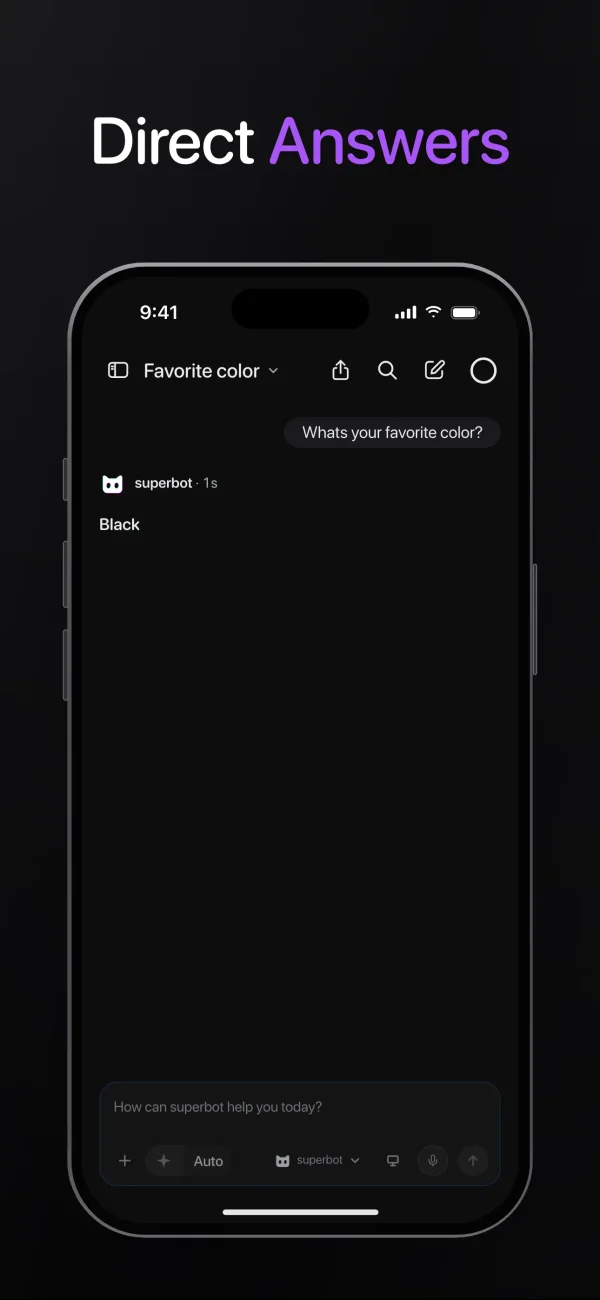
Superbot is your own AI agent: with the Superbot desktop app on your computer, anything you can do there, it can do, fast, and it runs your recurring tasks on a schedule across all your devices.
Try it in your browser, no account: superbot.gg/chat
Ask it to turn your receipts into an expense sheet, sort your downloads folder every Friday, track flight prices, or watch a page and tell you what changes. Ask once and it sets the job up as an automation that runs on a schedule without you. It works across all your devices: run your computer from your phone and pick up the same chats on desktop, phone and the web. Use it for business admin, personal admin and the busywork of your job. It asks before it uses your computer.
On your phone
- Automations and recurring tasks: ask in chat, or open Settings, then Automation, to create, edit, pause, run or delete one.
- Chat with your Superbot agents in threads you can come back to.
- Talk instead of typing. Voice chat and dictation use your microphone, and replies can play back as voice.
- Attach photos and files to a message.
- Allow calendar access to read the titles and times of today's events. Allow location to use your city, region and country. Both stay off until you allow them.
- Confirm linking a computer with Face ID or your device passcode.
- Receive notifications from Superbot.
Superbot also makes pictures, video, songs, 3D and apps, browses the web, and gives other agents one MCP tool for errands like calls, texts, faxes and Gmail drafts.
Your control
- Before you start, you choose: let the third-party AI providers named on screen receive some messages, files, photos, your location and profile, or use Superbot's own models only. Change it any time in SUPER.
- Press any AI reply, tap More actions and choose Report response to send it to the Superbot team for review.
- Delete your account in the app, under Settings, or on the web at https://superbot.gg/legal/delete-account.
- Read the privacy policy at https://superbot.gg/legal/privacy.
Superbot works on its own. Features that act on your computer, including running it from your phone, need the Superbot desktop app on that computer, and your permission there first.
What’s new
Version 1.1.53 · Nov 23, 2026
This update makes pictures easier to find and keeps the chat where you left it.
Pictures your agent makes are now numbered, and an All images button shows them together.
You can point to a picture by its number in your next message.
The picture viewer keeps up when you swipe quickly.
If you scroll up while an answer is coming in, the chat stays put.
On SUPER Auto, your pick on a choice card goes straight to your agent.
The weather card uses your units.
Sign-in suggests a fix when your email address looks mistyped.
When your computer is offline or can't take a request, the app says so plainly.
App privacy
What EZO Labs Inc. declares on the App Store about how this app handles data.
-
Data linked to you
May be collected and linked to your identity.
- Location
- Contact info
- Contacts
- User content
- Identifiers
- Usage data
- Diagnostics
Privacy practices may vary, for example with the features you use or your age.
Information
- Seller
- EZO Labs Inc.
- Category
- Productivity
- Version
- 1.1.53
- Updated
- Nov 23, 2026
- Released
- Nov 10, 2026
- Size
- 118.2 MB
- Requires
- iOS 16.4 or later
- Age rating
- 17+
- Price
- Free
- Languages
- English
- Copyright
- © 2026 EZO Labs Inc.
You might also like
-
 EnigmaAI – Private AI ChatAnonymous ChatGPT, Claude & AI
-
 Atomic Chat: Private Local AIPrivate & Offline AI Assistant
-
 Mask - Incognito AI ChatAnon. Private. No signup GPT5.
-
 Mindute AIPrivate AI, Runs On Your Phone
-
 Jango AI: AI Chat & AnswersUncensored chat & AI images
-
 CivitAI -Image Video GeneratorText to Image & Video AI
-
 Grok for IntuneAI chat & video generation
-
 AppuBot: AI Agents & TeammatesYour assistant bots, on the go
-
 Skales - AI Agent & TasksAutomation with any AI model
-
 Ai - open source AI AssistantPrivate, open source AI Models