
- Age rating4+
- CategoryUtilities
- DeveloperAlex Stanage
- LanguagesEnglish
- Size1.1 MB
Links to the official App Store page
Download.org hosts no file of survAIor. The button opens its official App Store page, published by Alex Stanage. Listing last checked on Nov 15, 2026.
Screenshots


About
survAIor is a professional surveying calculator designed for engineers, surveyors, and field technicians who need accurate results on-site without carrying a dedicated calculator.
SURVEYING CALCULATORS
Traverse — Enter a start coordinate and a series of bearing and distance legs. survAIor applies the Bowditch correction and returns adjusted easting/northing coordinates for every station, along with linear misclosure and precision ratio.
Area — Calculate the area and perimeter of any polygon by entering coordinate points. Results are returned in both square metres and hectares using the shoelace formula.
Curve — Solve horizontal curve elements from any of four input combinations: Δ+R, Δ+T, Δ+L, or R+T. Returns radius, tangent length, arc length, external distance, middle ordinate, long chord, and optional BC/EC chainages.
Volume — Compute earthwork cut and fill volumes from cross-sectional areas using the average-end-area method. Returns total cut, total fill, net volume, and a per-interval breakdown.
GPS CAPTURE
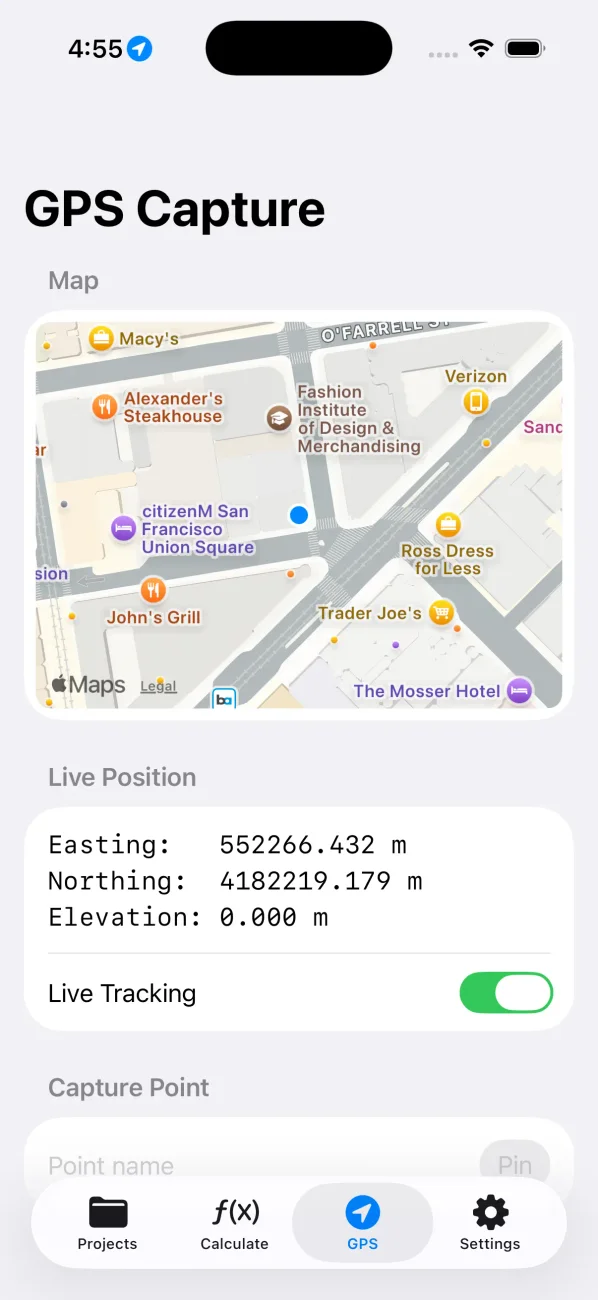
Use your iPhone's GPS to capture survey points in the field. Live coordinates are converted to UTM eastings and northings in real time and displayed on an interactive map. Named points are saved to your device and can be exported as a CSV with full easting, northing, elevation, latitude, longitude, and timestamp columns.
PROJECT MANAGEMENT
Organise your work into projects. Each project stores its calculations and field notes together, making it easy to manage multiple jobs at once. Return to any saved calculation to view, edit, and re-export results at any time.
FIELD NOTES
Add titled, free-text field notes to any project — record observations, site conditions, or instructions alongside your calculations.
EXPORT
Every calculator and the GPS capture tool supports one-tap CSV export via the iOS share sheet, ready for import into Excel, CAD, or GIS software.
PRIVACY
All data is stored locally on your device. survAIor does not collect analytics, display advertising, or transmit any data over the internet.
App privacy
What Alex Stanage declares on the App Store about how this app handles data.
-
Data not collected
The developer does not collect any data from this app.
Privacy practices may vary, for example with the features you use or your age.
Information
- Seller
- Alex Stanage
- Category
- Utilities
- Version
- 1.0
- Updated
- Mar 23, 2026
- Released
- Mar 22, 2026
- Size
- 1.1 MB
- Requires
- iOS 17.0 or later
- Age rating
- 4+
- Price
- Free
- Languages
- English
- Copyright
- © Alex Stanage
You might also like
-
 Survey ToolboxUtilities
-
 Highways & Roadwork CalculatorUtilities
-
 Lean: InclinometerOff-Road Pitch & Roll Meter
-
 GeoShift: Coordinate ConverterUTM, State Plane & GPS Survey
-
 iNexusNurture bonds
-
 GNSS Survey LoggerLog GNSS survey data
-
 MapLab: GPS Area MeasureMeasure Areas & Distances
-
 GlucoMedi SensorUtilities
-
 MapPin Fields Area Measure MapField perimeter, Tool KML, KMZ
-
 Media File Format ConverterConvert Photo Video Audio File