
talisentu
An offline-first music player
Designed for iPhone, iPod touch
Free · In-app purchases
- Age rating4+
- CategoryMusic
- DeveloperMICHAEL SCOTT SCHNEIDER
- LanguagesEnglish
- Size32.6 MB
Links to the official App Store page
Download.org hosts no file of talisentu. The button opens its official App Store page, published by MICHAEL SCOTT SCHNEIDER. Listing last checked on Nov 24, 2026.
Screenshots


About
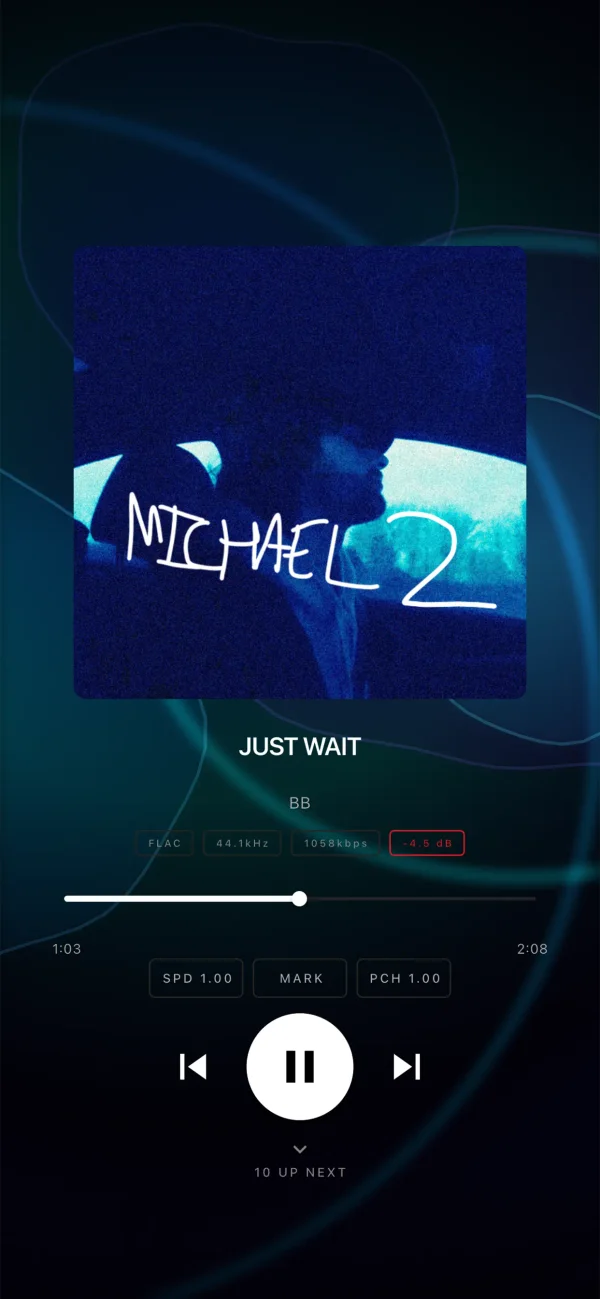
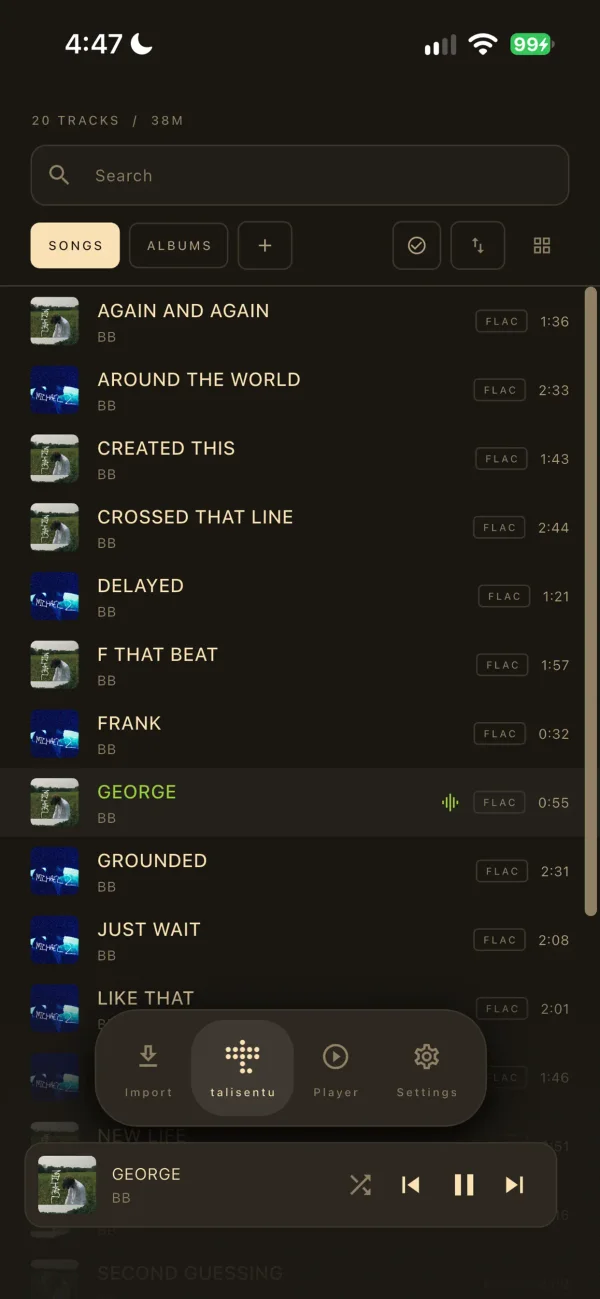
talisentu is a music player for the music you already own. No account, no streaming, no ads and no subscription. Your songs live as files on your phone, and everything works offline.
GET YOUR MUSIC ONTO YOUR PHONE
• Send your library from talisentu on your computer, free for Windows and Mac, over your home Wi-Fi. Scan the code once, and every sync after that is one tap.
• Choose exactly what comes across: whole folders, single albums or individual songs. Music added later follows what you ticked.
• Or add songs straight from the Files app.
HEAR IT AT ITS BEST
• Plays MP3, FLAC, ALAC, AAC, WAV, Ogg, Opus and more.
• Loudness levelling brings every song to the same volume without clipping, so a quiet record and a loud one play side by side.
• A built-in equalizer, plus speed and pitch controls.
MADE TO BE LOOKED AT
• Albums are worked out from your folders, with their covers. Missing covers can be looked up online.
• Visualizers behind the player that move with the music.
• Pick your own accent color and background.
YOUR LIBRARY, YOUR WAY
• Sections for your own playlists, arranged however you like.
• Swipe the cover to skip, and control playback from the lock screen and your headphones.
PRICING
Everything is free for 7 days. After that, talisentu is a single one-time purchase to keep listening. No subscription, ever. Your songs stay on your phone whatever you decide.
What’s new
Version 1.1.3 · Nov 23, 2026
- Colours from the cover: the accent, background and text can follow the song playing. Pick Cover, the first swatch, in Settings. New installs start this way.
- The accent changes the moment you pick a song, and the background fades into the next one.
- Brighten cover colour: a slider to take the cover background from deep and dim up to bright.
- Static colour, Bloom and Dots: Static colour is a flat colour behind the player, the cover's shade or one you pick, like black. Glow from the cover adds a soft glow around the record if you want it.
- FLAC, kHz and the other format tags are tinted with your accent.
- Traditional folders take the colour of the record inside them.
- The Library page can be your top bar: hold a row and choose Add to top bar.
- Find missing cover art and Allow deleting files are on the Import tab.
- Customization opens to four short parts that say what is inside each. Tap the Settings tab again to go back to the top.
- Hiding volume, speed or pitch puts it back to normal, so the music is never left quiet or slow.
- Swipe down to leave the player, and it fades into your background instead of black.
- Clock, Wi-Fi and battery show on the player.
- Accented letters in song tags show properly.
App privacy
What MICHAEL SCOTT SCHNEIDER declares on the App Store about how this app handles data.
-
Data not collected
The developer does not collect any data from this app.
Privacy practices may vary, for example with the features you use or your age.
Information
- Seller
- MICHAEL SCOTT SCHNEIDER
- Category
- Music
- Version
- 1.1.3
- Updated
- Nov 23, 2026
- Released
- Nov 9, 2026
- Size
- 32.6 MB
- Requires
- iOS 15.0 or later
- Age rating
- 4+
- Price
- Free
- In-app purchases
- Yes
- Languages
- English
- Copyright
- © 2026 Michael Schneider
You might also like
-
 Auralyn PlayerFLAC, DSD, MKV & your servers
-
 Lucid - Local Audio PlayerMusic
-
 SoneviaYour lossless music player
-
 BeatPlayYour music. No streaming
-
 PearTune: Self-Hosted MusicYour music, playable anywhere
-
 HIFI MP3 Player: Offline AudioMelody Songs & Sound Library
-
 Polemo - Offline Music PlayerFLAC, WebDAV & Lossless Audio
-
 Audio Converter: MP3 AAC WAVBatch MP3 & Audio Converter
-
 Artificial ParadiseUnlock CD & Vinyl Content
-
 Wave - Offline Music PlayerOpus, MP3, Flac, HQ Audio, AAC