Teezee — Visual World Clock
Time zones on one timeline
Designed for iPhone, iPad, Mac
Free · In-app purchases
- Age rating4+
- CategoryUtilities
- DeveloperXenoCode
- LanguagesEnglish+ 9 more
- Size42.9 MB
Links to the official App Store page
Download.org hosts no file of Teezee — Visual World Clock. The button opens its official App Store page, published by XenoCode. Listing last checked on Nov 17, 2026.
Screenshots

About
Free to download. Use one home city free; one lifetime purchase unlocks every city and platform. No subscription.
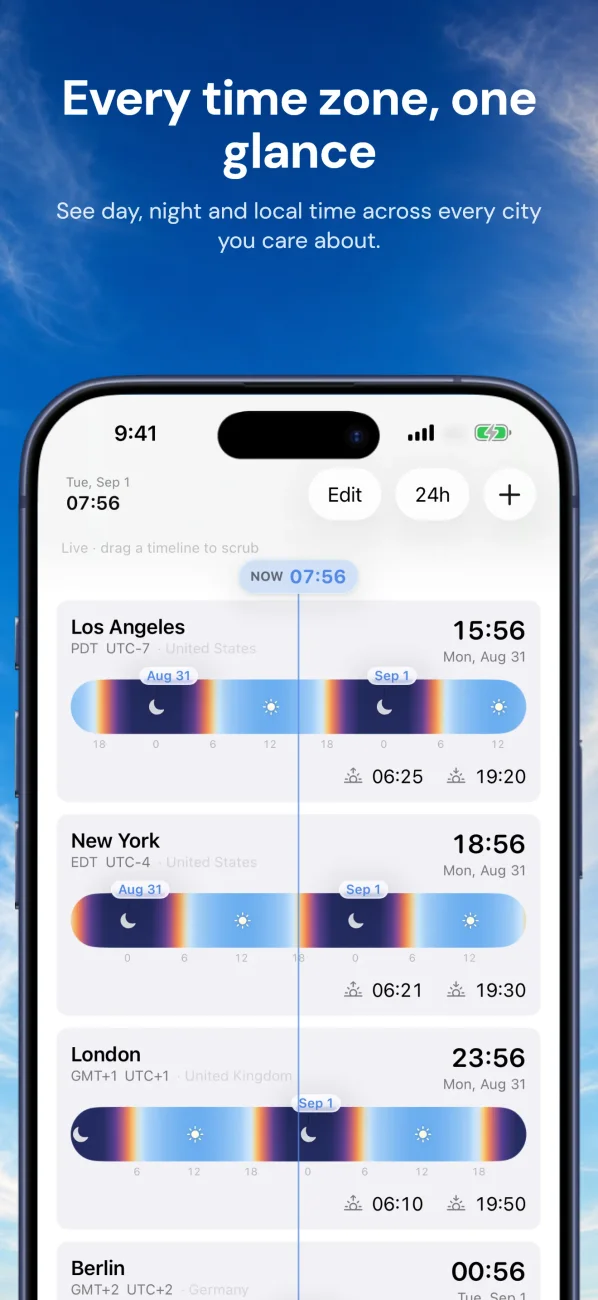
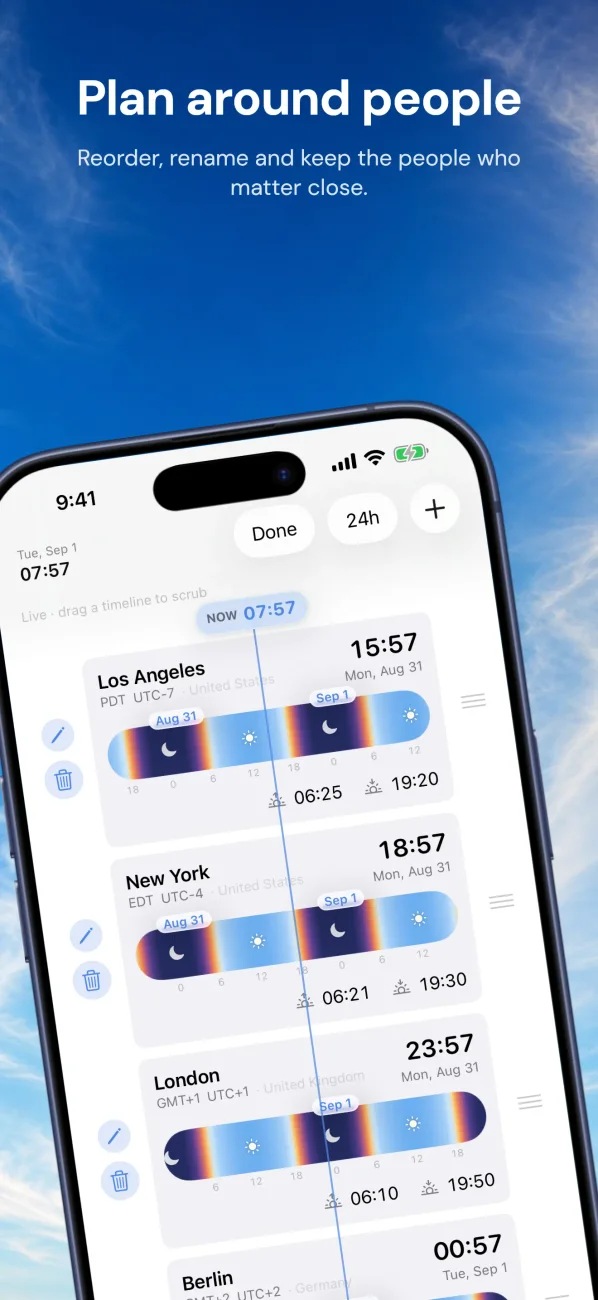
Teezee shows every city you care about as a sky — a timeline painted with that city's real night, dawn, day, and dusk, computed from its actual sunrise and sunset. Line them up, and time-zone math disappears: one glance tells you it's breakfast in London, deep night in Los Angeles, and golden hour in Tokyo.
Drag any timeline and every city scrubs together, so "does 9am Thursday work for Sydney?" is answered by sliding the cursor there and looking.
Download Teezee free and keep using your home city. A one-time lifetime purchase unlocks unlimited cities, widgets, Apple Watch, the Mac menu bar, and every platform. Cities chosen during onboarding stay saved as locked previews until you decide.
WHY TEEZEE
• The sky is the interface — each bar sweeps through indigo night, violet dawn, gold sunrise, and blue noon exactly when that city does. You read the world's day at a glance, not in numbers.
• Scrub time, not spreadsheets — swipe to slide the shared cursor minutes, hours, or days. Every city follows in lockstep. One tap snaps back to now.
• Real sun times — sunrise and sunset for each city's actual location and date, visible right on the bar.
• Home offsets — pick a home city and every other row shows its offset from home (−8h, +16h), the number you actually think in.
• Menu bar clock (Mac) — every city's time one click away, without opening a window. Optionally show a chosen city's time right in the menu bar.
• Keyboard-first (Mac) — arrow keys scrub, ⌘N adds a city, ⌘0 snaps back to now.
• iCloud sync — your cities and preferences follow you across iPhone, iPad, Mac, and Vision Pro.
• Current weather — see a small condition icon and local temperature for every city, or turn it off in Settings.
• Spatial (Vision Pro) — pin the world's day to your wall in a glass window; look at a timeline and pinch-drag to scrub.
• Your labels — rename "London" to "Alice (Eng)" and plan around people, not airports.
• 12/24-hour time, seconds display, drag to reorder, light and dark mode.
BUY ONCE, EVERYWHERE
One purchase unlocks Teezee on iPhone, iPad, Mac, Apple Watch, and Apple Vision Pro.
PRIVATE BY DESIGN
No accounts, no ads, no personal profiles. Your city list stays on your devices and in your iCloud. Optional weather sends city coordinates only to Apple Weather; optional privacy-preserving usage counts never include city names. Both can be switched off in Settings.
Made for people who live in several time zones at once — remote teams, distributed families, frequent flyers, and anyone tired of counting on their fingers.
What’s new
Version 2.3 · Sep 13, 2026
• Five new Shortcuts actions: check your city times, compare a moment, create shareable text, open your timeline at a chosen time, and get sunrise and sunset
• Use your saved cities or choose cities for a shortcut, with local dates and UTC offsets in the results
• Refined onboarding and a clearer lifetime-purchase screen across iPhone, iPad and Mac
• Improved moment sharing and a smooth return to Now on Mac
App privacy
What XenoCode declares on the App Store about how this app handles data.
-
Data not linked to you
May be collected but is not linked to your identity.
- Purchases
- Identifiers
- Usage data
Privacy practices may vary, for example with the features you use or your age.
Information
- Seller
- XenoCode Inc
- Category
- Utilities
- Version
- 2.3
- Updated
- Sep 13, 2026
- Released
- Jul 15, 2026
- Size
- 42.9 MB
- Requires
- iOS 17.0 or later
- Age rating
- 4+
- Price
- Free
- In-app purchases
- Yes
- Languages
- English, French, German, Italian, Japanese, Korean, Portuguese, Simplified Chinese, Spanish, Traditional Chinese
- Copyright
- © 2026 XenoCode Inc
You might also like
-
 Spirit Level + Measure KitAngle Finder, Compass & Qibla
-
 OpenSesame - Gate Code ManagerDelivery Gate Code Manager
-
 Text FormatterYour All-in-One Text Toolkit
-
 SpacelessLocations everywhere
-
 Unit Converter & Currency RateConversion Calculator & Metric
-
 Tag Shark: Barcode & NFCQR Scanner & Loyalty Cards
-
 Smart Calculator: All In OneAI Math, BMI, Unit Converters
-
 TriTab Calc: Multi CalculatorThree calculators at once
-
 SnoozeBuster - Alarm ClockWake Up Without Snoozing
-
 PageScribble for SafariDraw, markup & screenshot