
TeleScroll Voice
Teleprompter with Voice Scroll
Designed for iPhone, iPad, iPod touch
Free · In-app purchases
- Age rating4+
- CategoryUtilities
- DeveloperPrompterPeople
- LanguagesEnglish
- Size58.9 MB
Links to the official App Store page
Download.org hosts no file of TeleScroll Voice. The button opens its official App Store page, published by PrompterPeople. Listing last checked on Nov 15, 2026.
Screenshots

About
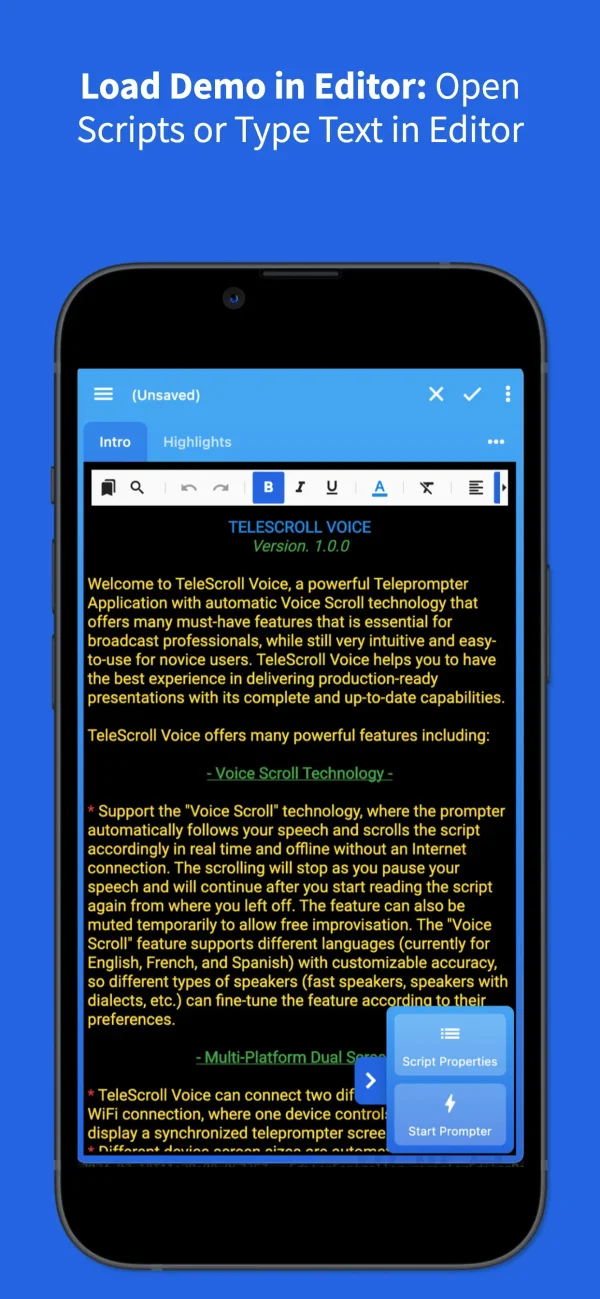
TeleScroll Voice is a a powerful Teleprompter Application with automatic Voice Scroll technology that offers many must-have features that is essential for broadcast professionals, while still very intuitive and easy-to-use for novice users. TeleScroll Voice helps you to have the best experience in delivering production-ready presentations with its complete and up-to-date capabilities.
TeleScroll Voice offers many powerful features including:
- Voice Scroll Technology -
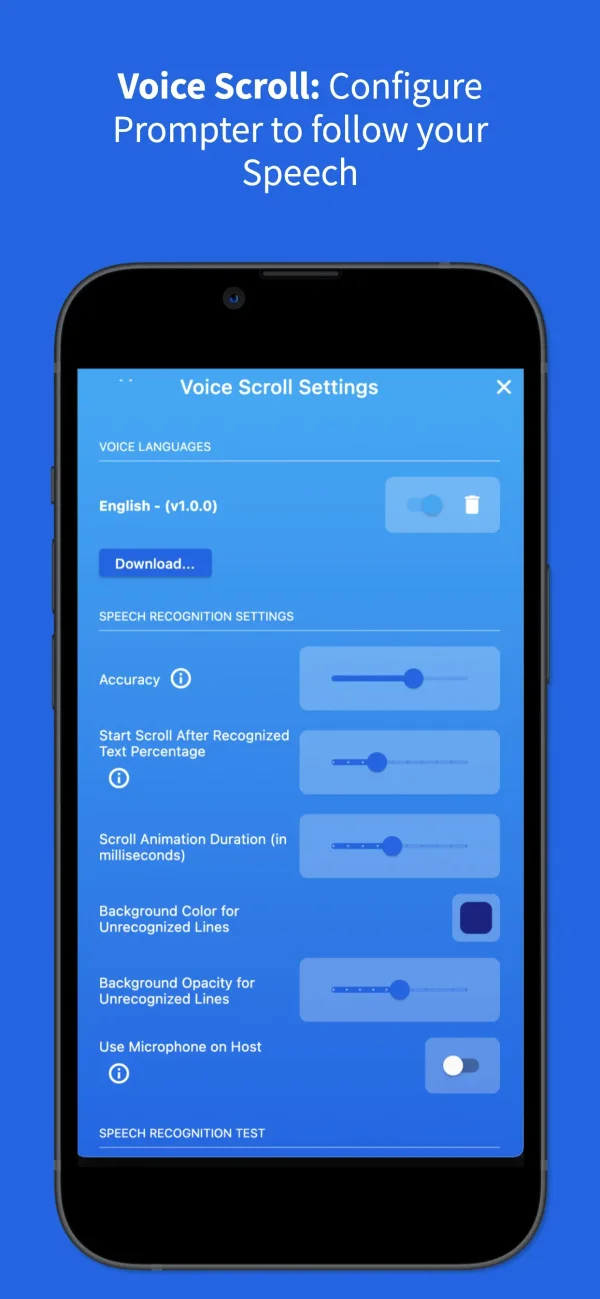
* Support the "Voice Scroll" technology, where the prompter automatically follows your speech and scrolls the script accordingly in real time and offline without an Internet connection. The scrolling will stop as you pause your speech and will continue after you start reading the script again from where you left off. The feature can also be muted temporarily to allow free improvisation. The "Voice Scroll" feature supports different languages (currently for English, French, and Spanish) with customizable accuracy, so different types of speakers (fast speakers, speakers with dialects, etc.) can fine-tune the feature according to their preferences.
- Multi-Platform Dual Screen -
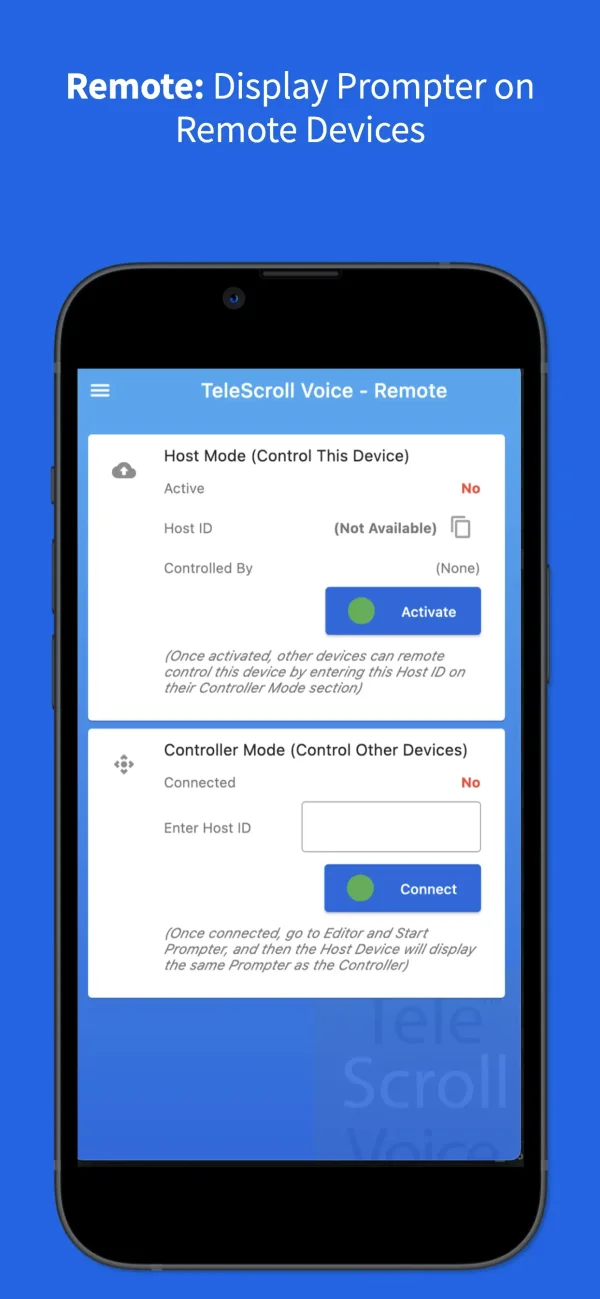
* TeleScroll Voice can connect two different devices via WiFi connection, where one device controls the other to display a synchronized teleprompter screen.
* Different device screen sizes are automatically adapted by TeleScroll Voice so the resulted scrolling text are still smooth and proportionally visible on both screens.
* All supported platforms are fully interoperable to act as a Controller (device that controls the prompter) and also as a Host (device that display the prompter).
- Main Features -
* Support multiple languages (English, French, and Spanish).
* Support Normal and Reversed text while scrolling, and can be configured independently on the Host and on the Controller.
* Support using different Fonts and different Font Sizes.
* Support using different Background Colors.
* Support Left, Centered, and Right Alignment.
* Support different Text Color and styles on each character such as Bold, Italic, or Underline.
* Support Margins and Vertical Line Spacing.
* Support showing Cue Marker with configurable position, size, color, and its shape.
* Support variable Scrolling Speed and Start/Pause the prompter.
* Built-in Text Editor to quickly change the script, complete with Find and Replace functions.
* Support Bookmarks to quickly jumps to different script positions.
* Support Multiple Scripts in one Document to quickly jump to different scripts in a single prompter session.
* Support synchronizing the Editor's cursor with Prompter lines to maintain the scrolling position.
* Highly configurable settings where any settings can be configured globally to be applied to all Documents and Scripts, or set specifically down to the Document and Script level.
* Support opening many popular text file formats, from plain text, rich text, etc.
* Support exporting into many popular text file formats, from plain text, rich text, etc.
* Save Document changes to TeleScroll Document format to be compatible with all supported platforms.
* Show and hide Button Slide Panels while prompting to easily clear the Prompter screen from the control buttons.
* Action Assignment feature to change the default keyboard / touchpad / mouse navigation in Prompter screen.
* Support Full Screen Mode in prompter with text margin adjustments (full-width, 4:3, 16:9).
* Colorful Application Themes and Light / Dark modes.
What’s new
Version 1.0.8 · Mar 16, 2025
- Fixed some parsing issues in the new Voice Scroll Japanese language.
- Fixed some typos in Demo Document.
- Fixed issue in new Voice Scroll languages (German, Japanese).
- Fixed In-App-Purchase issue in iOS.
- Support new interface languages (German, Italian, Portuguese and Japanese).
- Support new Voice Scroll languages (German, Italian, Portuguese and Japanese).
App privacy
What PrompterPeople declares on the App Store about how this app handles data.
-
Data linked to you
May be collected and linked to your identity.
- Contact info
- Identifiers
Privacy practices may vary, for example with the features you use or your age.
Information
- Seller
- Prompter People Inc.
- Category
- Utilities
- Version
- 1.0.8
- Updated
- Mar 16, 2025
- Released
- Jul 19, 2024
- Size
- 58.9 MB
- Requires
- iOS 13.0 or later
- Age rating
- 4+
- Price
- Free
- In-app purchases
- Yes
- Languages
- English
- Copyright
- © Prompter People, Inc.
You might also like
-
 VoicePrompter AI TeleprompterTrack your voice using AI
-
 Voice Teleprompter LiteMemorize Lines & Speeches
-
 edelkrone v2Utilities
-
 VoiceScroll - TeleprompterAuto-Scroll as You Speak
-
 ScrollVox - AI TeleprompterVoice Scroll & Floating Script
-
 SmallGoGoUtilities
-
 S-TeleprompterTeleprompter
-
 Teleprompter ▪for Vloger and Video Blogger
-
 Sidus AudioUtilities
-
 Wireless Workbench MobileWireless monitoring & control