Template Camera
Refer images take great photos
Designed for iPhone
In-app purchases
- Age rating4+
- CategoryPhoto & Video
- Developer文健 朱
- LanguagesEnglish+ 6 more
- Size11.6 MB
Links to the official App Store page
Download.org hosts no file of Template Camera. The button opens its official App Store page, published by 文健 朱. Listing last checked on Nov 23, 2026.
Screenshots


About
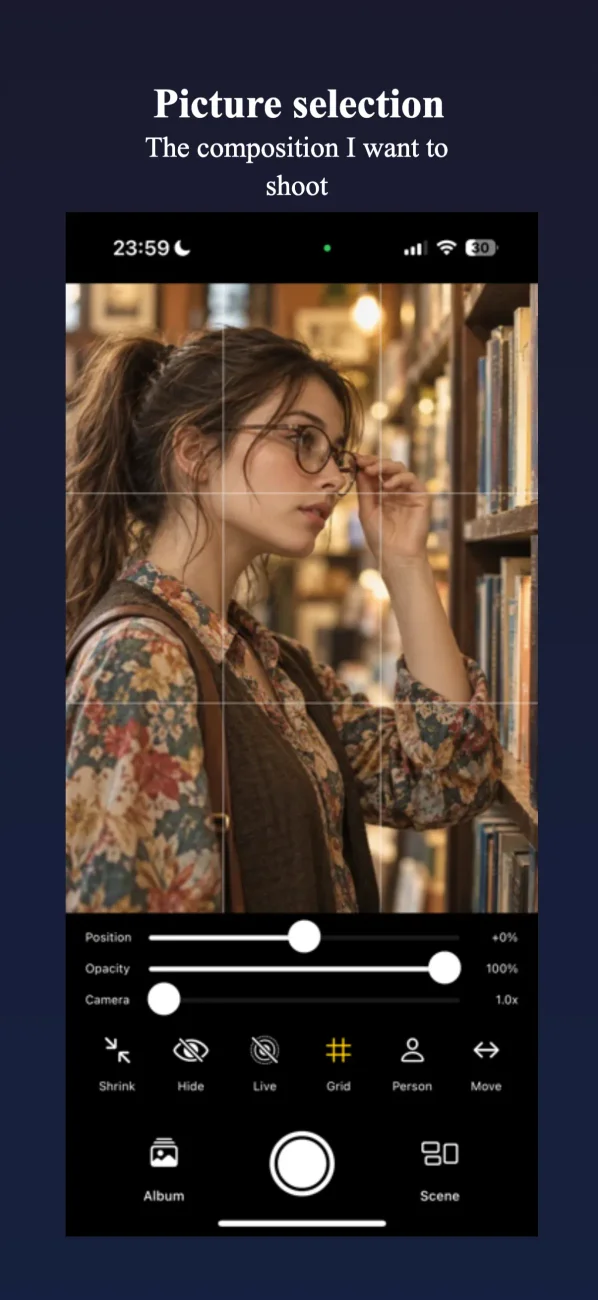
Template Camera is a camera app that lets you shoot with a reference photo right on your viewfinder.
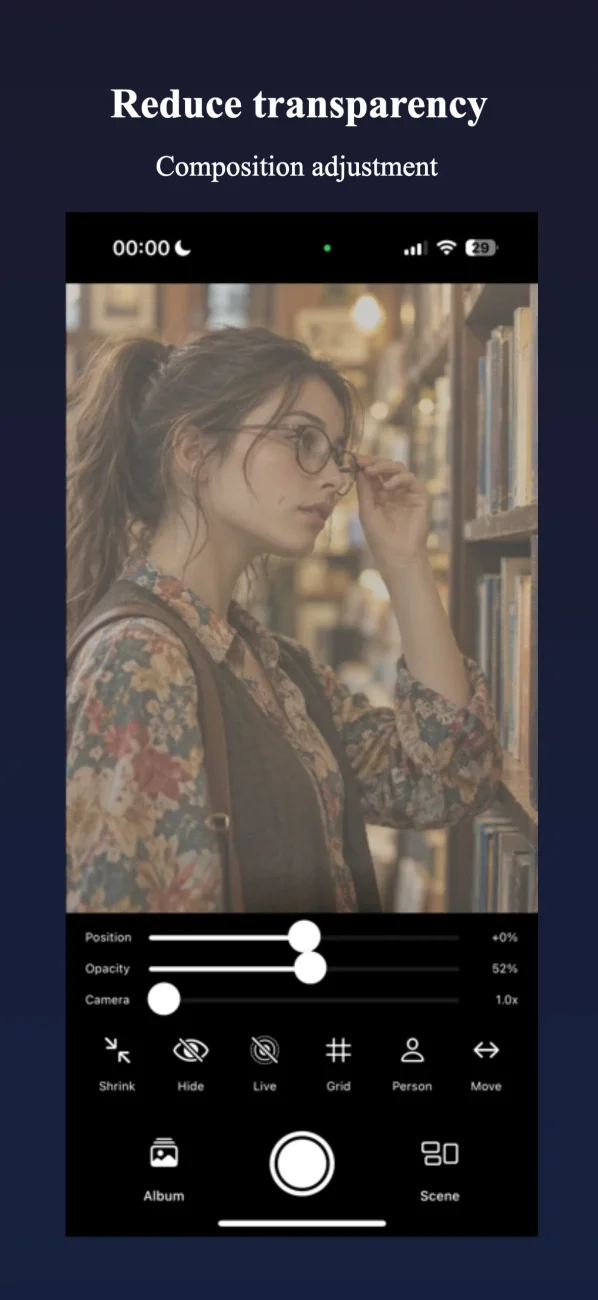
Struggling with poses or composition? Overlay a reference image on the camera screen, adjust its position and opacity, then frame your shot by matching the pose, angle and negative space shown in the template. No need to memorize poses or keep switching between your camera and album.
【Key Features】
• Reference Photo Overlay
Pick a template image and overlay it on the viewfinder. Drag, zoom and adjust transparency freely, then hide it with one tap before hitting the shutter.
• Scene Library
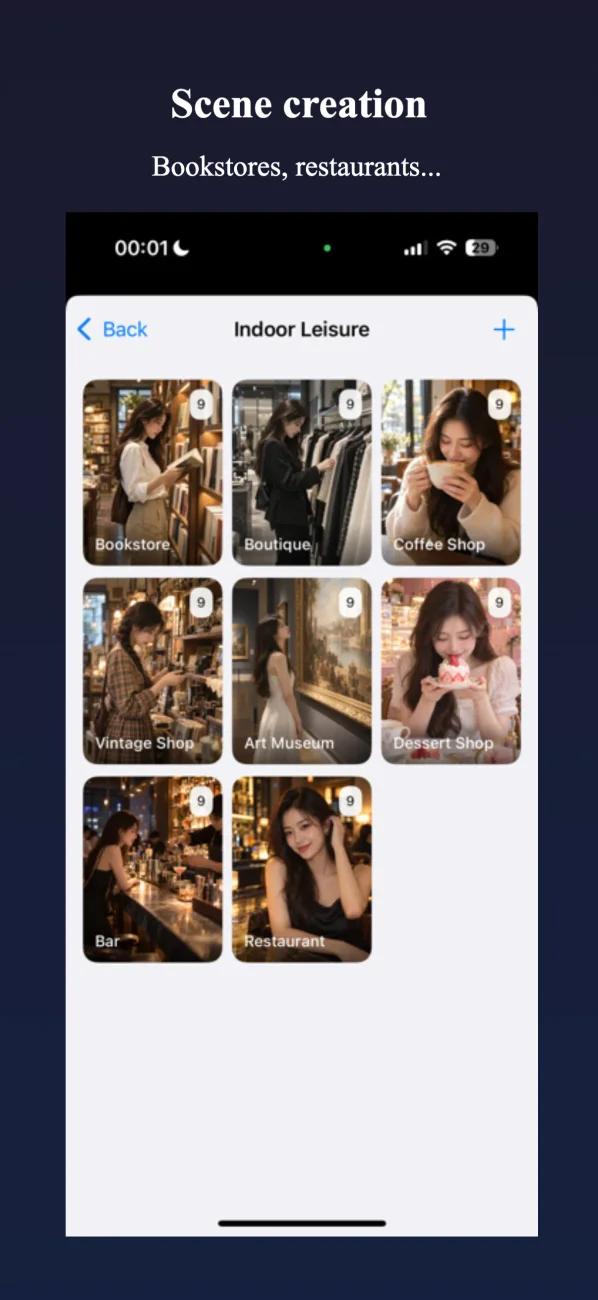
Browse built-in scenes such as Home and Indoor Leisure. Each subscene comes with multiple unique reference photos — covering bed, window, sofa, coffee shop, bookstore, restaurant and more — so inspiration is always one tap away.
• Custom Scenes
Create your own scenes and subscenes, then add and name reference photos from your album. Favorite cafes, local parks, travel destinations — build your personal photo library in advance and pull it up on location.
• Composition Aids
Grid lines, focus control, Live Photo and other quick controls help even beginners nail composition and negative space in no time.
【Who is it for】
• Anyone whose partner or travel buddy can't take a good photo — let them "copy the homework" from a reference
• People who want to take better photos but don't know what pose to strike or how to compose
• Planners who like to prepare photo ideas ahead of time and shoot on location
• Everyday life, cafe-hopping, travel and portrait photography
The life you live today is worth capturing.
What’s new
Version 2.4.2 · Nov 20, 2026
1. Add event statistics
2. When the template image is a scene image, add the "Previous" and "Next" buttons.
3. Adjust the positions of the Live button and the grid line button
App privacy
What 文健 朱 declares on the App Store about how this app handles data.
-
Data used to track you
May be used to track you across apps and websites owned by other companies.
- Location
- Identifiers
- Usage data
- Diagnostics
-
Data linked to you
May be collected and linked to your identity.
- Location
- Identifiers
- Usage data
- Diagnostics
Privacy practices may vary, for example with the features you use or your age.
Information
- Seller
- 文健 朱
- Category
- Photo & Video
- Version
- 2.4.2
- Updated
- Nov 20, 2026
- Released
- Jul 5, 2025
- Size
- 11.6 MB
- Requires
- iOS 17.0 or later
- Age rating
- 4+
- In-app purchases
- Yes
- Languages
- English, French, German, Japanese, Korean, Simplified Chinese, Traditional Chinese
- Copyright
- © 2023 Wenjian Zhu
You might also like
-
 DCam : Pro Photo Pose CameraModel Posture Imitation
-
 CineSnap AI: Photo EditorFilm presets & color grade
-
 Show Pics - Elevate Your PhotoUltimate Photo Template Tool
-
 YAN - AI Photo CuratorMaster composition & lighting
-
 Pix: Photo Coach AINail the shot, first try
-
 Snap Stamp - Timestamp CameraGPX Running & Photo Watermarks
-
 MirroCamEasily Capture Similar Photos
-
 SnapKeepsImages turn into quick notes
-
 FILMU - Film Camera CamcorderFilm days you'll miss someday.
-
 SnapCaption - Photo CaptionsOn-device hashtags, your tone