
- Age rating4+
- CategoryProductivity
- DeveloperAlfred Ang
- LanguagesEnglish
- Size2.2 MB
Links to the official App Store page
Download.org hosts no file of Tertiary Planner. The button opens its official App Store page, published by Alfred Ang. Listing last checked on Nov 18, 2026.
Screenshots
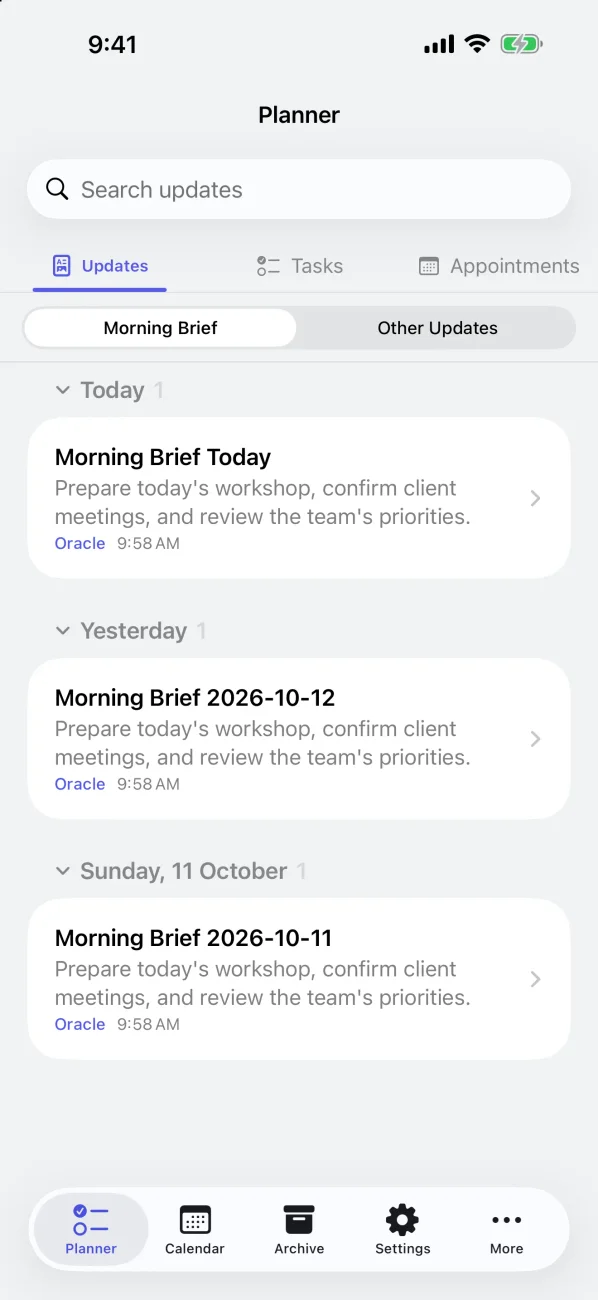
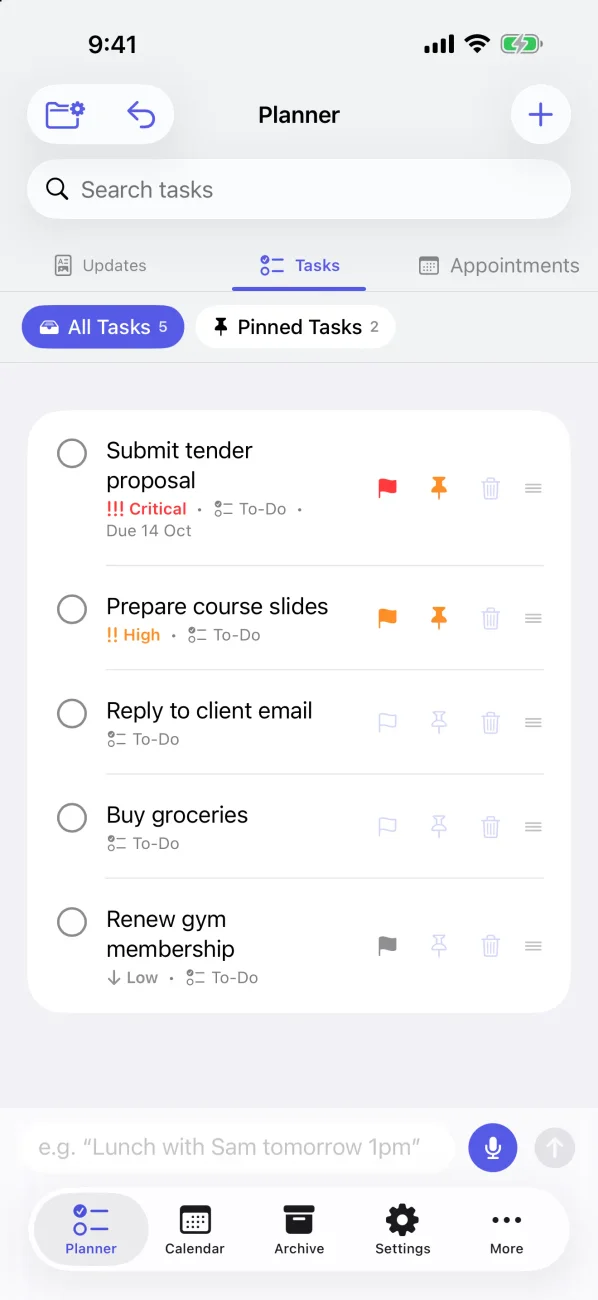
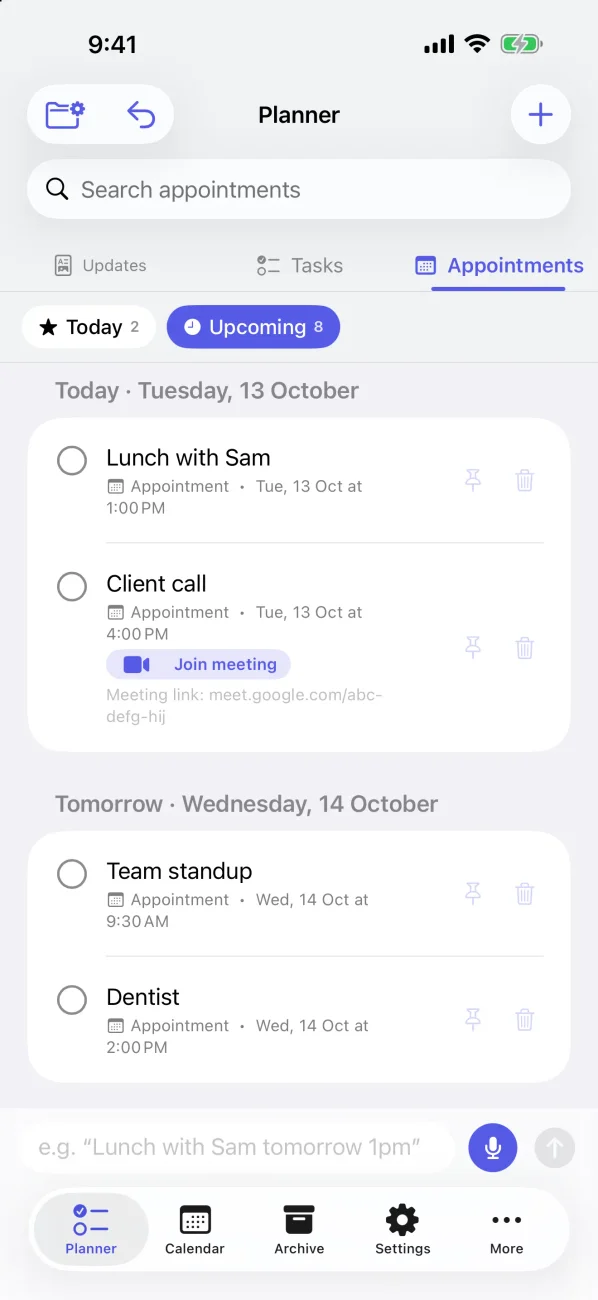
About
Tertiary Planner is a fast, private to-do and planner app for iPhone, iPad and Mac. Type or speak what you need — "Lunch with Sam tomorrow at 1pm" — and the on-device assistant words it nicely and saves it as an appointment or a to-do, straight into your list.
On supported devices it uses Apple Intelligence, running entirely ON DEVICE, to understand your intent and word your items clearly. On other devices the same on-device parsing (Apple's Natural Language and Speech frameworks) does the job. Either way, nothing you type or say ever leaves your device to any third party.
FEATURES
• One Planner page with To-Do and Appointment tabs, each filterable by your lists
• Capture bar at the bottom — type or dictate, and the assistant drafts and saves the entry; Undo reverts it
• Apple Intelligence on-device intent understanding (with an on-device fallback)
• Voice capture using native iOS speech recognition
• Your own lists and sub-lists — create, rename, pin, reorder and nest them
• Assign items to people; items added in someone's list go to that person
• To-Do priorities — Critical, High, Medium or Low; Critical and High are pinned automatically
• Pin anything to the top; drag to rearrange everything by hand
• Smart views: All Tasks, Pinned, Today and Upcoming show your own queue
• Upcoming — everything with a date, broken down by day, with anything overdue on top
• Calendar — a month view with each day's appointments written into the day, plus a List view
• Meeting links — paste a Google Meet, Zoom or Teams link and tap Join on the appointment
• Singapore public holidays marked on the calendar
• Today's appointments — a morning summary and an alert just before each appointment starts
• Advance reminders — a notification before anything with a date is due (1, 3 or 7 days ahead)
• Optional mirror of appointments into your system Calendar (EventKit only)
• Search across titles, notes, assignee and list names
• Duplicate check — spots the same title on the same day and offers to archive the extras
• Check off an item and it is automatically archived; restore anytime
• iCloud sync — your items stay up to date on every device signed in to your iCloud
• Light, Dark or System appearance, with a choice of accent colours
PRIVACY
Your data belongs to you. All intelligence runs on your device. Items are stored on your device and synced only through your personal, private iCloud database, which only you can access — we never see your data. No third-party AI services, no accounts, no tracking.
Developed by Tertiary Infotech Academy Pte Ltd.
What’s new
Version 3.1 · Nov 15, 2026
• Swipe an appointment to the left in the Calendar, in the month view or the list, and tap Delete to remove it from Planner
App privacy
What Alfred Ang declares on the App Store about how this app handles data.
-
Data not collected
The developer does not collect any data from this app.
Privacy practices may vary, for example with the features you use or your age.
Information
- Seller
- Alfred Ang
- Category
- Productivity
- Version
- 3.1
- Updated
- Nov 15, 2026
- Released
- Jul 3, 2026
- Size
- 2.2 MB
- Requires
- iOS 17.0 or later
- Age rating
- 4+
- Price
- Free
- Languages
- English
- Copyright
- © 2026 Tertiary Infotech Academy Pte Ltd
You might also like
-
 OnChip AIOn-Device Private AI
-
 Complete Stuff PlannerDrag Drop, Done.Daily Planner.
-
 Weekly Planner - SortaVoice Notes, ADHD Organizer
-
 1 MonthRebuild Your Life
-
 Reflow: ADHD Daily PlannerThe plan that fixes itself
-
 Trace: AI RemindersVoice notes & to-do organizer
-
 MCP NotesProductivity
-
 Aura: To-Do List & TasksSmart Offline Daily Planner
-
 Prysm AIYour AI companion
-
 Calendar & Tasks: CalityCalendar & Habit Tracker