
Tide: Beautiful Voice Notes
Beautiful layered voice notes
Designed for iPhone, iPad
$4.99
- Age rating9+
- CategoryMusic
- DeveloperElijah Lucian
- LanguagesEnglish
- Size11.5 MB
Links to the official App Store page
Download.org hosts no file of Tide: Beautiful Voice Notes. The button opens its official App Store page, published by Elijah Lucian. Listing last checked on Nov 20, 2026.
Screenshots


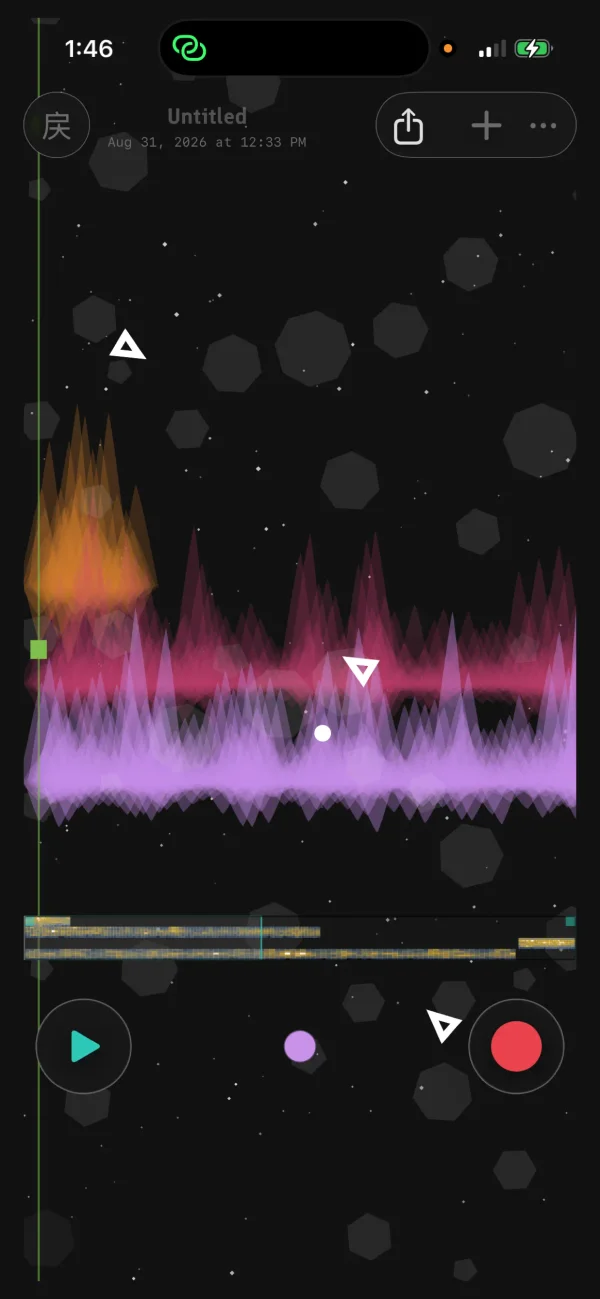

About
Tide turns voice notes into something you actually want to keep — and share.
Most voice memos are throwaway. Tide is for the ones that matter: the melody stuck in your head, the verse before you forget it, the rhythm you tapped on a table. Hit record, layer take on take onto a single tape, and watch each one paint itself into a living picture.
LAYER YOUR SOUND
Stack voice, humming, beatbox, anything — every pass adds to the last. One tape, no clutter, no setup. Move the cursor while you record; the take follows you.
SEVEN WAYS TO SEE IT
Calm bars, watercolor triangles, swaying grass, a gold-and-blue sonogram that lays every take down like sediment, and more. Switching looks re-skins the whole app.
SCRATCH AND SCRUB
Drag across your take to scrub through it like vinyl — fast or slow, with natural momentum. A timeline strip shows the whole sketch; set in and out markers to loop the good part.
REAL EFFECTS
Host your AUv3 plugins (and Apple's built-ins) in a two-patch rack with an XY performance pad. Effects print to tape — what you hear is what you keep.
CAPTURE, THEN SHIP
Tap record, get the idea down, send it out. Export a take — or just the looped slice — straight to Choppa, to the members wall, or anywhere. Opens right back into your last sketch, exactly where you left it.
The fastest path from "I have an idea" to "here, listen to this."
What’s new
Version 1.3.0 · Oct 27, 2026
Tempo and key: Tide listens to each sketch and shows what it heard next to the date, like 120 BPM · A MIN, only when it's sure.
Names: a sketch you haven't named gets one from the on-device model after its first take. Your own names always win, and SUGGEST in Rename asks for one.
iCloud: your loops are on every device signed in to your iCloud, on Wi-Fi.
Import a whole song: it comes in as a performance, laid out lane by lane, and you watch it build. QUICK IMPORT skips that and brings it in as one wave.
MIDI in: USB, Bluetooth, network or another app. Pads run the transport, knobs drive the XY mixer, and MIDI LEARN maps your own.
Post a take to Bluesky with #WAVELOOP, from your own account.
TRAINING: little checklists that tick themselves as you use Tide.
WAVELOOP is the look, in zen. Sparser waves, a cleaner play row, and a library icon that matches Wake. The other looks are in settings under EXTRA THEMES.
Opening the app no longer freezes, long takes open as waves instead of a wall of colour, and every take draws at the same density.
App privacy
What Elijah Lucian declares on the App Store about how this app handles data.
-
Data not collected
The developer does not collect any data from this app.
Privacy practices may vary, for example with the features you use or your age.
Information
- Seller
- Elijah Lucian
- Category
- Music
- Version
- 1.3.0
- Updated
- Oct 27, 2026
- Released
- Jun 10, 2026
- Size
- 11.5 MB
- Requires
- iOS 17.0 or later
- Age rating
- 9+
- Price
- $4.99
- Languages
- English
- Copyright
- © 2026 Elijah Lucian