
TimeSheet Tracker: BeeFlow
Log Hours, Manage Clients
Designed for iPhone, iPad
Free · In-app purchases
- Age rating4+
- CategoryBusiness
- DeveloperKelvin Kioko
- LanguagesEnglish
- Size16.0 MB
Links to the official App Store page
Download.org hosts no file of TimeSheet Tracker: BeeFlow. The button opens its official App Store page, published by Kelvin Kioko. Listing last checked on Nov 18, 2026.
Screenshots
About
BeeFlow – The Effortless Way to Track Your Time
Stop guessing where your hours went. BeeFlow is the intuitive time tracking app designed for freelancers, consultants, and professionals who need a simple yet powerful way to log work hours, manage clients, and stay on top of their productivity.
Whether you're billing clients by the hour, monitoring project progress, or simply want to understand how you spend your workday, BeeFlow gives you the tools to take control of your time—beautifully and effortlessly.
WHY BEEFLOW?
We built BeeFlow because time tracking shouldn't feel like a chore. Most apps are cluttered, complicated, or built for large teams. BeeFlow is different. It's designed for individuals who want to log hours quickly, see their progress at a glance, and get back to the work that matters.
KEY FEATURES
- Quick Time Logging
Log hours in seconds, not minutes. Our streamlined entry flow lets you add project details, descriptions, and categories without unnecessary steps. Just tap, enter, and done.
- Clock In / Clock Out
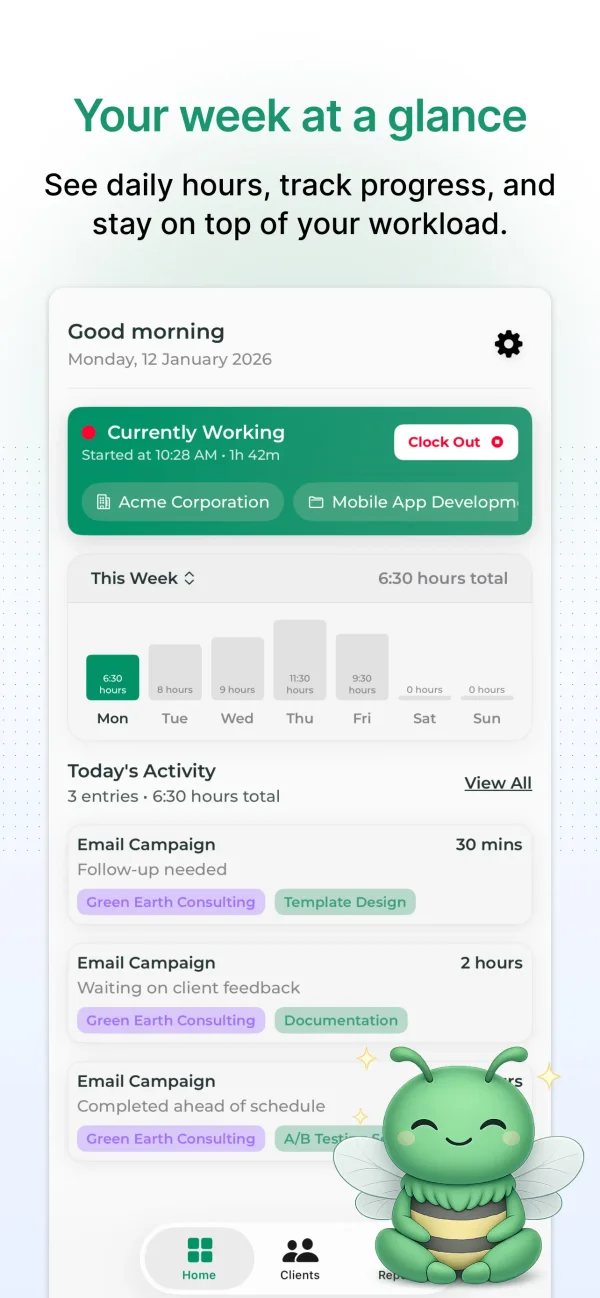
Start your workday with a single tap. BeeFlow tracks your active session automatically, so you never forget to log time again. Perfect for those who prefer real-time tracking over manual entry.
- Weekly Dashboard
See your entire week at a glance. The visual daily breakdown shows exactly how many hours you've logged each day, helping you spot patterns and stay balanced.
- Client & Project Management
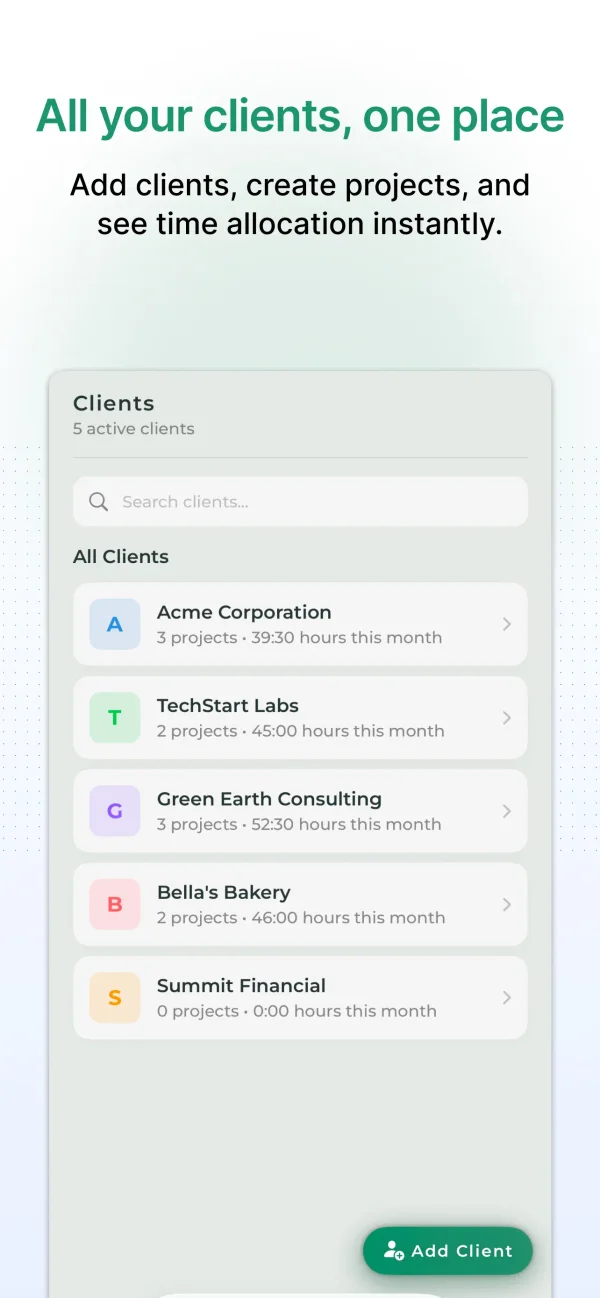
Organize your work the way you think. Create clients, add multiple projects under each, and categorize your time entries for clear, accurate records. Perfect for freelancers juggling multiple accounts.
- Today's Activity Feed
Your home screen shows exactly what you've accomplished today. Review entries, check total hours, and quickly add more time—all from one place.
- Complete History & Search
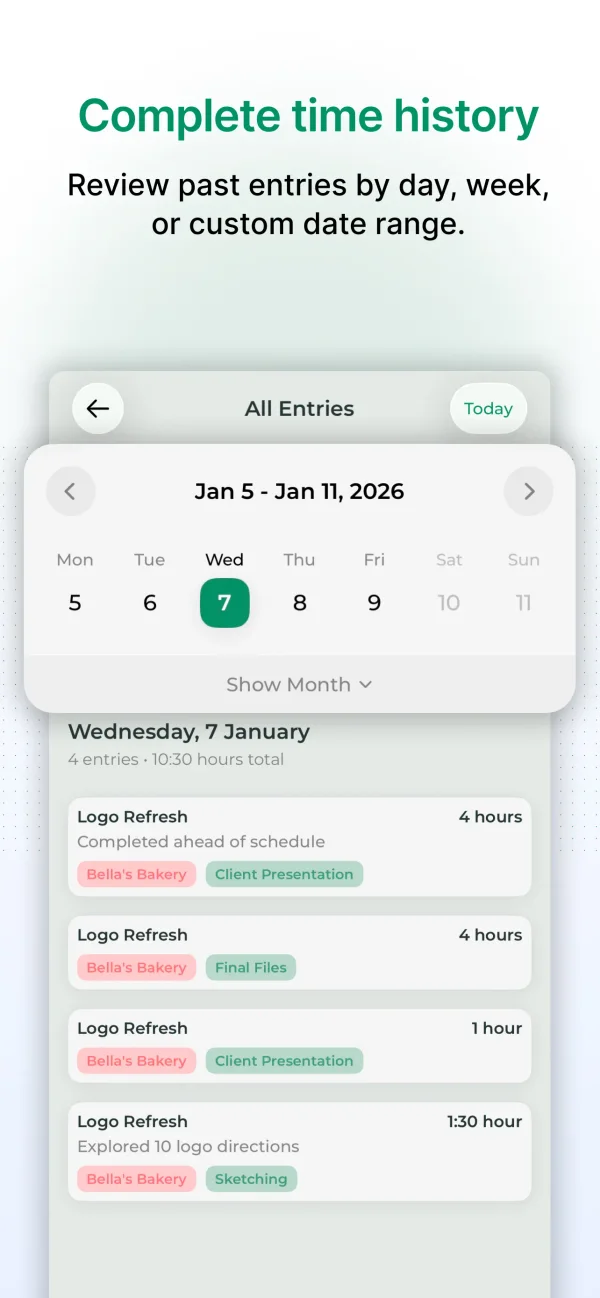
Every entry is saved and searchable. Filter by client, project, date range, or keyword to find exactly what you need. Great for invoicing, tax prep, or simply reviewing past work.
- CloudKit Backup & Sync
Your data is automatically backed up to your private iCloud account. Switch devices, get a new phone, or work from your iPad—your timesheets follow you everywhere, securely and seamlessly.
- Beautiful on Every Device
BeeFlow is optimized for both iPhone and iPad. On iPad, enjoy a spacious split-view layout with sidebar navigation. On iPhone, navigate effortlessly with our intuitive tab bar.
- Dark Mode & Light Mode
Work comfortably at any hour. BeeFlow adapts to your system appearance with carefully crafted dark and light themes that are easy on the eyes.
- Privacy First
Your time data stays yours. We don't collect, sell, or share your information. Everything syncs through your personal iCloud account—not our servers.
PERFECT FOR
→ Freelancers tracking billable hours
→ Consultants managing multiple clients
→ Remote workers monitoring productivity
→ Creative professionals logging project time
→ Anyone who wants to understand where their time goes
BEEFLOW PRO
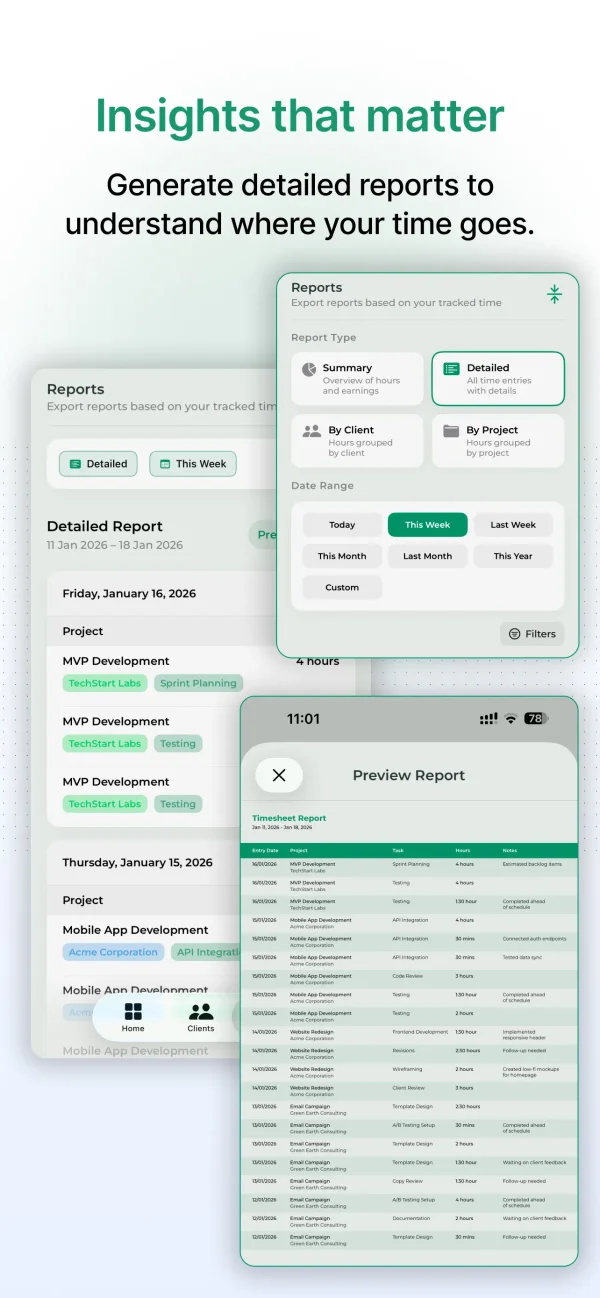
Unlock the full power of BeeFlow with Pro. Get unlimited clients and projects, advanced reporting, export options, and priority support. Start with a free trial and upgrade when you're ready.
GET STARTED TODAY
Download BeeFlow now and take the first step toward effortless time tracking. Your future self—and your clients—will thank you.
Terms of Use: https://kenseicraft.com/beeflow/termsOfUse.html
Privacy Policy: https://www.kenseicraft.com/privacyPolicy.html
App privacy
What Kelvin Kioko declares on the App Store about how this app handles data.
-
Data not collected
The developer does not collect any data from this app.
Privacy practices may vary, for example with the features you use or your age.
Information
- Seller
- Kelvin Kioko
- Category
- Business
- Version
- 1.0.0
- Updated
- Jan 15, 2026
- Released
- Jan 15, 2026
- Size
- 16.0 MB
- Requires
- iOS 17.6 or later
- Age rating
- 4+
- Price
- Free
- In-app purchases
- Yes
- Languages
- English
- Copyright
- © Kensei Craft 2026
You might also like
-
 ServiceTrack Time TrackingField Service Time Tracking
-
 AlpkonBusiness
-
 ShiftLog Pro: Work Hours & PayShift Tracker, Overtime, Tips
-
 ClientTime: Time TrackerHours, clients & invoices
-
 HoursWorkTrack your work hours & wages
-
 60-Second TimesheetTrack hours. Export PDFs.
-
 TimeScapeLive PlusProductivity
-
 Splitorium - Split expensesSplitting expenses made easy
-
 Wesplit - IOU expense trackerEasily settle shared expenses
-
 InvoicePal: Easy Invoice MakerSimple Estimates Generator app