
- Age rating4+
- CategoryMusic
- DeveloperHakaru Hirose
- LanguagesEnglish+ 1 more
- Size1.4 MB
Links to the official App Store page
Download.org hosts no file of Tonrad. The button opens its official App Store page, published by Hakaru Hirose. Listing last checked on Nov 23, 2026.
Screenshots

About
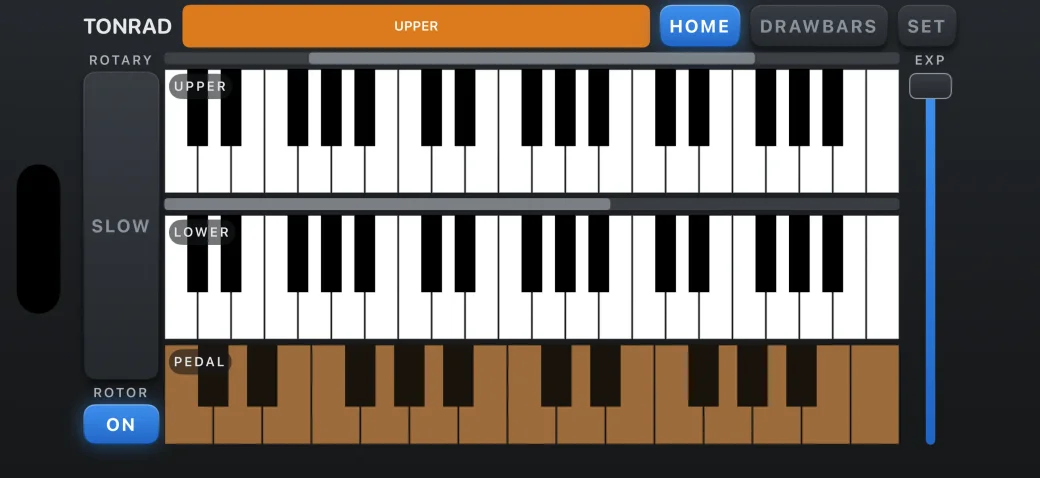
Tonrad is a tonewheel organ app played on the screen of an iPhone or iPad (landscape only, iOS 18 or later).
PLAY
- Upper manual, lower manual and pedalboard, stacked on the screen and played with several fingers at once.
- The upper and lower manuals show part of their 61 keys; drag the strip above each one to move the range. All 25 pedal keys are shown.
- A MIDI keyboard connected by USB can play it too. Give the upper manual, lower manual and pedals separate MIDI channels, or split one keyboard into BASS / LOWER / UPPER with the strip in the top row.
- Add a pedal tap to left-hand bass (a setting on the SET screen): when it is on, keys in the BASS zone and lower-manual keys below the BASS boundary sound on the lower manual with a short pedal note of the same name on top. The tap length can be set from 10 to 200 ms.
- Fold notes into range (a setting on the SET screen): MIDI notes below or above a keyboard's range are played by shifting them in octaves, keeping the same note name.
- MIDI CC11 moves the expression; CC1 and CC64 change the rotary speaker's speed.
- MIDI LEARN: assign the knobs, sliders and buttons of your device (control changes) to the drawbars, percussion, vibrato, rotary speaker and reverb.
- The sound continues when another app is in front, so you can keep playing from a MIDI keyboard while reading a score in another app.
SHAPE THE REGISTRATION
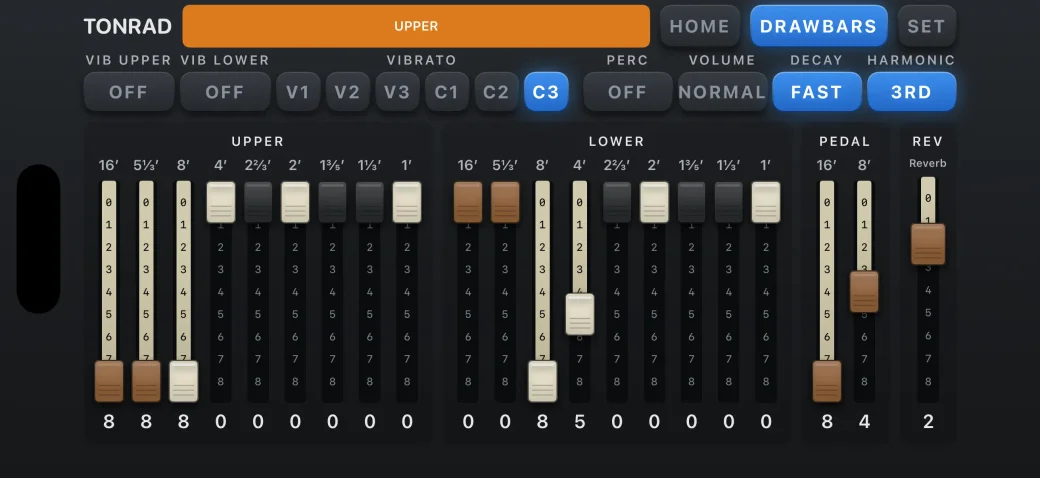
- Drawbars: 9 for the upper manual, 9 for the lower manual and 2 for the pedals (positions 0 to 8).
- Percussion (upper manual): second or third harmonic, volume and decay switches.
- Vibrato and chorus: six positions (V1 V2 V3 C1 C2 C3), switched on or off separately for the upper and lower manuals.
- Expression: moved by the EXP control at the right edge of the HOME screen.
- Rotary speaker: slow and fast speeds with rotor stop on HOME. Full speaker bypass is in SET.
- Spring reverb: three springs, with the amount set by the REV drawbar.
- The drawbars and the other controls are saved automatically and come back the next time you open the app.
SET SCREEN
The MIDI channels and octaves, the fold-into-range and pedal-tap settings, the names of the connected MIDI devices, the MIDI LEARN list, SPEAKER OFF to bypass the entire rotary speaker, the output volume, a PANIC button that stops every sound, the name of the audio output, the audio measurements and a "Privacy Policy" row that opens the privacy policy page.
HOW IT WAS MADE
The tone is computed from circuit and part values read from service documents and published papers. The source of each constant is recorded in a ledger kept with the code. Values the documents do not give were set by ear or are provisional.
WHAT IT DOES NOT DO
- MIDI keyboards connect by USB. The app has no screen for pairing wireless MIDI devices.
- It does not record.
- It cannot be used as an Audio Unit (AUv3) plug-in.
YOUR DATA
Nothing about you or your use is collected, and the app makes no network connections. Settings stay on this device.
Screens are in English and Japanese.
What’s new
Version 0.3.0 · Nov 17, 2026
- The pedal tap added to left-hand bass can now be set from 10 to 200 ms.
- The default tap length is now 20 ms instead of 60 ms. Your saved settings are preserved.
App privacy
What Hakaru Hirose declares on the App Store about how this app handles data.
-
Data not collected
The developer does not collect any data from this app.
Privacy practices may vary, for example with the features you use or your age.
Information
- Seller
- Hakaru Hirose
- Category
- Music
- Version
- 0.3.0
- Updated
- Nov 17, 2026
- Released
- Nov 13, 2026
- Size
- 1.4 MB
- Requires
- iOS 18.0 or later
- Age rating
- 4+
- Price
- Free
- Languages
- English, Japanese
- Copyright
- © 2026 Hakaru Hirose
You might also like
-
 Claviro OrganPipe organ sample set player
-
 Radio OrganTube organ meets ghost radio.
-
 OrganKey: Organ & BandArranger Keyboard & Lessons
-
 Allen Apex RemoteMusic
-
 Torero OrganA pro vintage instrument
-
 Piano TransposePlay straight from sheet music
-
 ToneWright: Music WorkshopPlay piano, drums & more
-
 Street OrganOrgue de Barbarie
-
 Bulldog SamplesMusic
-
 Naad BoxMulti Instrument Studio