Touch Trigonometry
Learn trigonometry with touch
Designed for iPhone, iPod touch
Free · In-app purchases
- Age rating4+
- CategoryEducation
- DeveloperAisatsu LLC
- LanguagesEnglish
- Size48.4 MB
Links to the official App Store page
Download.org hosts no file of Touch Trigonometry. The button opens its official App Store page, published by Aisatsu LLC. Listing last checked on Nov 12, 2026.
Screenshots

About
Finally understand trigonometry.
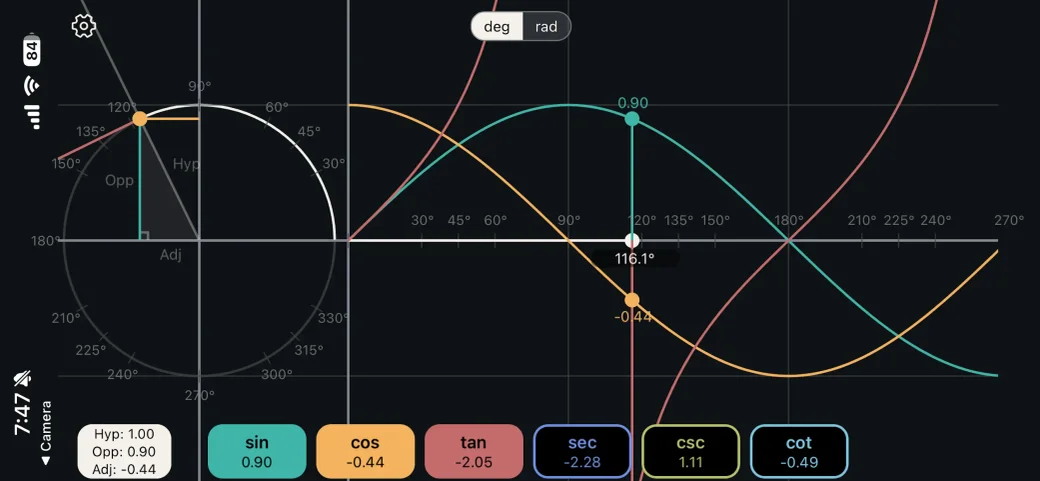
Touch Trigonometry is the most intuitive way to learn the trigonometric functions. Instead of memorizing formulas, you'll see how sin, cos, tan, and the rest actually work—by touching and exploring a live unit circle and graph. Drag your finger around the circle and watch trig functions respond in real time. You'll be amazed at how quickly the "true meaning" of trigonometry becomes clear. Watch the graph on the right trace their values. In seconds, concepts that confused you for years will suddenly click. This app is great for students struggling with trigonometry or anyone looking for a refresher.
HOW IT WORKS
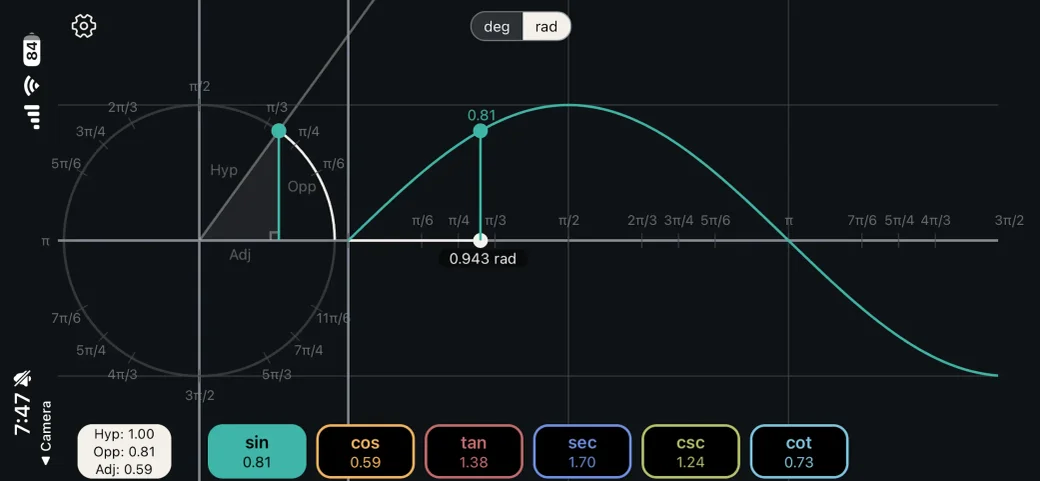
On the left: an interactive unit circle. Touch anywhere and drag to change the angle θ (theta). A triangle forms showing the relationships between the angle and the trig values. On the right: live graphs of all six trig functions. As you move the angle, dots trace along each curve showing the current value. Touch the graph side to control the angle from there too. It's bidirectional, immediate, and intuitive. No tutorial needed—just touch and explore. Users have told us that they never understood *why* the trig functions existed—until they used this app. From students to the math curious, Touch Trigonometry offers a truly intuitive way to understand one of the trickiest parts of geometry—at your fingertips!
FEATURES
• Interactive unit circle with touch control
• All 6 trig functions: sin, cos, tan, sec, csc, cot
• Live function graphs with real-time value tracking
• Bidirectional control (circle or graph)
• Right triangle overlay showing opposite/adjacent/hypotenuse
• Reference angle markers (30°, 45°, 60°, 90°, etc.)
• Switch between degrees and radians
• Snap-to-reference-angles mode
• Pinch to zoom the graph
• Colorblind-friendly color palette
• Clean dark theme, no distractions
• No ads, no account required
WHO IT'S FOR
• High school & college students learning trig
• Teachers demonstrating concepts in class
• Engineers & scientists refreshing fundamentals
• Anyone who was told to "just memorize SOHCAHTOA"
• Visual learners who need to see it to get it
FREE FEATURES
• Full unit circle interaction
• Sine visualization
• Triangle overlay
• Degree/radian switching
• All UI customization options
UNLOCK EVERYTHING (One-Time Purchase)
• One-time purchase for lifetime access to all paid features
• Cosine, tangent, secant, cosecant, cotangent
• All future paid features
App privacy
What Aisatsu LLC declares on the App Store about how this app handles data.
-
Data not collected
The developer does not collect any data from this app.
Privacy practices may vary, for example with the features you use or your age.
Information
- Seller
- Aisatsu LLC
- Category
- Education
- Version
- 1.0
- Updated
- Feb 11, 2026
- Released
- Feb 11, 2026
- Size
- 48.4 MB
- Requires
- iOS 15.1 or later
- Age rating
- 4+
- Price
- Free
- In-app purchases
- Yes
- Languages
- English
- Copyright
- © 2026 Aisatsu LLC
You might also like
-
 Trigonometry Toolkit by CSLearn Trig by Doing
-
 The Unit Circle AppInteractive Unit Circle
-
 Visual Trig FuncVisual trigonometric function!
-
 Beautiful TrigonometrySee how trigonometry works
-
 Speed TrigonometryMemorize the Unit Circle
-
 Trigonometry for BeginnersTrigonometry lesson & exercise
-
 Sine Cosine Tangent CalculatorSolution, steps & graph
-
 Unit Circle PracticeTrig Practice & Test Prep
-
 Asap CalculusA quick way to learn calculus
-
 Dogl CalculusStudy smarter, understand more