TrackTap: Habit Tracker
Track habits in one tap
Designed for iPhone, iPad
Free · In-app purchases
- Age rating4+
- CategoryHealth & Fitness
- Developerobycode, LLC
- LanguagesEnglish
- Size8.1 MB
Links to the official App Store page
Download.org hosts no file of TrackTap: Habit Tracker. The button opens its official App Store page, published by obycode, LLC. Listing last checked on Nov 24, 2026.
Screenshots



About
TrackTap is the simplest way to keep up with your habits. Pick an emoji, tap to log, and watch your streaks or goals grow — no clutter, no complex setup.
Now with Plans and a Today view, Apple Health, Siri, NFC tag support, a Summary view, and smart notifications — TrackTap fits into your life wherever habits actually happen.
Features:
- One‑tap tracking with emojis
- Plans and a Today view — build a scheduled routine and get reminders at exact times
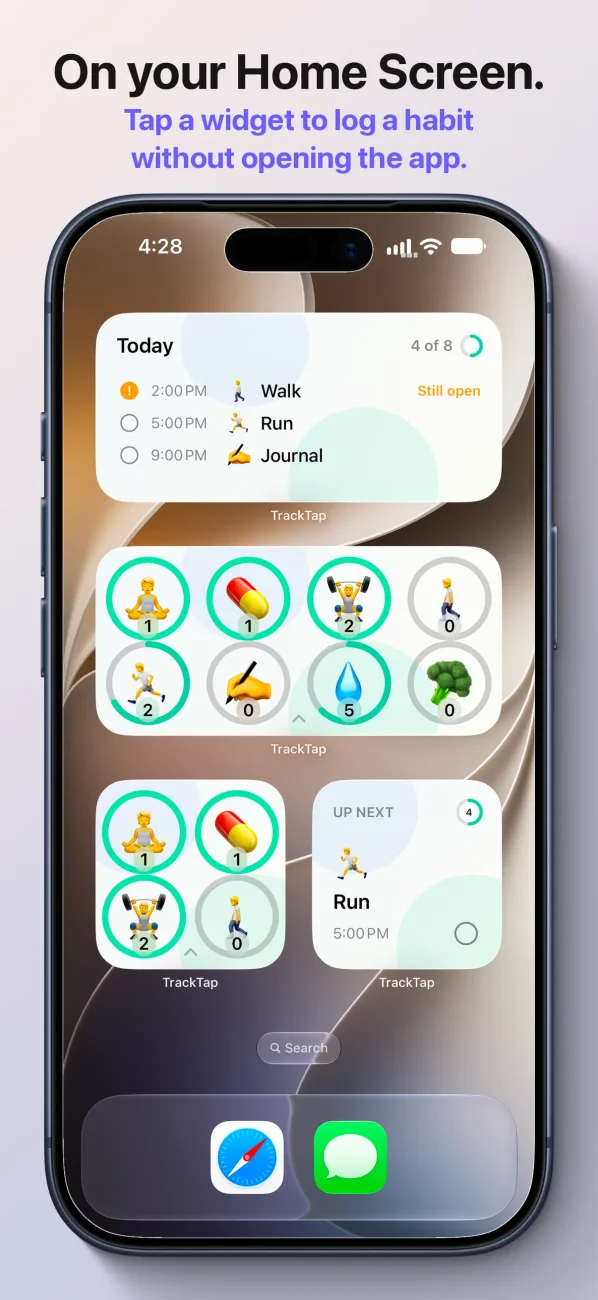
- Up Next widget and watch complication — today's plan on your home screen, lock screen, and watch face (Pro)
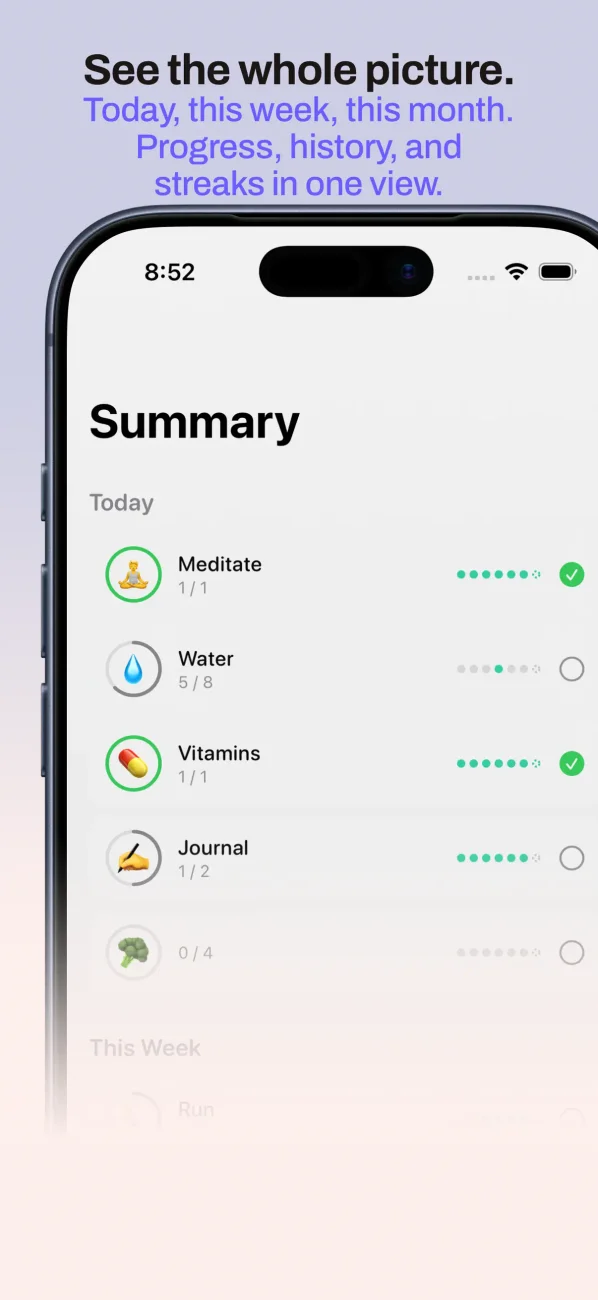
- Summary view — see all your habits at a glance
- Smart notifications — goal reminders, streak milestones, and a weekly summary written from your own habits, on your device
- Apple Health — automatically log workouts as habits
- NFC tags — physical shortcuts for real‑world habits
- Siri and Shortcuts — log habits, check progress, and build powerful automations
- Streaks, goals, and simple insights
- Quick widgets for iPhone (Pro)
- Apple Watch app and complications (Pro)
- Perfect for daily routines, fitness habits, mindfulness, or anything you want to stay consistent with.
Terms of Use: https://www.apple.com/legal/internet-services/itunes/dev/stdeula/
What’s new
Version 1.10 · Nov 22, 2026
Skip a day, or pause a plan — long-press a plan on Today to skip it for today, or pause it until tomorrow, for a few days, a week or a date you pick. Only that plan's reminders stop, and widgets and your watch leave it out. For "at least" goals by the day, week, month or year, a skipped session comes off that period's goal (never below what the rest of your plan still asks), and a period you skip entirely doesn't break your streak. Do a skipped plan anyway and it counts as done. Skipped plans wait at the bottom of Today with Undo; paused ones show "Paused until" and Resume, which brings the plan back straight away, today included. Plan suggestions don't count skipped days as misses and give a new plan two weeks first.
Streak at risk — a new evening heads-up when a streak still needs a tap before its day or week is up. Switch it off in Settings → Notifications.
Fill in a forgotten tap — "Add at…" on a tracker logs a tap at an earlier time, and tapping a day in its history shows that day's taps to add, edit or delete.
Summary, one tap deeper — tap a tracker to open it, and see how this week compares with the same point last week.
Lock Screen, Control Center and Action button (Pro) — put a tracker's count on your Lock Screen, and on iOS 18 log a tap with a new control. Right after a restart they wait for your first unlock instead of showing an upgrade prompt.
Safer with your data — if TrackTap can't open your history it says so and tries again instead of closing; nothing is deleted. Backups now carry your plans, skipped days and pauses, and restoring doesn't duplicate taps or lose two made in the same second.
Days that agree — with a late reset time, a 1am tap counts toward the same day everywhere, even when the clocks change; plans and reminders keep their time then too. Streaks go past 90 days.
Faster taps — tiles and the watch react the moment you touch them.
Reminders that behave — turning notifications off removes ones already scheduled. Reminders and milestones don't repeat or get cancelled by your next tap; one tap clears one dose's reminder; goal nudges stop once the goal is met, stay quiet overnight and follow your week start. New trackers get nudges and the weekly summary without a hidden switch, restored or Health history doesn't announce old streaks, and the weekly recap catches up after you log.
Everything in step — changing a plan, editing a tap or restoring a backup updates widgets, watch and reminders right away. iPhone widget taps reach the watch. Widgets reset with your day, tick rolling counts down one at a time, never log a plan twice, stop logging once Pro ends, and ask you to open the app rather than say "All done!" when they can't read your plans.
Apple Watch — a tap made away from your iPhone keeps its time and shows "Saved — syncs with iPhone"; no tap is recorded twice, and a quick second complication tap isn't lost. The watch turns over to the new day on its own, asks you to sync when over a day behind, its complication says "Choose an item" for a deleted tracker, and it says "Connecting to iPhone" rather than asking a Pro user to upgrade.
Plans and Health — suggestions read multi-dose plans dose by dose, aren't blocked by a plan you never do, and remember what you declined; turning a plan off no longer sets a goal of zero, and the goal follows when you delete a plan or drop days. Workouts deleted in Health disappear here, one you removed stays removed, and none import twice — a workout an earlier version imported more than once is cleaned up to a single entry.
Small things — tracker details open quickly, and a new tracker's averages cover only its own days; the emoji field never saves blank; sharing shows progress; history rows swipe to Edit or Delete, and deleting asks first; a passed plan says "Still open", not "Missed"; Summary is quicker, turns over to the new day while open, and adds "This Year", an empty state and a place for trackers without goals.
App privacy
What obycode, LLC declares on the App Store about how this app handles data.
-
Data not collected
The developer does not collect any data from this app.
Privacy practices may vary, for example with the features you use or your age.
Information
- Seller
- obycode, LLC
- Category
- Health & Fitness
- Version
- 1.10
- Updated
- Nov 22, 2026
- Released
- Feb 26, 2026
- Size
- 8.1 MB
- Requires
- iOS 17.2 or later
- Age rating
- 4+
- Price
- Free
- In-app purchases
- Yes
- Languages
- English
- Copyright
- © obycode, LLC
You might also like
-
 EvenhaleBox Breathing for Calm
-
 Moss: Meditation TimerSimple. Still. Nothing extra.
-
 Respirare: Box BreathingGuided Breathwork & Meditation
-
 Rude Habit TrackerHabits with tough love
-
 Heart SitHeart rate meditation, real
-
 Just Breathe.Breathe for a better life.
-
 Breathe+ for watchBetter mindfulness app
-
 VibeCraft TimerHaptic Timer for Meditation
-
 Active Life PT Home ProgramHealth & Fitness
-
 Fine Tune PilatesHealth & Fitness