Treadmill Assistant
Smart Treadmill Control & Log
Designed for iPhone, iPad, iPod touch
Free · In-app purchases
- Age rating17+
- CategoryHealth & Fitness
- DeveloperKolto Tech Piotr Koszur
- LanguagesEnglish+ 4 more
- Size41.2 MB
Links to the official App Store page
Download.org hosts no file of Treadmill Assistant. The button opens its official App Store page, published by Kolto Tech Piotr Koszur. Listing last checked on Nov 17, 2026.
Screenshots



About
Your treadmill, but smarter. Connect via Bluetooth, control speed and incline from your phone, and see every workout as a chart — all for free, no account required. No ads, no videos, no gimmicks — just you and your workout. Go further with Premium: custom programs, heart rate zones, Live Activity, Apple Health sync, and more.
CONNECT & CONTROL
• Instant Bluetooth pairing — remembers your treadmill for next time
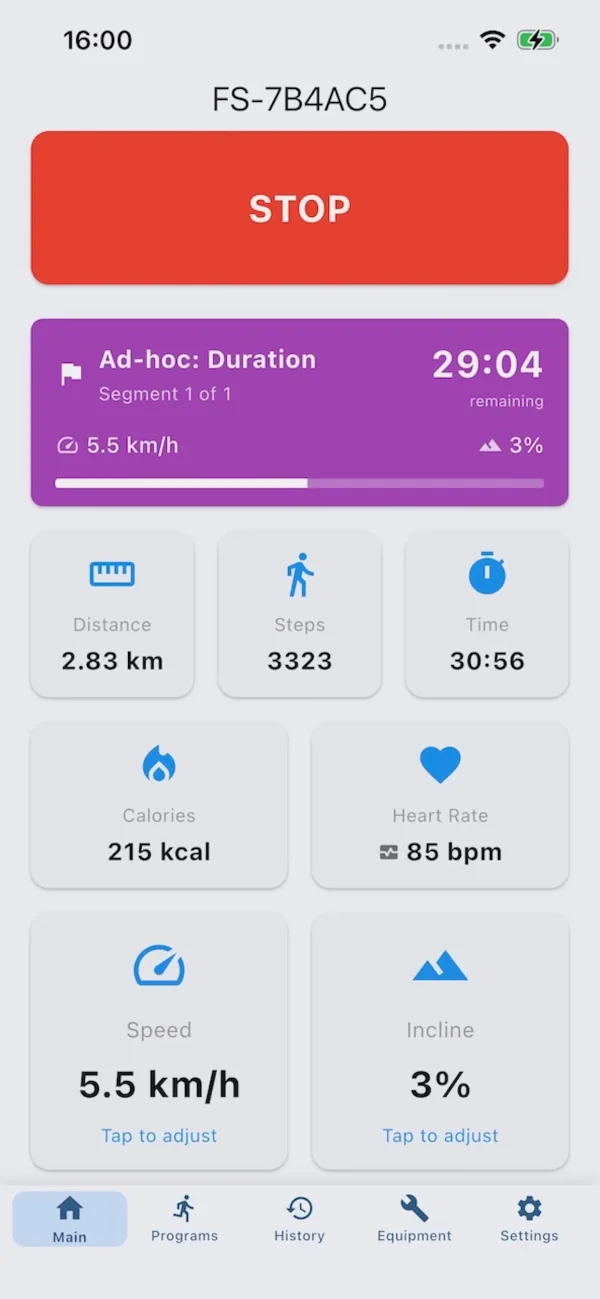
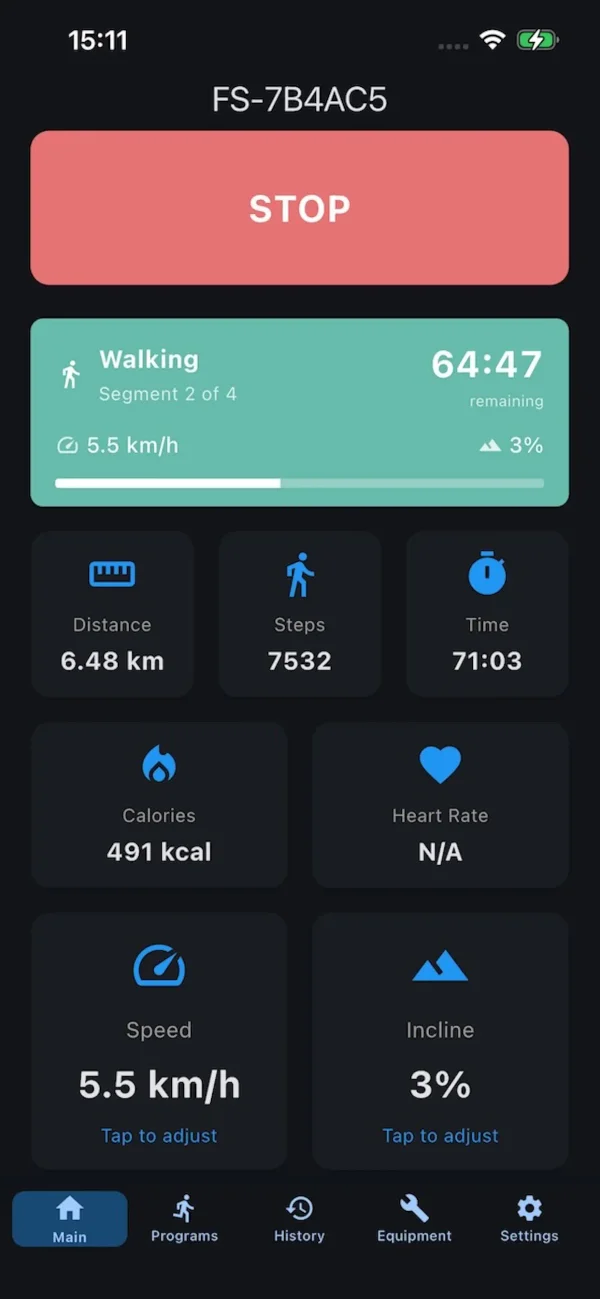
• Adjust speed and incline directly from your phone
• Export and import workouts and programs — share or back up your data
SUPPORTED TREADMILLS
• Built for FitShow.
• FTMS-compatible treadmills are supported, but FTMS implementations vary by manufacturer. Some allow full control (speed, incline, start, stop) and rich data; some allow data only, with no control over the belt; some restrict third-party apps almost entirely. FTMS itself doesn't relay every metric — steps, for example, aren't part of it. We can't guarantee every FTMS treadmill will work — support depends entirely on what the manufacturer permits over Bluetooth.
• Live compatibility list before you buy: https://treadmill-assistant.com/docs/compatibility/
• Treadmill not on the list? Get in touch via email or Discord (links on https://treadmill-assistant.com) for guidance on adding support, where possible.
TRACK EVERY WORKOUT
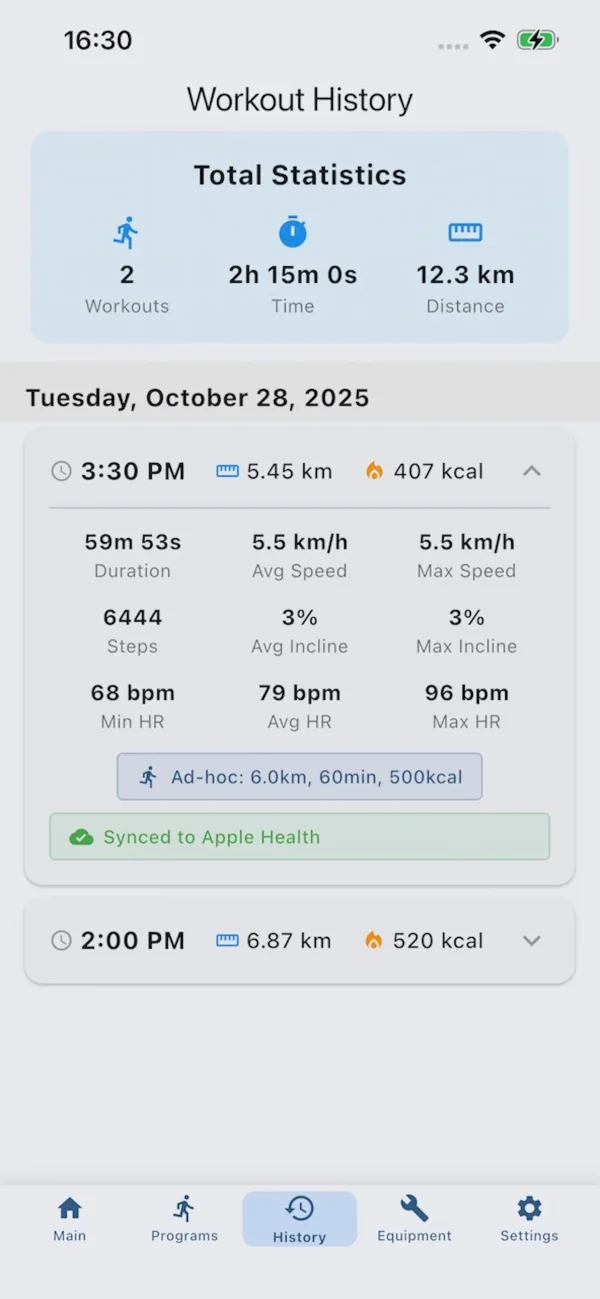
• Real-time stats: speed, distance, time, calories, steps, heart rate
• Workout charts — see your heart rate, speed, and incline across the whole run, with touch scrubbing in landscape
• Automatic workout recording and history
• Heart rate monitoring from treadmill grip sensors
• Static incline for flat treadmills and walking pads
• Metric and imperial units — incl. body weight & height
LANGUAGES
• English
• French
• Polish
• German (machine-translated)
• Spanish (machine-translated)
PREMIUM — 14-DAY FREE TRIAL
Take your workouts further. Try everything free for two weeks.
CUSTOM PROGRAMS
• Build multi-segment workouts with speed and incline per phase
• Segments by duration or distance — your choice
• Automatic transitions — the treadmill adjusts for you
• Pause and resume mid-workout without losing progress
AD-HOC TARGETS
• Set a distance, time, or calorie goal and go
• Auto-stop when you hit your target
LIVE ACTIVITY & DYNAMIC ISLAND
• Track your workout from the lock screen
• Real-time speed, distance, and time in the Dynamic Island
HEART RATE ZONES
• Connect any Bluetooth heart rate monitor (chest strap, armband)
• See your current zone in real time during workouts
• Review time spent in each zone in your workout summary
• 5 zones from Recovery to Maximum, calculated from your age
APPLE HEALTH & iCLOUD
• Auto-sync workouts to Apple Health
• Back up everything to iCloud — workouts, programs, settings
EQUIPMENT TRACKING
• Track belt lubrication, belt replacement, and shoe mileage
• Warnings when maintenance is due
COMPANION TOOLS
• Web program editor — build, edit, and share programs in your browser, no account required: https://treadmill-assistant.com/editor.html
PRIVACY FIRST
Your data stays on your device. No accounts, no analytics, no ads. Optional iCloud sync uses your personal iCloud storage — we never see your data.
DEVICE SUPPORT
• Optimized for iPhone
• iPad supported
REQUIREMENTS
• FitShow or FTMS-compatible treadmill
• iPhone or iPad with Bluetooth
• iOS/iPadOS 15.0 or later
SUBSCRIPTION TERMS
Payment is charged to your Apple ID account at confirmation of purchase. Subscription automatically renews unless turned off at least 24 hours before the end of the current period. Manage and cancel subscriptions in your Apple ID account settings.
Terms of Use: https://treadmill-assistant.com/terms.html
Privacy Policy: https://treadmill-assistant.com/privacy.html
This app is not affiliated with or endorsed by any treadmill brand or manufacturer. Treadmill control is off by default — enable it in settings. Always stop immediately if something seems wrong.
Questions or feedback? We'd love to hear from you!
What’s new
Version 2026.11.01 · Nov 11, 2026
• Guided programs now work on treadmills the app can't control. Pick a program and tap START: the app waits for you to reach the first segment's speed and incline, then shows what to set on the treadmill panel at each segment, keeps time and records the workout. The warm-up before the first segment is left out of the saved workout.
• New Max speed and Max incline settings (Settings → Treadmill Control), per treadmill, for treadmills that don't report their own range. They replace the old 30 km/h "Override speed limit" switch.
• Treadmills that report incline but don't accept incline commands now show the Incline tile, with incline read-only in Settings.
• FitShow treadmills: at each segment change the app checks that both speed and incline were applied and re-sends one the treadmill missed. It never overrides a change you made on the panel.
• A Bluetooth drop in the middle of a run now saves the workout instead of discarding it, and the totals stay on screen under "Finalizing…" until the save completes.
• Stopping the belt on the treadmill panel during a program now ends and saves the workout.
• Settings lists every treadmill you've connected to; swipe to remove one, or delete them all.
• Fixed workouts being saved to Apple Health when you reopened the app with Auto-save Workouts switched off. You can still sync them manually from History or Settings.
• iPhone Duo: first layout adjustments so the app works better on the folded screen, ahead of a bigger visual overhaul.
• Larger Text and Bold Text: History stat tiles reflow, the heart-rate zone legend no longer clips, and dialogs scroll instead of overflowing.
• FIT export: time after a program finishes gets its own lap.
• Debug logging now records every session, so if something goes wrong you can export the log afterwards. Logs delete themselves after the next launch.
• Plus fixes for program starts and restarts on a running belt, and heart-rate monitors that report 0 bpm.
App privacy
What Kolto Tech Piotr Koszur declares on the App Store about how this app handles data.
-
Data not collected
The developer does not collect any data from this app.
Privacy practices may vary, for example with the features you use or your age.
Information
- Seller
- Kolto Tech Piotr Koszur
- Category
- Health & Fitness
- Version
- 2026.11.01
- Updated
- Nov 11, 2026
- Released
- Feb 20, 2026
- Size
- 41.2 MB
- Requires
- iOS 15.0 or later
- Age rating
- 17+
- Price
- Free
- In-app purchases
- Yes
- Languages
- English, French, German, Polish, Spanish
- Copyright
- © 2025 Kolto Tech
You might also like
-
 Treadmill Pro: Walking PadRemote & Heart Rate Zones
-
 InclineFlowTreadmill Workout Tracker
-
 Klemy: Treadmill WorkoutsVirtual treadmill, walking pad
-
 PowerTread: Treadmill TrainingConquer Any Course Indoors
-
 Thrivify Connect: FTMS PairBluetooth Fitness FTMS Sync
-
 KS LiteHealth & Fitness
-
 Treadmill Buddy: Run & WalkScenic routes & training plans
-
 Treadmill Workouts: CoachRunning Plans & Audio Cues
-
 WalkingPad+Health & Fitness
-
 GymTrakrHealth & Fitness