
TurnClock – Game Timer
Voice countdowns for turns
Designed for iPhone, iPad, iPod touch
Free · In-app purchases
- Age rating4+
- CategoryBoard
- DeveloperHoot Hall LLC
- LanguagesEnglish
- Size55.6 MB
Links to the official App Store page
Download.org hosts no file of TurnClock – Game Timer. The button opens its official App Store page, published by Hoot Hall LLC. Listing last checked on Nov 18, 2026.
Screenshots



About
[Feel the Countdown. Enjoy the Game.]
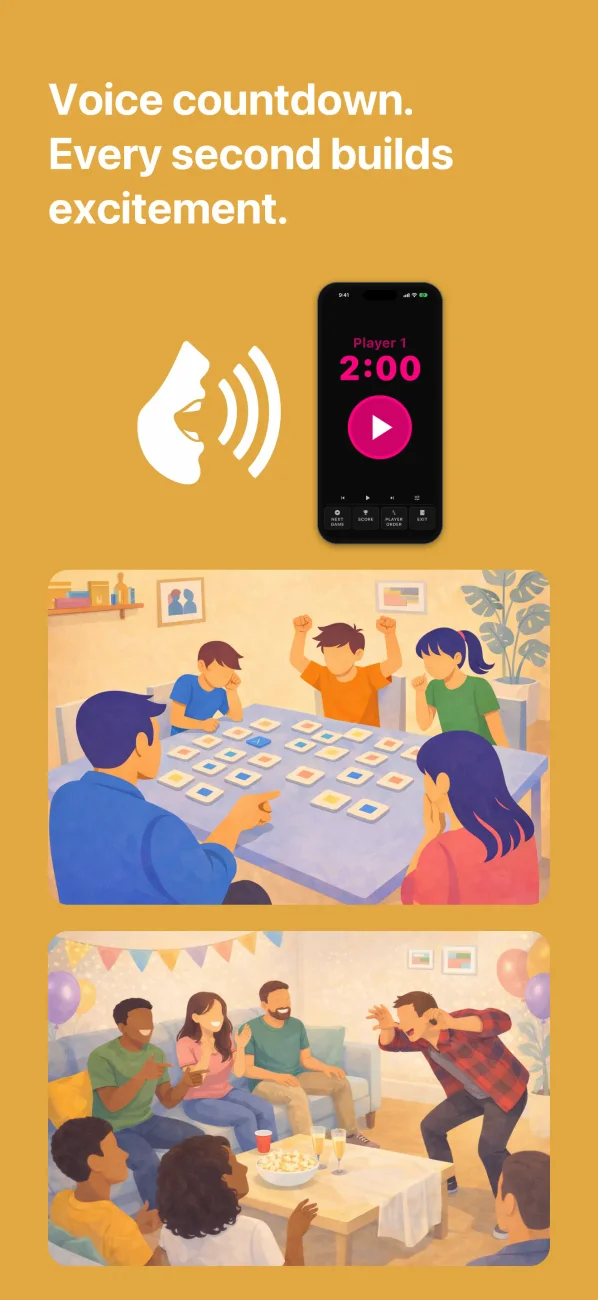
TurnClock is a simple mobile app that adds excitement to tabletop and party games with voice countdowns, making every turn clear, fast, and fun.
The countdown isn’t just a rule.
It becomes part of the game.
Clear visuals and optional voice alerts create tension and rhythm, helping games move smoothly while keeping everyone engaged.
• No complicated setup
• No interruptions
• No ads, even on the free plan
[What is TurnClock?]
TurnClock enhances turn-based games by adding timing, rhythm, and excitement.
• Voice and sound countdowns
• Clear visuals visible from across the table
• Designed to support gameplay, not control it
Players can focus on the game instead of watching the clock.
[Key Features]
Turn-Based Game Timer
• Set a turn time that fits your game’s pace
• Move to the next turn with a single tap
• Keeps games flowing without confusion
Voice and Sound Countdowns
• Audio cues and voice alerts signal remaining time
• Play without constantly watching the screen
• Builds excitement as time runs out
Multi-Direction Display
• 1-way, 2-way, and 4-way display modes
• Everyone around the table can see the timer clearly
• Ideal for group and family play
Grace Mode or Hard Stop
• Grace Mode lets the timer count up after zero
• Hard Stop ends the turn immediately at zero
• Choose what best fits your game style
Completely Ad-Free
• No ads for free users
• No interruptions during gameplay
• Designed to protect the flow of game time
[Designed for Everyone]
TurnClock is built with simplicity first.
• Large buttons and clear layouts
• Generous tap areas
• Minimal text and visual noise
• Easy to understand at a glance
Even kids can start using it immediately, no instructions needed.
[Perfect for These Games]
Board Games
• Rummikub
• Scrabble
• Catan
• Other turn-based tabletop games
Party and Gesture Games
• Charades
• Word and gesture games
• Family party games
Strategy Games
• Chess
• Shogi
• Go
• Timed or fast-paced variants
If your game has turns, TurnClock fits right in.
[How It Works]
• Choose the number of players
• Pick a display mode that fits your table
• Set the turn timer
• Choose Grace Mode or Hard Stop
• Tap to move from one player to the next
Everything is designed to be visible and understandable from across the table.
[Upgrade to Premium]
TurnClock Premium lets you personalize the experience and enjoy even more features.
• More sound and voice options
• Theme color customization
• Player names instead of numbers
• Game history and records
• Simple leaderboards to track results over time
Great for families, regular game groups, and party hosts.
Pricing may vary by region. Please check the upgrade page in the app for the latest pricing in your local currency.
Payment will be charged to your Apple ID account upon confirmation of purchase.
By upgrading to Premium, you agree to Apple’s End User License Agreement (EULA), as well as Sports Clock Manager’s Terms of Service and Privacy Policy.
Terms of Use (EULA):
https://www.apple.com/legal/internet-services/itunes/dev/stdeula/
Terms of Service:
https://hoothall.com/turnclock/terms/
Privacy Policy:
https://hoothall.com/turnclock/privacy/
What’s new
Version 1.0.3 · Oct 30, 2026
• Landscape support: TurnClock now adapts to portrait and landscape on iPhone, iPhone Duo and iPad.
• Bigger, clearer clocks that resize to fit any screen in 1-way, 2-way and 4-way modes.
• The settings screen uses two columns on wide screens.
• Updated in-app purchase library and stability improvements.
App privacy
What Hoot Hall LLC declares on the App Store about how this app handles data.
-
Data linked to you
May be collected and linked to your identity.
- Purchases
- Identifiers
Privacy practices may vary, for example with the features you use or your age.
Information
- Seller
- Hoot Hall LLC
- Category
- Board
- Version
- 1.0.3
- Updated
- Oct 30, 2026
- Released
- Feb 26, 2026
- Size
- 55.6 MB
- Requires
- iOS 15.0 or later
- Age rating
- 4+
- Price
- Free
- In-app purchases
- Yes
- Languages
- English
- Copyright
- © 2026 HootHall LLC
You might also like
-
 WitsAgoraThe debate party game
-
 500 Rummy Score BoardEasy 500 Rummy Scoring
-
 Scorekeeper for SkyjoA simple Skyjo score tracker
-
 Dexor - MTG managerCard scanner & deck tracker
-
 Don't Tap That Red Button!Fast Reflex Color Button Game
-
 じゃんけん大会 in もぐらんどFamily
-
 Stars and GhostsFly through the Halloween sky!
-
 Set The Clock GameCan you set the clock?
-
 3,2,1 Launch!Mission: Go For Launch
-
 チーズは誰が食べた?司会用音声Games