
Unwritten Journal
A calm place to write daily
Designed for iPhone, iPad, Mac
Free · In-app purchases
- Age rating4+
- CategoryLifestyle
- DeveloperSmond AB
- LanguagesEnglish+ 1 more
- Size2.2 MB
Links to the official App Store page
Download.org hosts no file of Unwritten Journal. The button opens its official App Store page, published by Smond AB. Listing last checked on Nov 23, 2026.
Screenshots




About
Unwritten is a quiet place to write every day.
No feeds, no streaks to protect, no noise. Just a blank page, a gentle daily goal, and a calendar that slowly fills with everything you've written.
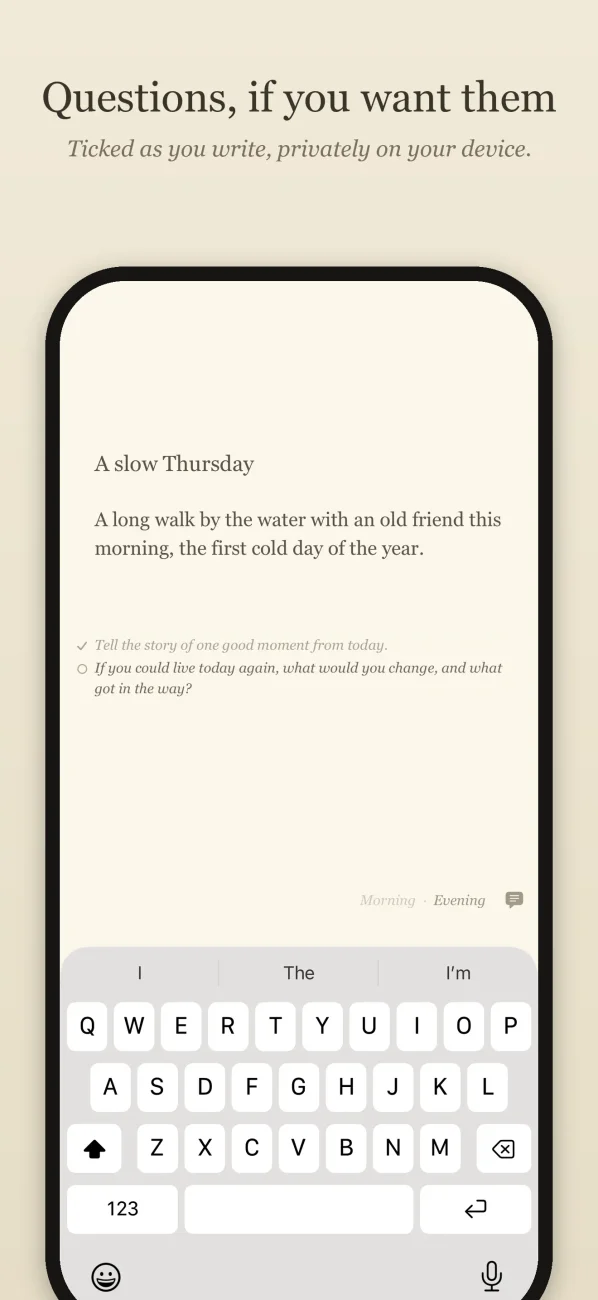
QUESTIONS, IF YOU WANT THEM
New in Unwritten Pro, on devices with Apple Intelligence: a journal can follow a five-minute morning and evening, a Stoic review, a daily reflection or your own questions. They stay out of your text until you ask for them, then appear quietly below the cursor. Each is ticked once your writing has answered it, or tap the circle to tick it yourself. Your writing is read only by Apple's on-device model, and nothing leaves your device for it.
A PAGE THAT FEELS LIKE PAPER
Write in a warm, distraction-free editor set in a classic serif, with generous spacing that makes long entries a pleasure to read back. Give an entry a title or simply start writing. Hide the sidebar and start typing, and everything else steps aside until you stop.
A DAILY GOAL, NOT A CHORE
Choose how many pages you want to write each day, from one to five. As you write, each day on the calendar deepens in color, so you can see at a glance which days you showed up and which ones ran long.
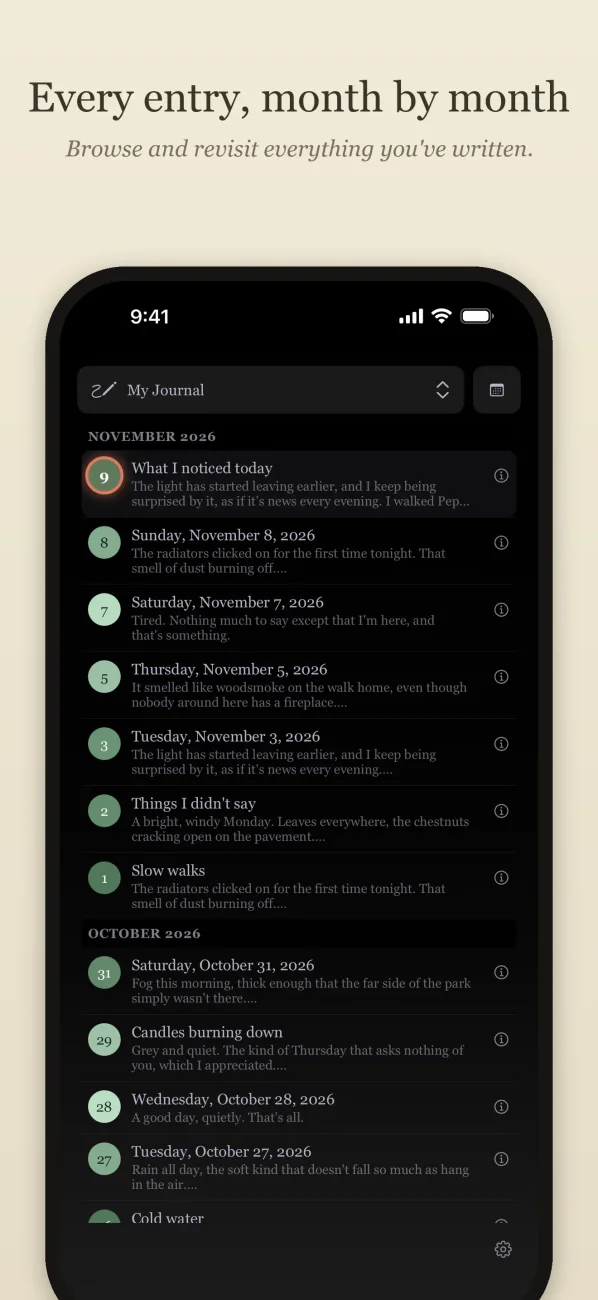
SEE YOUR WRITING OVER TIME
Flip the sidebar from calendar to list to browse every entry by month. Tap the info button on any entry to see its pages, words, paragraphs and reading time, how it measures up against your daily goal, and how it compares with your usual entry.
MORE THAN ONE JOURNAL
Keep separate journals for different parts of your life, each with its own icon and daily goal. Every entry keeps its earlier versions, so you can always bring back a draft.
BRING YOUR PAST WITH YOU
Import entries from your previous journaling app, or from an earlier Unwritten export. Each entry is matched to its date and merged into your journal. Export a single entry or a whole journal whenever you like, as Markdown files organised by year and month, or as a full backup.
MADE FOR THE MAC TOO
Unwritten runs on iPhone, iPad and Mac, and is ready for iPhone Duo: unfold mid-sentence and keep writing. On the Mac, open today's entry from anywhere with a global keyboard shortcut or from the menu bar, move between days with the keyboard, and hold Command to see every shortcut.
PRIVATE BY DESIGN
Your journal is stored on your device, and synced only through your own private iCloud account. Lock it with Face ID, Touch ID or Optic ID. Unwritten collects no data, has no analytics and no tracking, and requires no account.
FREE TO WRITE
Writing, the calendar, history, the lock and export are all free. Unwritten Pro adds iCloud sync between your iPhone, iPad and Mac, and guided prompts, as a one-time purchase or a yearly subscription that renews automatically until cancelled in your Apple Account settings.
Ideas, questions and other writers: r/unwrittenjournal on Reddit.
Terms of Use: https://www.apple.com/legal/internet-services/itunes/dev/stdeula/
Privacy Policy: https://smond.studio/unwritten/privacy
Write a little. Every day.
What’s new
Version 1.1.1 · Nov 19, 2026
Write in the morning, come back in the evening: type -- and press Return, and a quiet ornament divides the page. Same day, same entry, with each sitting in its own section. Guided prompts start fresh in each new section.
Also new:
• On iPhone with a keyboard, ⌃⌘S shows and hides the sidebar, and holding ⌘ lists the shortcuts.
• The page count no longer covers the line you're writing or hides behind the keyboard.
• Fixed text disappearing on iPhone Duo while editing a long entry.
App privacy
What Smond AB declares on the App Store about how this app handles data.
-
Data not collected
The developer does not collect any data from this app.
Privacy practices may vary, for example with the features you use or your age.
Information
- Seller
- Smond AB
- Category
- Lifestyle
- Version
- 1.1.1
- Updated
- Nov 19, 2026
- Released
- Oct 15, 2026
- Size
- 2.2 MB
- Requires
- iOS 18.1 or later
- Age rating
- 4+
- Price
- Free
- In-app purchases
- Yes
- Languages
- English, Swedish
- Copyright
- © 2026 Smond AB
You might also like
-
 LocalInk: Diary & JournalPrivate, offline & encrypted
-
 One Question a Day JournalDaily Prompts, Diary & Memoir
-
 Bullet HabitsYour habits, in a ring
-
 QuietPage: Private JournalJournal that stays on device
-
 Nottee - Jot & Get RemindedJot it down. Get reminded.
-
 Today. — Interstitial JournalPrivate journal, on-device AI
-
 Echoes: A Journal for LifeTrack Your Journey Named Life
-
 itsWritten: AI JournalPrivate diary & reflection
-
 Luna JourneyPrivate AI Journal & Insights
-
 Anchor: Daily JournalReflect. Remember. Grow.