
- Age rating4+
- CategoryPhoto & Video
- DeveloperGood To Hear
- LanguagesEnglish
- Size60.6 MB
Links to the official App Store page
Download.org hosts no file of Video Pencil. The button opens its official App Store page, published by Good To Hear. Listing last checked on Nov 25, 2026.
Screenshots




About
Make it obvious. Draw it.
Draw over any video or your camera, pause where it matters and record what you mean, right on your iPad.
MAKING VIDEOS
Tutorials, reviews and walkthroughs, with your drawings and your voice together. No editing.
COACHING
Break down match footage and share it with the team. Put it on the TV at training, at half-time or in the team meeting, and show the whole squad what happened, and what should have.
TEACHING
Walk through a diagram, a worked example or an experiment, step by step.
NEW: THE SOCCER TOOLKIT
Made with coaches, from professional clubs to youth and grassroots teams.
• Tap a player to number them. Press play and the number follows them.
• Drag out the space a player is running into.
• Link two defenders with a line that tracks them as the play continues.
• Arrows for passes, runs and the path of the ball.
An in-app subscription.
TAKE PEOPLE THROUGH A VIDEO
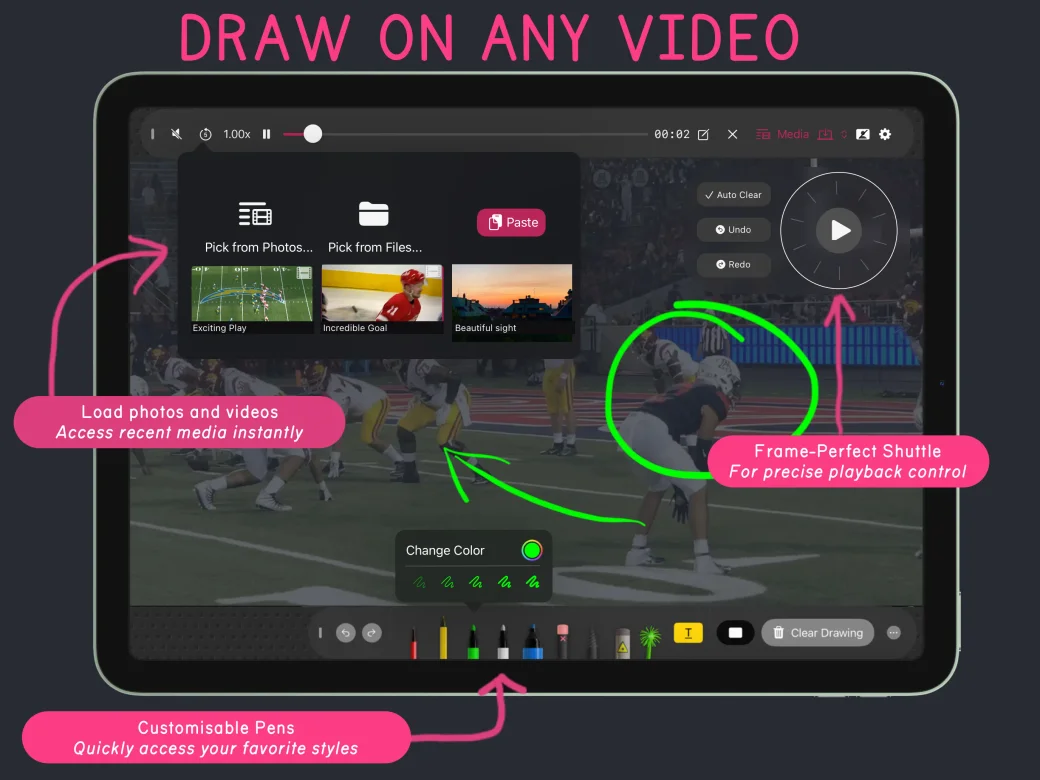
Load any video from your library, play or pause, and scrub to the perfect moment. Then just start drawing. Or switch to your iPad's camera, or a USB camera, and draw over it live.
Record your drawings and your voice as a finished video, or as a transparent drawing layer to put over your own footage.
DRAWING TOOLS CURATED FOR VIDEO
Every tool is chosen to stand out clearly on top of moving pictures. Set up your favourite pens and colours so they're always one tap away. Every line responds to Apple Pencil's tilt and pressure.
ACTION REPLAY
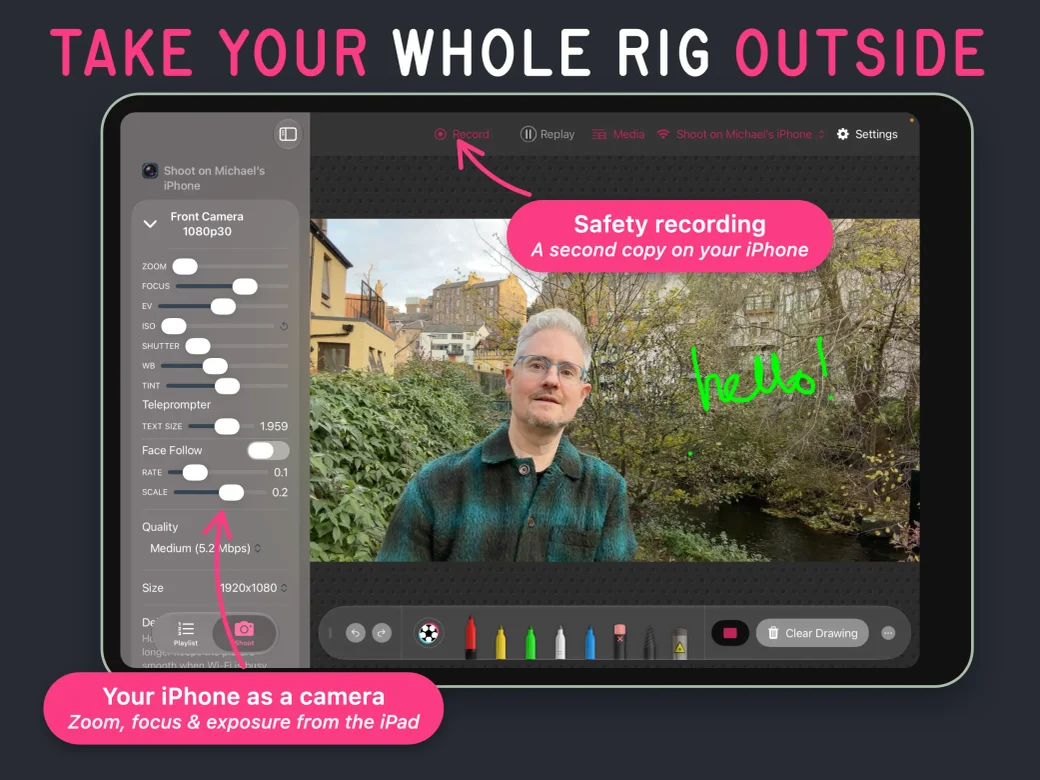
Pause and rewind any live camera: your iPad's own camera, a USB camera or an NDI feed. Jog the Shuttle Wheel back to the moment and draw on it frame by frame, while the live feed keeps playing picture-in-picture. Save the best moments as clips.
LIVE TITLES
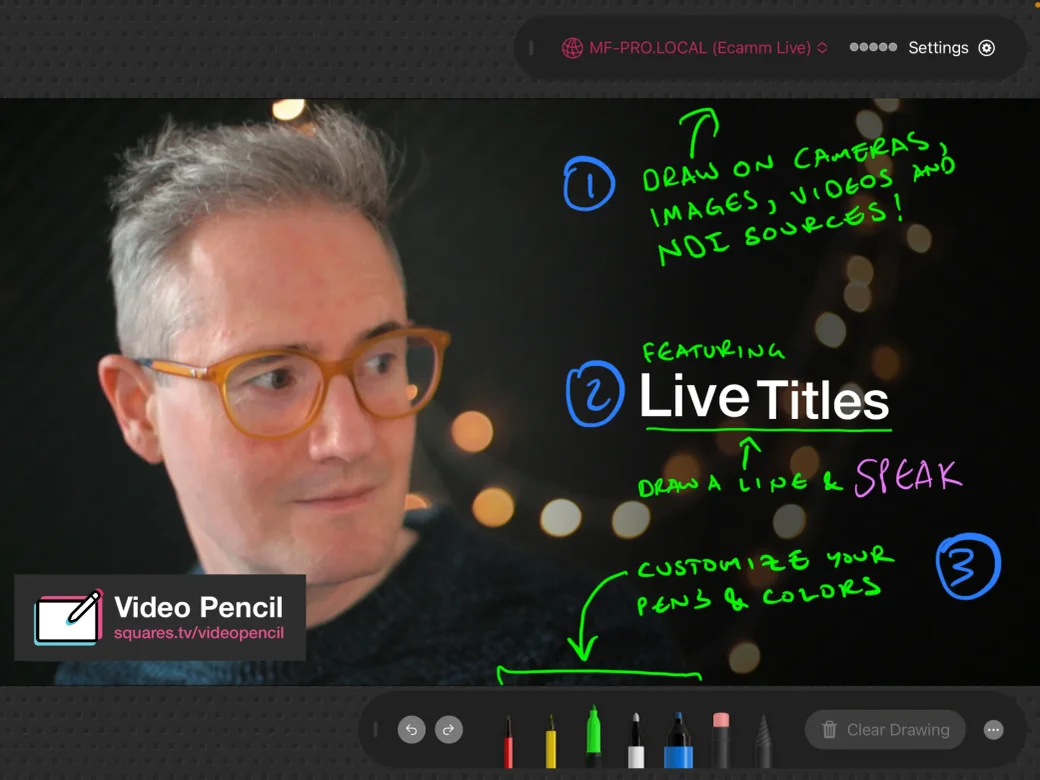
Draw a line, say what you want it to say, and your text appears, sized to fit your line.
ON THE BIG SCREEN
Put your iPad on a TV or projector with Apple TV, AirPlay or an HDMI adapter. The big screen shows only the footage and your drawings; the toolbar stays on your iPad.
YOUR OWN BRANDING
Make it look like your club, school or business on every screen.
DRAW LIVE IN YOUR CALLS AND STREAMS
Video Pencil connects to your Mac or PC for Zoom, Teams, Google Meet, OBS, Ecamm Live and mimoLive. With CueCam Presenter on your Mac, you draw on your iPad and everyone sees it over you, live. Video Pencil also connects over HDMI, AirPlay and USB, and sends and receives NDI, including a transparent NDI feed for Ecamm Live, OBS, mimoLive or your switcher.
PART OF THE CUECAM SUITE
Video Pencil works on its own, and pairs with CueCam Presenter for Mac and Shoot for iOS. A CueCam subscription includes Video Pencil's core features.
FREE TO DOWNLOAD
One-off upgrades are yours for life: remove the watermark, add Action Replay, or get Lifetime Updates for every current and future feature that isn't a subscription.
“Best app out there for film day for coaching that isn't $600. Love it!” Coachfro25
“I cannot emphasise how amazing this app is. It's one that I use every day on my tutorials, client calls, and live streams.” Neil Farrimond, Creator Café
“This has been my favorite tool (besides ecamm of course) of 2026! Proudly endorsed by the ecamm team!” Jill, Ecamm Facebook Community
“I use Video Pencil connected via HDMI to a TV in the classroom for live game film review and I use the recording feature to create clips for the team or specific players. I could not do what I do without Video Pencil.” Echevarria Family
Made by a single developer, working in public. Tell me what to build next at videopencil.com.
NDI® is a registered trademark of Vizrt NDI AB. https://ndi.video
What’s new
Version 3.0.2 · Nov 24, 2026
New Features
- Videos and pictures you open from Files stay where they are: Recent keeps a link to them, not a copy, and downloads one from iCloud when you open it
- Adding a clip with chapters or pauses to a playlist offers to split it into a card for each part
- Press and hold a thumbnail in Recent for Info or Delete; Select… deletes several at once
- Pick from Photos in Add Media takes several photos and videos at once
- Connection Settings for CueCam in the camera menu, with more options to smooth its picture on busy networks; it tells you when the picture keeps pausing
Improvements
- Recent opens straight away and shows each video's length
- A clip's Info is clearer, and the top bar's Edit is now Info
- Creating playlists is smoother
- CueCam's picture in Video Pencil is smoother
- More options to smooth Shoot's picture on busy networks
- Notes on a side of the screen run its full height, so more of them show
Soccer Toolkit
- Player tracking is now 140% faster, starts where you are in a match, and follows you when you skip ahead
- Don't Track This Clip, and Track players in a clip's Info to turn it back on
- Player tracking no longer blocks the video
Bug Fixes
- Adding several photos with no playlist open no longer closes Video Pencil: they all go into one new playlist
- The app icon looks right on iPadOS 26 again
App privacy
What Good To Hear declares on the App Store about how this app handles data.
-
Data linked to you
May be collected and linked to your identity.
- Purchases
- Location
- Identifiers
- Usage data
- Diagnostics
- Other data
Privacy practices may vary, for example with the features you use or your age.
Information
- Seller
- Good To Hear Ltd
- Category
- Photo & Video
- Version
- 3.0.2
- Updated
- Nov 24, 2026
- Released
- Nov 20, 2022
- Size
- 60.6 MB
- Requires
- iOS 17.6 or later
- Age rating
- 4+
- Price
- Free
- In-app purchases
- Yes
- Languages
- English
- Copyright
- © Michael Forrest / Good To Hear Ltd
You might also like
-
 MovieMarkupMovie annotation made easy
-
 NDI Capture: Screen SharingSend your screen to any device
-
 NDI PlayerWith Screen Mirroring & Markup
-
 NDI Screen CaptureFull or Partial Screen Capture
-
 Coach Play - Sports VideoTracking player Annotate video
-
 NDI Monitor ProMonitor, Record, Scopes, PTZ
-
 NDI MultiviewMonitor PTZ Record VideoScope
-
 Video AnnotationAnnotate and Mark Up Videos
-
 TopDirector (NDI,SRT,UVC,RTSP)Multicam Switcher, Live Stream
-
 VxioNDI Monitor