
- Age rating4+
- CategorySports
- DeveloperDotNetIdeas LLC
- LanguagesEnglish
- Size48.6 MB
Links to the official App Store page
Download.org hosts no file of VideoScribbler. The button opens its official App Store page, published by DotNetIdeas LLC. Listing last checked on Nov 12, 2026.
Screenshots

About
Draw on the frame. Then ask the person who can answer.
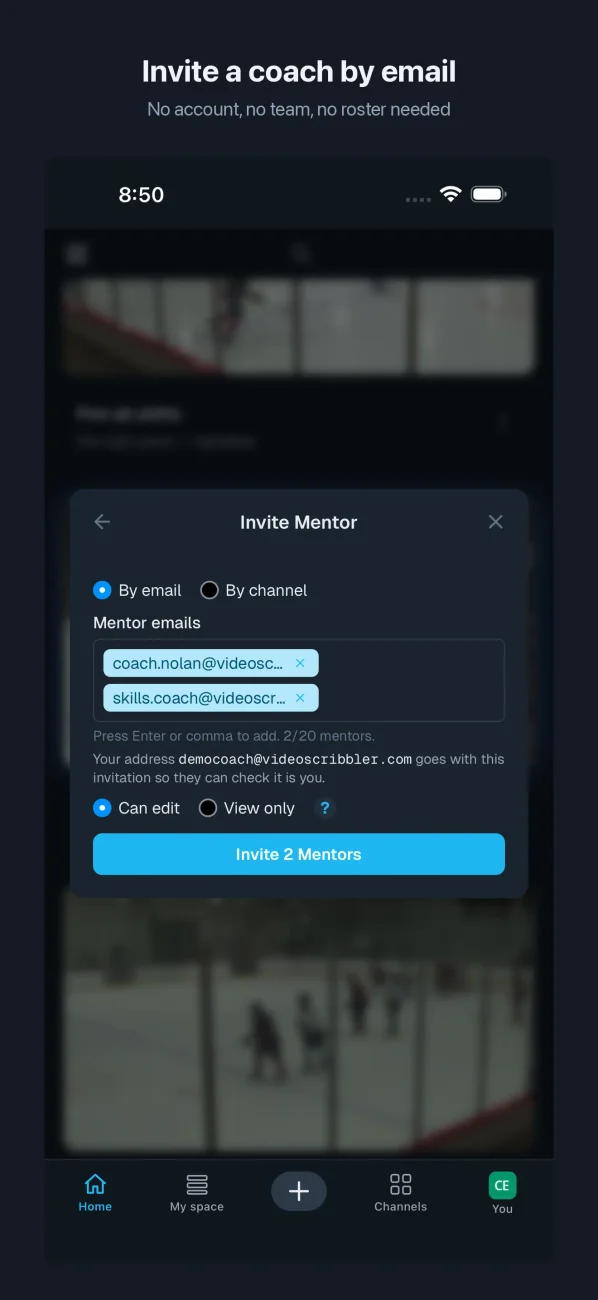
One question? Type an email address — that is the whole invitation. No account needed, and the link opens on your exact frame with the comment already highlighted.
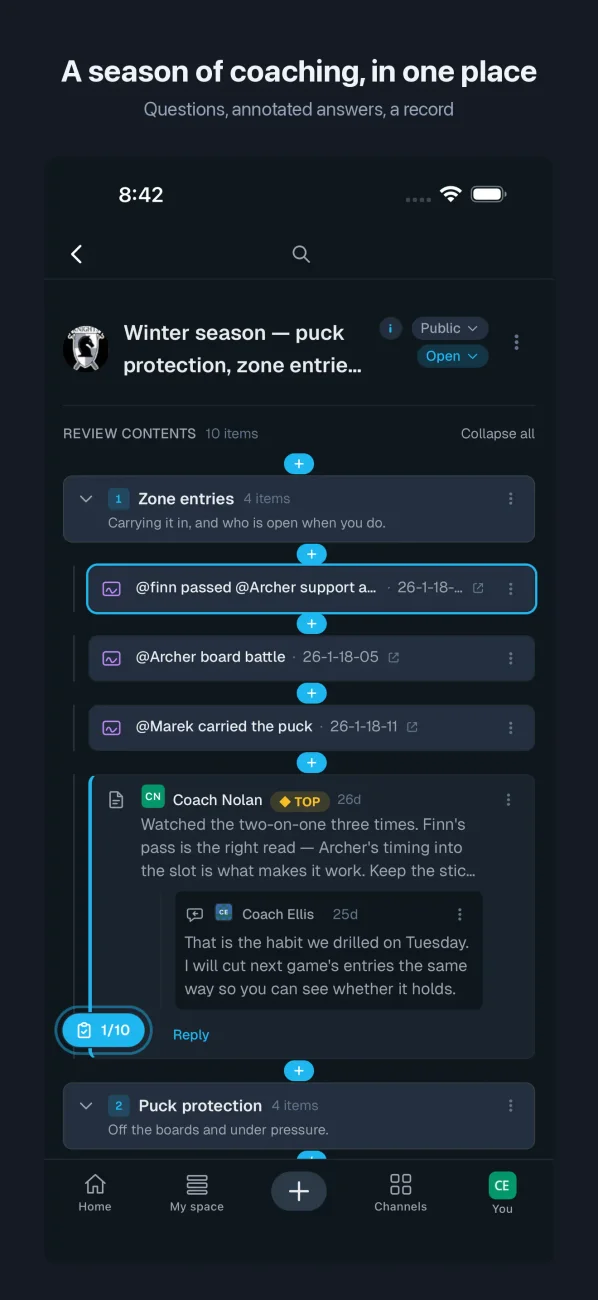
A season of questions? Open a formal review: asked as they come up, answered with annotated clips, gathered in one thread instead of a year of comments.
Everyone can draw on a video. What is hard is getting a coach involved — and keeping their answer attached to the moment it was about. That is what VideoScribbler is for.
TWO WAYS TO BRING A COACH IN
Invite a mentor — one thing, one question.
They do not need an account, and they do not need to be on your team — so you can be coached by someone from another club, a former teammate, or an expert you found last week. They open your link looking at what you were looking at — no scrubbing, no "around 4:12". Let them read along, or let them draw and reply.
Start a formal review — many videos, a stretch of time.
A review is a Q&A thread that spans a tournament, an event, a whole season. Reviewers answer inline with annotated clips. The goals you set in September are still gathered in one place in the spring, instead of scattered across a year of comments.
Request a review from a channel's reviewers, from one specific person, or from an email address that does not have an account yet. Nominate the reviewers you would prefer. Keep it private, or make it public.
NOTHING TO UPLOAD
VideoScribbler works on the YouTube video itself. Nothing to upload, nothing to transcode, no waiting for a file to process — paste a link and start marking it up.
DRAW ON THE MOMENT, NOT THE VIDEO
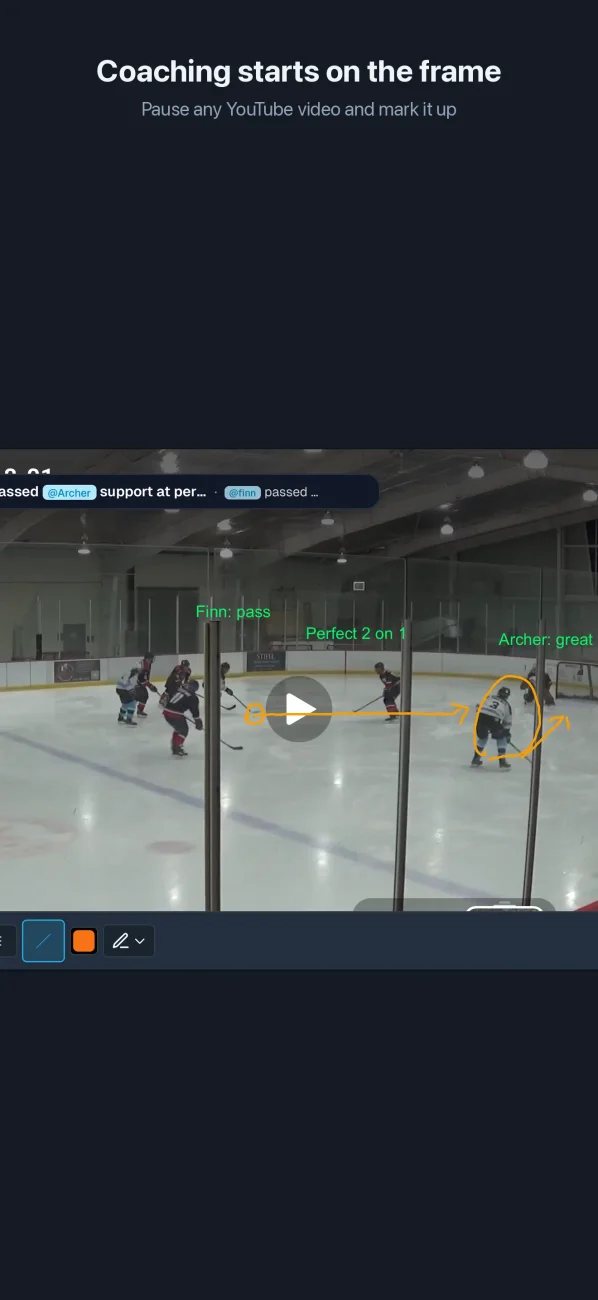
• Pause anywhere and draw — arrows, shapes, freehand, straight on the frame
• Several boards on one frame, one per idea or one per person, so ideas stay separate instead of piling onto the same picture
• A frame pins a moment to a topic, so every reply and drawing lands on what you are looking at
WALK THEM THROUGH IT, IN ORDER
Mark the moments that matter across a game, a set or a lesson, then group them. A replay group plays those frames back in sequence, pausing at each one, so a coach sees the whole argument instead of hunting the timeline for each piece. Choose how long it waits at each stop — or set it to wait until someone continues, and the group becomes a session you run together.
REVIEWERS EARN THEIR STANDING
After a reviewer answers, the person who asked rates them one to five stars. Those ratings accumulate into Trusted and Top standing, shown on channel and profile pages — so you can tell who is worth asking before you ask.
REVIEW AS A TEAM
Channels hold a group's posts, lists and reviewers, with Admin, Editor and Contributor roles. A review can be addressed to a whole channel, and any of its reviewers can pick it up. Invite a whole channel as a mentor in one move, instead of chasing addresses one at a time.
ACCESS, NOT OWNERSHIP
An invitation is access and can be revoked at any time. It never transfers ownership of your post, and a person you invite can pass access on only at or below the level they hold themselves. Private stays private: a private review is visible to the two sides and to anyone deliberately invited to it.
FOR EXAMPLE
A player's season review: open it in September — "How is her skating?" — the coach answers with annotated clips, and by spring it is a full record of the season.
Coaching is wider than sport, and so is this. The same shape fits a music lesson, a lecture, a film class, a golf swing, a debate round, or a code walkthrough. If you have ever typed "at 4:12, watch his stick" and wished the coach could just see it, this is that.
You bring the coach — VideoScribbler makes bringing them take one email address. Requires a YouTube video to work on. Free to use.
What’s new
Version 9.9.1 · Oct 11, 2026
User interface improvements
App privacy
What DotNetIdeas LLC declares on the App Store about how this app handles data.
-
Data used to track you
May be used to track you across apps and websites owned by other companies.
- Contact info
-
Data not linked to you
May be collected but is not linked to your identity.
- Contact info
Privacy practices may vary, for example with the features you use or your age.
Information
- Seller
- DotNetIdeas LLC
- Category
- Sports
- Version
- 9.9.1
- Updated
- Oct 11, 2026
- Released
- Feb 23, 2021
- Size
- 48.6 MB
- Requires
- iOS 16.0 or later
- Age rating
- 4+
- Price
- Free
- Languages
- English
- Copyright
- © DotnetIdeas
You might also like
-
 UView: AI Sports Video CoachAnalyze, Compare & Improve
-
 Mean CoachVideo Coaching & Form Review
-
 VidTrace: Coach Video AnalysisTag Team Film & Track Players
-
 Coach KAI: Sports PerformanceAI Golf & Tennis Form Analysis
-
 VideoCoach.aiSports
-
 Pinpoint - Video AnalysisSports
-
 IceLog SkatingSkating schedule & progress
-
 TOKTI - Video Analysis AIVideo Analysis & Sports Coach
-
 Enhanced CoachAnnotate your Coaching Videos
-
 Timing Mate TeamsAffordable Timing Gate System.