
Waffle Browser
Multi-Window Grid Browser
Designed for iPhone, iPad
Free · In-app purchases
- Age rating17+
- CategoryProductivity
- DeveloperNicholas Molargik
- LanguagesEnglish+ 3 more
- Size9.2 MB
Links to the official App Store page
Download.org hosts no file of Waffle Browser. The button opens its official App Store page, published by Nicholas Molargik. Listing last checked on Nov 18, 2026.
Screenshots




About
Keep the sites you care about on screen at once: a tidy grid on iPad, two live pages on iPhone.
Tabs make you choose. Waffle doesn't. Put websites next to each other and keep your mail, news, dashboards, and video in view at the same time. No clutter. No app switching. Just a smarter workspace.
NEW: WAFFLE ON iPhone
• Two live pages at once, stacked or side by side
• Drag the divider to give one page more room, or double-tap it to even things out
• Maximize a pane when it's time to focus
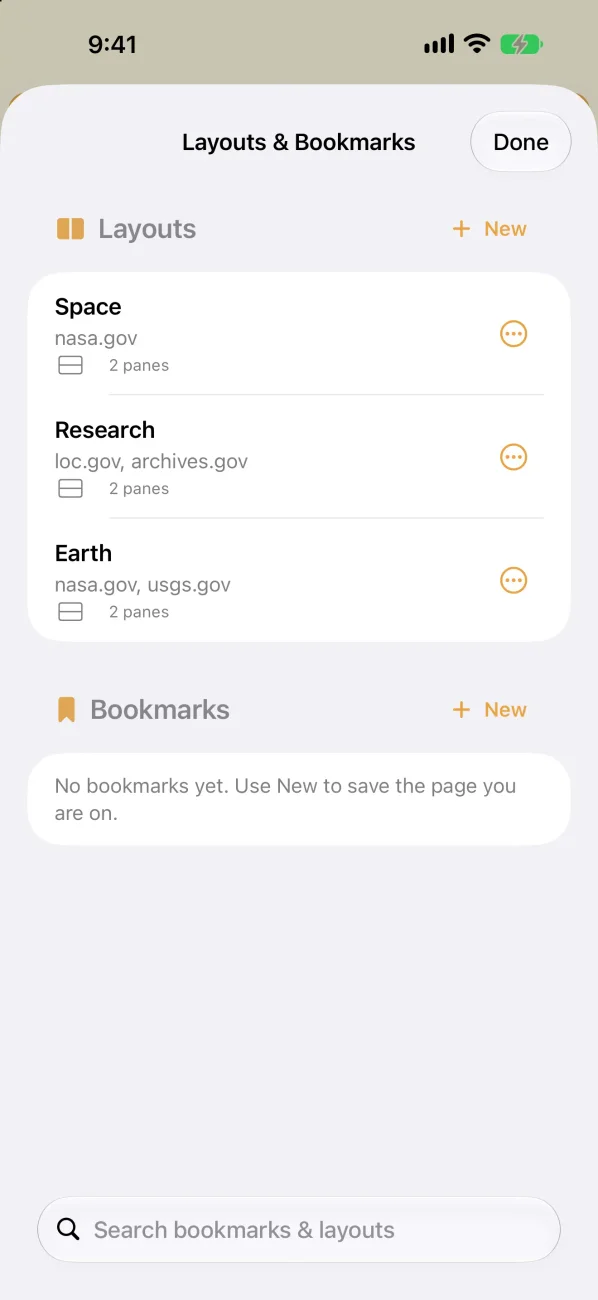
• Save a layout and bring both pages back with one tap
• On iPhone Duo, unfold for up to four panes that stay clear of the fold, and half-fold for Desk Mode (both with Syrup)
ON iPad
• Every cell in the grid is a full browser
• Tap a cell to select it: the address bar, back, forward, and reload control that cell
• Resize your grid with a tap: add or remove rows and columns anytime
• Drag a bookmark from the sidebar onto any cell to open it there
• Full hardware keyboard support with shortcuts for navigation and grid control
• Works with Siri, Shortcuts, and Spotlight
• Hand off the page you're reading to your other devices
ON EVERY DEVICE
• Block ads, trackers, and cookie banners, with a separate setting for each page
• Auto-refresh any page on a timer
• Bookmarks and saved layouts sync with iCloud
• No ads and no account
GO DELUXE WITH SYRUP (one-time purchase, no subscription)
• On iPad: larger grids up to 4×4 (free includes up to 2×2), rearrange cells, pop a cell out into its own window, fullscreen a cell, and save presets
• On iPhone: unlimited saved layouts (free includes one)
• On iPhone Duo: a third and fourth pane on the unfolded display, plus Desk Mode
• One purchase covers iPhone and iPad
• Family Sharing included
PERFECT FOR
• Students juggling research, notes, and lectures
• Traders and analysts watching live data
• Streamers tracking chat, feeds, and tools
• Sports fans following every game at once
• Anyone who wants a tidy, efficient workspace
Waffle is available in English, Spanish, French (Canada), and Japanese.
Try Waffle free, and pour on the Syrup when you're ready.
What’s new
Version 1.7.0 · Nov 14, 2026
Waffle comes to iPhone.
• Two live pages at once, stacked or side by side, with a divider you can drag
• Save a layout and reopen it with one tap. Layouts sync with your iPad over iCloud
• On iPhone Duo: up to four panes on the unfolded display, and Desk Mode when half-folded (with Syrup)
• Content blocking and auto-refresh are free on iPhone, as they are on iPad
One Syrup purchase covers iPhone and iPad.
App privacy
What Nicholas Molargik declares on the App Store about how this app handles data.
-
Data not collected
The developer does not collect any data from this app.
Privacy practices may vary, for example with the features you use or your age.
Information
- Seller
- Molargik Software LLC
- Category
- Productivity
- Version
- 1.7.0
- Updated
- Nov 14, 2026
- Released
- Sep 15, 2025
- Size
- 9.2 MB
- Requires
- iOS 26.0 or later
- Age rating
- 17+
- Price
- Free
- In-app purchases
- Yes
- Languages
- English, French, Japanese, Spanish
- Copyright
- © Molargik Software LLC.
You might also like
-
 Agentic ChatAI Workspace with Agents
-
 Capy HelperAI Assistant
-
 KonjacOn-device speech & translate
-
 Just BrowserCalm, private reading browser
-
 Ktulhu AIFast AI companion for ideas
-
 SaelyxSees, hears and acts with you
-
 Maho NotesBeautiful Markdown note-taking
-
 Focus Pomodoro | TimerBoost your productivity.
-
 Branchnote: Notes & ChecklistsNotepad & journal, organized
-
 Narrow32Browser for slow internet