WinGo Plan: projects & goals
Visual motivating task tracker
Designed for iPhone, iPad
In-app purchases
- Age rating17+
- CategoryProductivity
- DeveloperAlphyn Apps
- LanguagesEnglish+ 9 more
- Size65.5 MB
Links to the official App Store page
Download.org hosts no file of WinGo Plan: projects & goals. The button opens its official App Store page, published by Alphyn Apps. Listing last checked on Nov 27, 2026.
Screenshots
About
WinGo Plan — Visual Project & Goal Tracker
Are simple to-do lists not enough to see the whole picture, but corporate systems too complex? WinGo Plan is made just for you! We combine project management with goal achievement. Our planner helps you not just complete tasks, but focus on what truly moves you forward:
- Track current status, task progress, and goals for every project.
- Focus on what matters most.
- Organise your routine.
- Plan your day and create a schedule based on priorities.
____
With WinGo Plan, you don't just complete tasks – you accomplish what brings you closer to your goals.
____
SIMPLE AND LOGICAL PROJECT STRUCTURE
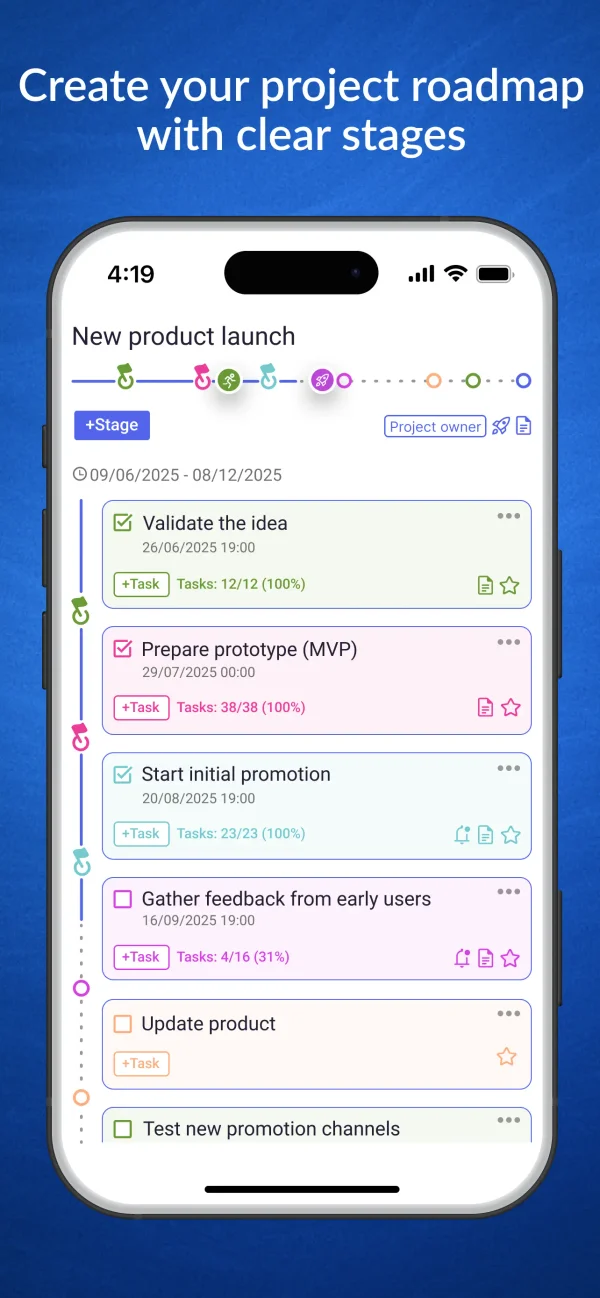
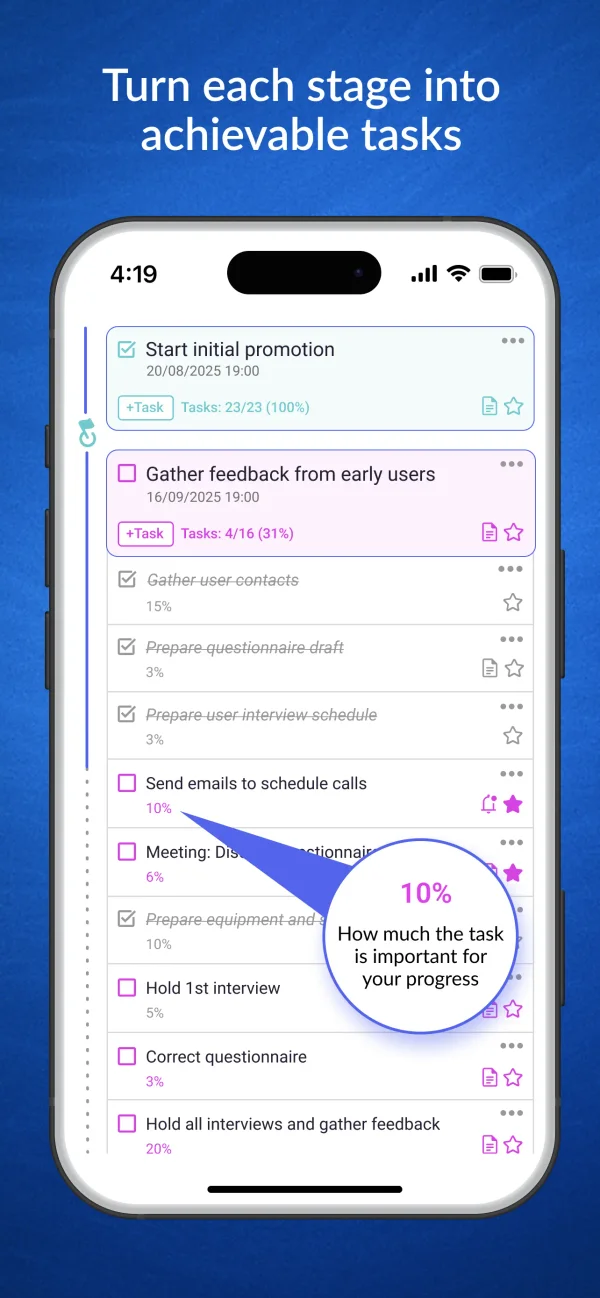
Turn an idea into a project. Break it down into stages, outline tasks, and set deadlines. Add notes, descriptions, document links, images, and reminders – all in one place.
PROJECT PROGRESS: CONNECT TASKS, DEADLINES, AND GOALS
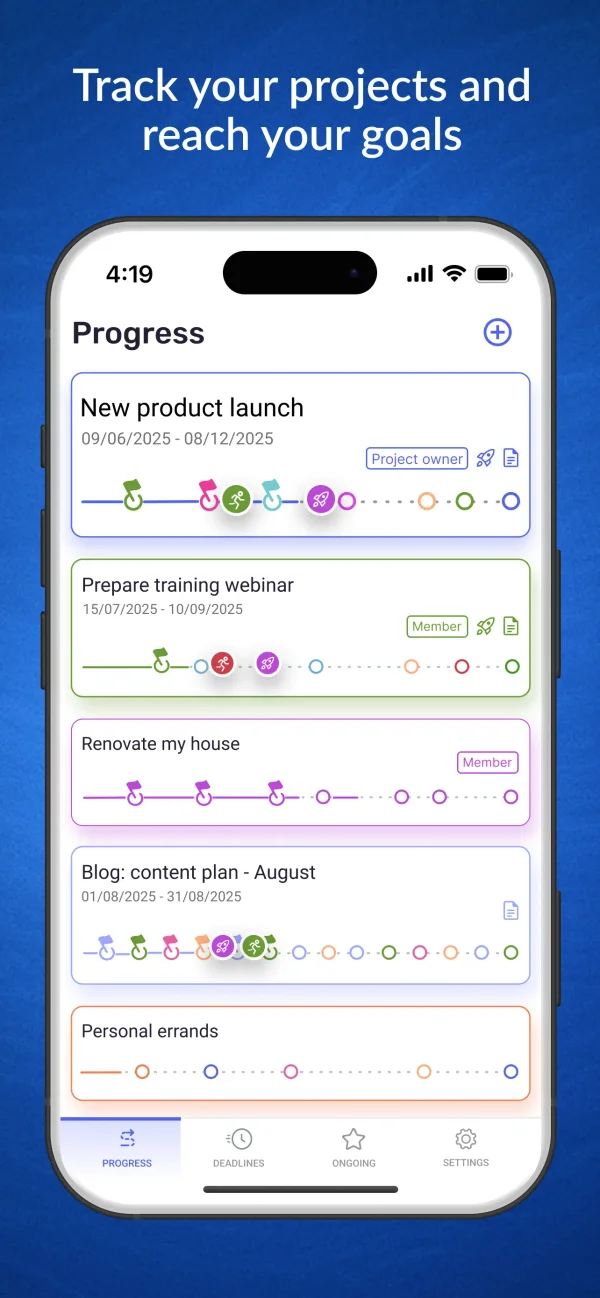
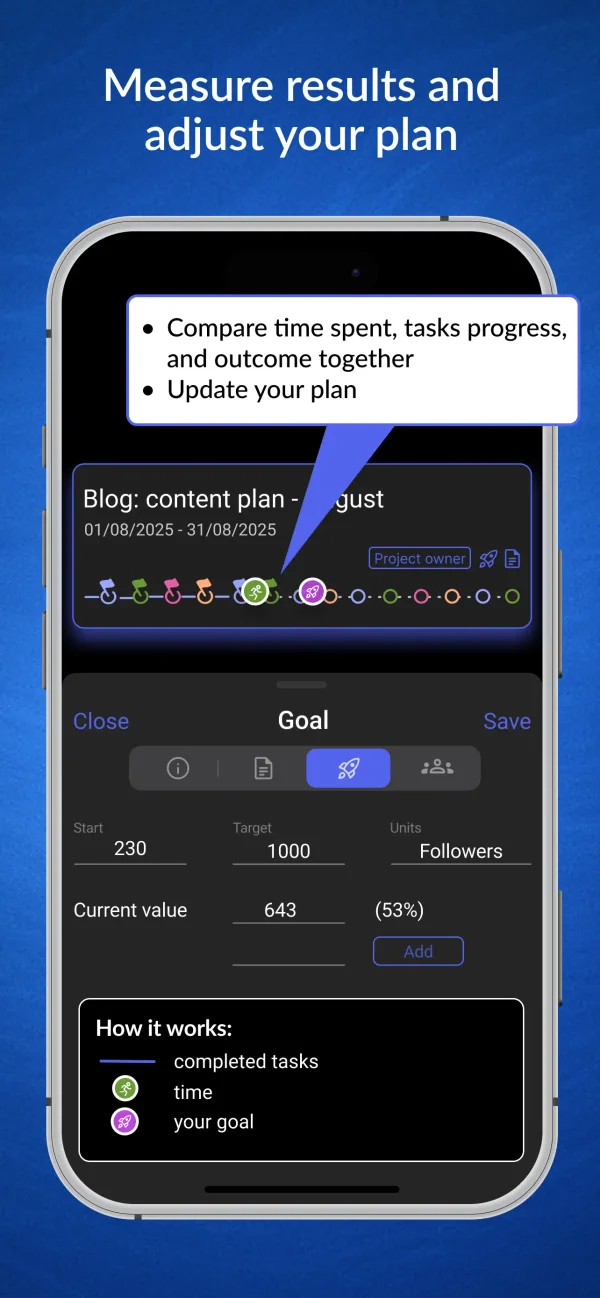
The Project Path — a modernised Gantt chart — clearly shows your progress, deadlines, and results (goal achievement). You will always know the current situation for every project:
- How much time has elapsed and how much remains until the end of the project or stage.
- The percentage of tasks completed — your progress.
- Whether you are meeting deadlines, and if there are any risks.
- Whether completed tasks are delivering expected results, or if you need to adjust your plan.
_____
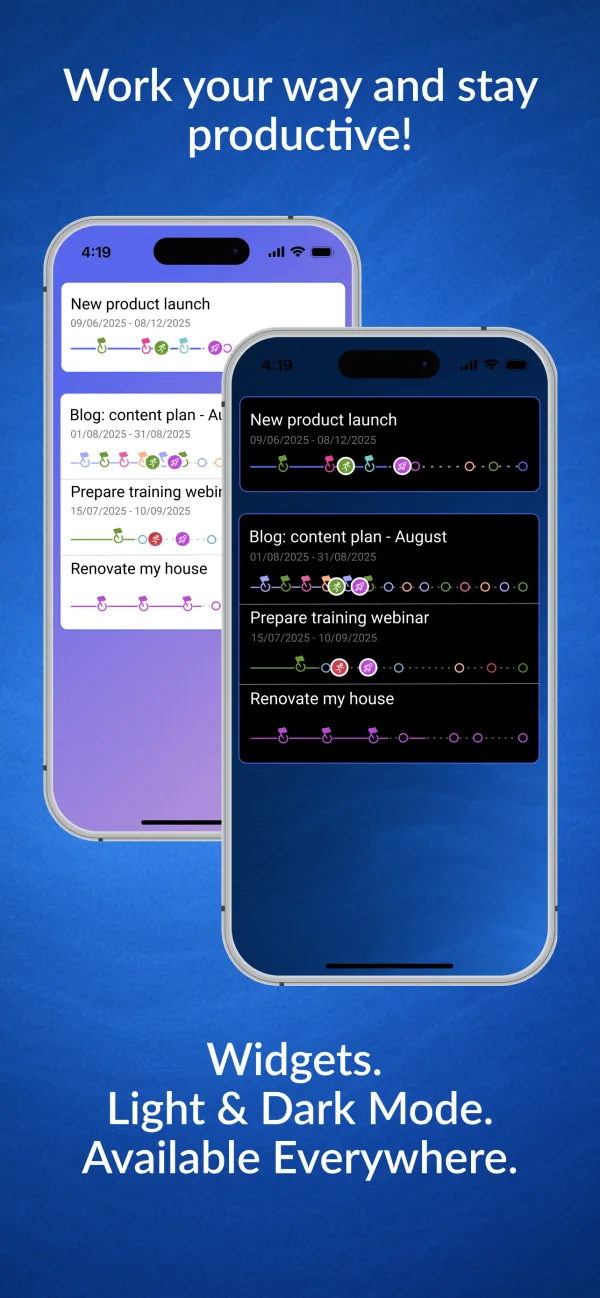
All project and goal progress charts appear on one screen, so you can grasp your overall status at a glance.
_____
DEADLINES
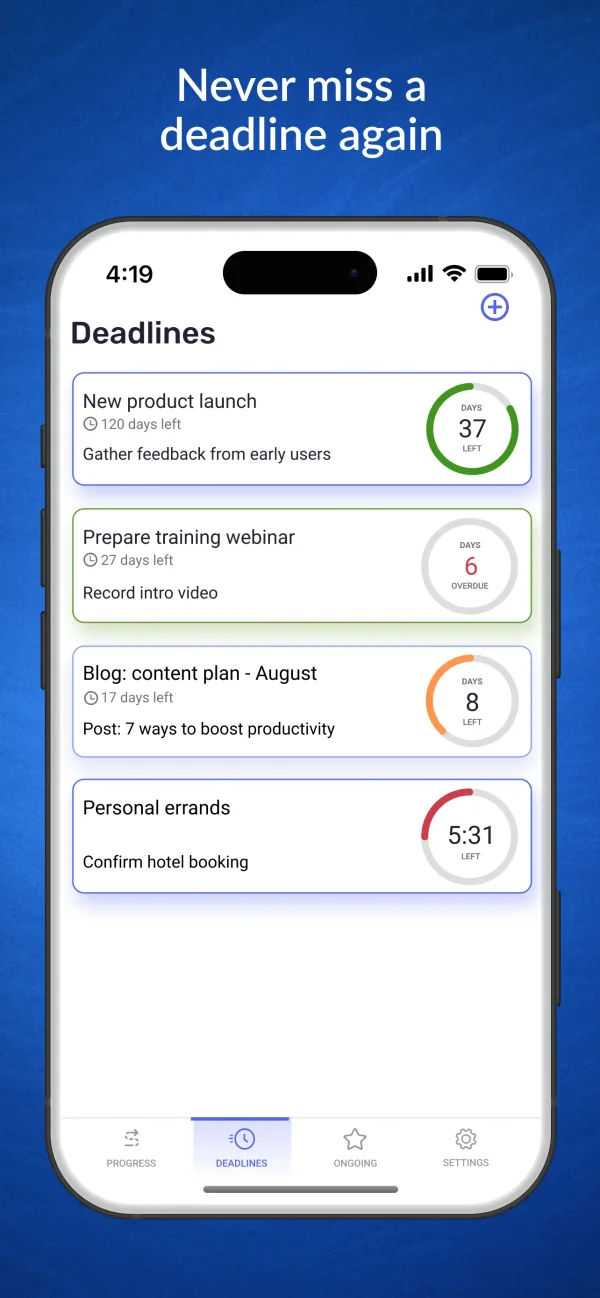
All important due dates: project end dates and the deadlines for upcoming stages — are gathered on one screen. Track the countdown and never miss a deadline!
TASK LIST FOR TODAY AND DAILY SCHEDULE
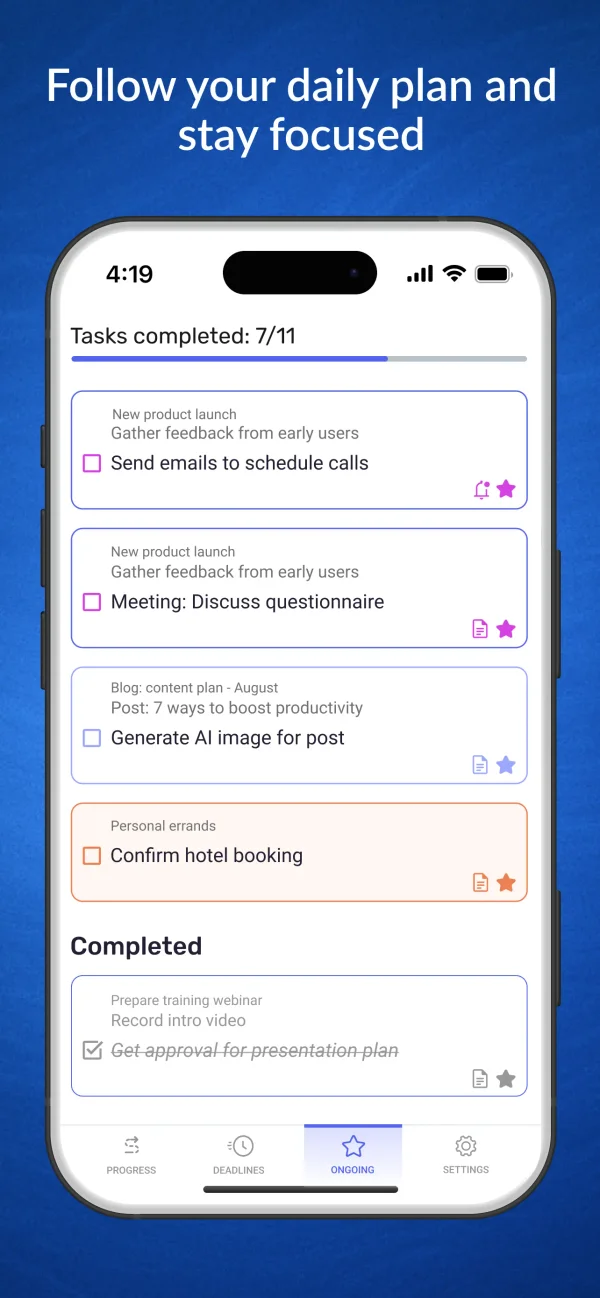
Select tasks from any project or schedule them for a specific date and time to create your daily or weekly task list.
PLAN AND REPLAN WITH EASE
Plan a project completely upfront or refine it as you go: add tasks, clarify deadlines, drag and drop tasks from one stage to another, or move them between projects. Everything is simple, intuitive, and easy to pick up.
COLLABORATIVE WORK
Share specific projects with clients, partners, or colleagues. Each participant sees only the projects they have access to. All on one screen, without switching workspaces.
MOTIVATION AND GAMIFICATION
Even the most serious projects become easier when you add a game element. Wingoman, counting time, helps you stay committed, and a competition with a rocket, counting down your progress towards your goal, adds motivation to move forward.
CROSS-PLATFORM
Work in the app on your phone or use the web version on your computer. Use the planner even offline – all data automatically synchronises when you reconnect.
_____
Powerful, smart, yet easy-to-learn tool. Get structure, control, and motivation in one app.
Download WinGo Plan!
_____
PREMIUM subscription allows you to use Wingo Plan with unlimited number of projects, milestones, and task and customise individual notifications and other premium features.
For the first subscription you may get 7 days as a free trial period. If you do not cancel Premium subscription before free period ends, your iTunes account will be charged annually. Subscription automatically renews unless auto-renew is turned off at least 24 hours before the end of current period. You can manage your subscription and turn off auto-renew from your iTunes Account settings. Any unused portion of a free trial period, will be forfeited if you purchase the subscription. Subscription means that you agree with Terms of Service: https://www.apple.com/legal/internet-services/itunes/dev/stdeula/
Privacy Policy - https://wingo.io/en/terms/
What’s new
Version 7.9.0 · Nov 26, 2026
In this update, we've added start dates for stages as well as deadlines for tasks. Now you can plan your project in great detail.
We've also significantly reworked the Deadlines screen, making it much more convenient and informative. It now brings together all your important dates, with a countdown to the end of the nearest stage and to the deadlines of all your tasks. Sorting options will help you customise this smart list to suit you.
As usual, we've worked on stability and performance.
We hope you'll enjoy the new version of WinGo Plan. As always, please share your feedback and suggestions with us.
App privacy
What Alphyn Apps declares on the App Store about how this app handles data.
-
Data used to track you
May be used to track you across apps and websites owned by other companies.
- Identifiers
- Usage data
-
Data not linked to you
May be collected but is not linked to your identity.
- Contact info
- User content
- Identifiers
- Usage data
- Diagnostics
Privacy practices may vary, for example with the features you use or your age.
Information
- Seller
- Alphyn Apps
- Category
- Productivity
- Version
- 7.9.0
- Updated
- Nov 26, 2026
- Released
- Dec 1, 2018
- Size
- 65.5 MB
- Requires
- iOS 16.6 or later
- Age rating
- 17+
- In-app purchases
- Yes
- Languages
- English, French, German, Hindi, Italian, Japanese, Korean, Portuguese, Russian, Spanish
- Copyright
- © 2018-2026, Alphyn Apps
You might also like
-
 Plime: Goal Setting & TrackerSelf Growth, Life Goal Planner
-
 UP: To Do List, Habit, TaskTo Do, Lists, Goals, Habits
-
 LogTime: Time to stay focusedPlanner of tasks, goals, notes
-
 Beesbusy : project managementManage all your projects
-
 Deadliner – Time ManagementVisual countdown & Gantt chart
-
 Goals Of My Life: Vision BoardSMART Goal Planner & Tracker
-
 Counter - Progress TrackerHabits, Widgets and Goals
-
 Chaos Control 2: AI OrganizerGTD Task Manager, Time Tracker
-
 Togezzer.net Work Chat TasksTodo List Project Workflow
-
 Kanba: ADHD Planner & KanbanTo Do List & Task Manager