Wordiamo
Play friends and robots!
Designed for iPhone, iPad, iPod touch
Free · In-app purchases
- Age rating9+
- CategoryWord
- DeveloperClifford Wang
- LanguagesEnglish
- Size49.6 MB
Links to the official App Store page
Download.org hosts no file of Wordiamo. The button opens its official App Store page, published by Clifford Wang. Listing last checked on Nov 14, 2026.
Screenshots




About
"...one of our highest recommendations." -The Smartphone App Review
---
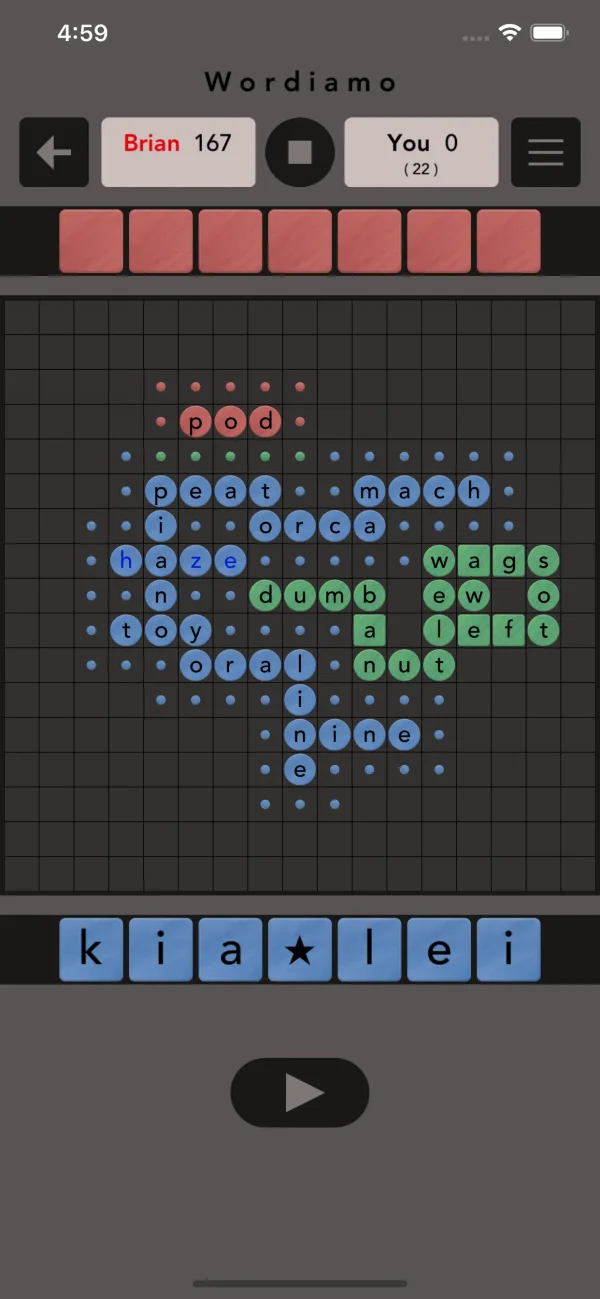
• Arrange letters to make words on the board.
• Play words anywhere—connected to other words or not.
• Build bridges between words to earn bonuses.
• Play 8 letters on the "mainland" to win by knockout.
• Go for long words. You're awarded bonuses according to the number of letters you play on a turn. For example, play 7 letters and you'll get a 7x point multiplier applied to those letters plus an 8th letter, a star that can become any letter.
• When you play words without connecting them to others, this creates word "islands". To score their points, be sure to connect islands to the mainland before they expire.
• Short words are less emphasized compared to traditional crossword games. It can still be handy to play those infamous two letter words like 'qi', 'za', or 'ka', but doing well depends less on knowing them.
• Play proper nouns and other words like 'Oz', 'Fiji', 'Zion', 'Venus', 'Sunday', or 'Botox' (an optional feature).
• No bonus squares to jockey over. This means you focus more on making words and less on defensive strategies. As a result, the board opens up and words begin to flow.
• Play friends online through Game Center.
• Play randomly matched opponents with Anyone Online games.
• More ways to play: Robot (you vs computer), Solitaire (just you) and Pass & Play (you vs friend sharing one device).
• With Robot games, there is a challenger ladder where each time you win, you advance to face a better robot. If you lose twice in a row to the same robot, you step down on the ladder for your next opponent.
• To return and redraw, press the round button, drag letters into the tray, and press play.
• To shuffle, drag letters out of your rack (but not onto the board).
• To quickly retrieve letters from the board, double-tap your rack.
• To zoom on the iPhone, pinch or double-tap the board.
• Robot games are only available on A10X or newer devices, e.g., iPhone 8, iPad Pro 2017, iPad Mini 2019, iPad Air 2019.
• Play on Macs with Apple Silicon processors
• To learn about rules and scoring: https://goo.gl/1xwEok (Facebook album)
• Visit us: http://wordiamo.com and http://facebook.com/Wordiamo
What’s new
Version 1.6.14 · Jun 23, 2025
Just general housekeeping updates to keep the app running smoothly.
App privacy
What Clifford Wang declares on the App Store about how this app handles data.
-
Data used to track you
May be used to track you across apps and websites owned by other companies.
- Location
- Identifiers
- Usage data
- Other data
-
Data not linked to you
May be collected but is not linked to your identity.
- Location
- Identifiers
- Usage data
- Other data
Privacy practices may vary, for example with the features you use or your age.
Information
- Seller
- Clifford Wang
- Category
- Word
- Version
- 1.6.14
- Updated
- Jun 23, 2025
- Released
- Nov 10, 2015
- Size
- 49.6 MB
- Requires
- iOS 12.0 or later
- Age rating
- 9+
- Price
- Free
- In-app purchases
- Yes
- Languages
- English
- Copyright
- © Clifford Wang
You might also like
-
 Wordfray: Crossword Word GameMultiplayer Word Battles
-
 Kitsune: Word GameClassic word strategy game.
-
 Milesoft WordsMultiplayer Vocab Builder
-
 WordRush: Unscramble Word GamePlay, Chat & Duel Your Friends
-
 Cereal WordsWords for Breakfast
-
 Wordgridia - Relaxing PuzzlesCrosswords and Anagrams
-
 Word Blitz! FriendsMaster Words and Rank Up!
-
 Crossword Club ProWord game
-
 Word Slug 2A word game with a twist.
-
 Lexie NexusMultiplayer word challenge