
- Age rating4+
- CategoryUtilities
- DeveloperTakashi Arai
- LanguagesEnglish
- Size39.2 MB
Links to the official App Store page
Download.org hosts no file of WristKeys. The button opens its official App Store page, published by Takashi Arai. Listing last checked on Nov 12, 2026.
Screenshots

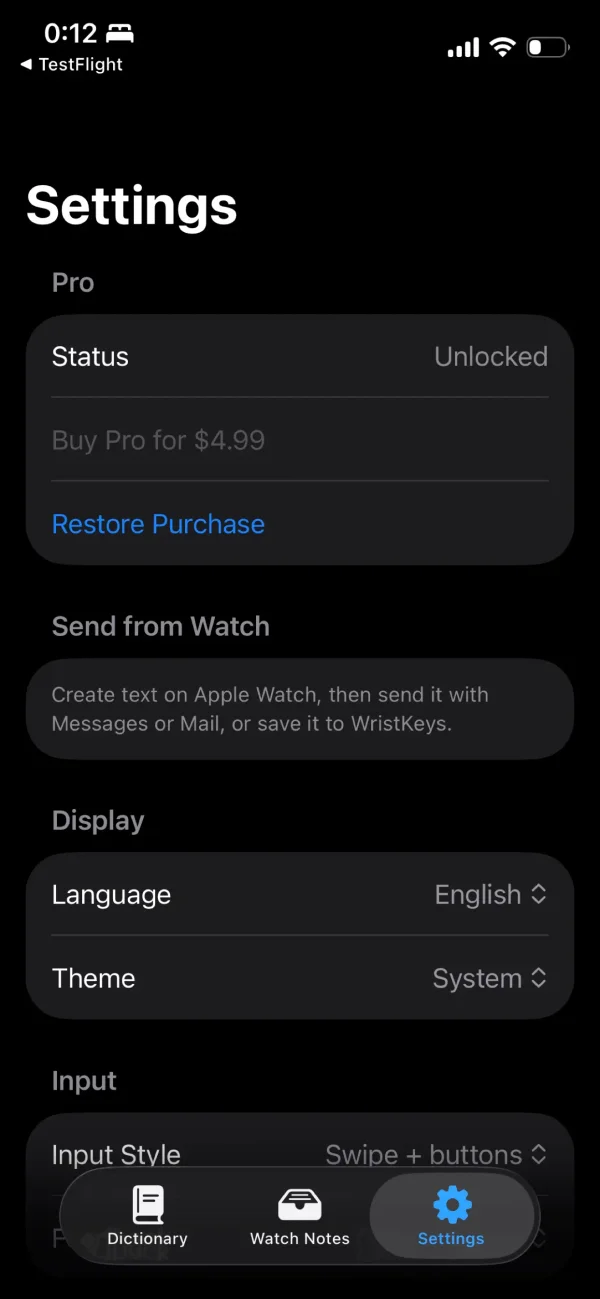

About
WristKeys is a text input companion app designed to make typing easier on Apple Watch SE and smaller Apple Watch models.
It supports Japanese flick input, English typing, numbers, symbols, snippets, and Watch notes. Create text on your Apple Watch and quickly send it through Messages or Mail.
On iPhone, you can manage your custom snippets, personal dictionary, saved notes, and settings. Save frequently used phrases, email addresses, replies, and notes in advance, then access them quickly from your Apple Watch.
What’s new
Version 2.1 · Sep 13, 2026
What’s New in Version 2.1
- Added voice input
- Added a microphone button near the input mode controls for quicker access
- Added a Done button to confirm text without conversion
- Improved the input layout for easier use on the small Apple Watch screen
- Includes small stability and usability improvements
App privacy
What Takashi Arai declares on the App Store about how this app handles data.
-
Data not collected
The developer does not collect any data from this app.
Privacy practices may vary, for example with the features you use or your age.
Information
- Seller
- Takashi Arai
- Category
- Utilities
- Version
- 2.1
- Updated
- Sep 13, 2026
- Released
- Sep 8, 2026
- Size
- 39.2 MB
- Requires
- iOS 26.0 or later
- Age rating
- 4+
- In-app purchases
- Yes
- Languages
- English
- Copyright
- © 2026 Takashi Arai
You might also like
-
 BatteryBar: All Your BatteriesBattery levels for all devices
-
 Life Progress Bar for WidgetsProgress for life, year, etc.
-
 Type Checker for Champions,SVWeaknesses & resistances
-
 Tile PosterPrint a wall poster on A4
-
 Capti: Transcribe Screen AudioTranscribe & Translate Screen
-
 MochiLogBattery Health & Cycle Tracker
-
 LED Message BoardUtilities
-
 Mobile Display – HDMI MonitorUse your iPad as HDMI monitor
-
 UsbPlayerUtilities
-
 Color Analyzer - Color LookupIdentify any color instantly.