
- Age rating4+
- CategoryProductivity
- DeveloperPeter Thomson
- LanguagesEnglish
- Size1.3 MB
Links to the official App Store page
Download.org hosts no file of Year View Planner. The button opens its official App Store page, published by Peter Thomson. Listing last checked on Nov 14, 2026.
Screenshots
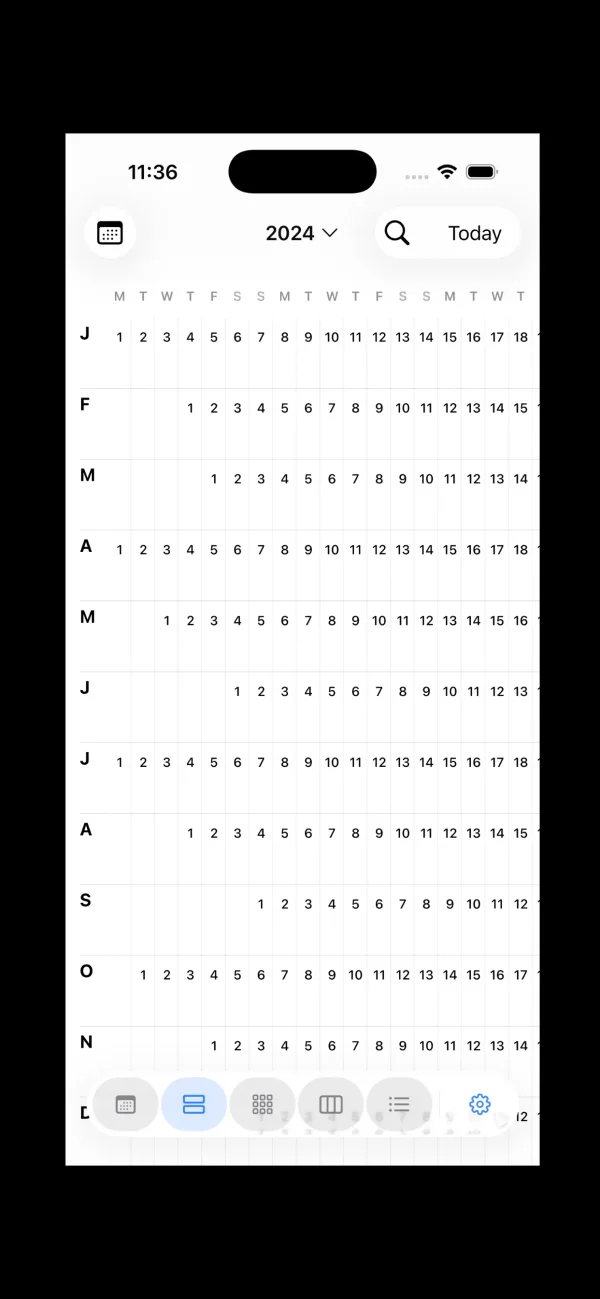

About
Three Views. One Year.
Grid:
The classic layout. Four rows, three columns, twelve months. Your entire year in the most intuitive arrangement.
Continuous:
Inspired by traditional wall planners, year views and annual calendars. Scroll horizontally through your year like flipping through pages of time.
List:
Months stacked vertically. Perfect for scanning through the year on your phone.
What’s new
Version 1.3 · Jul 27, 2026
Clearer all-day event display in Month Rows.
Automatic refresh when calendar data changes.
Appearance and event display settings now persist.
Improved stability and performance for calendars with many events.
App privacy
What Peter Thomson declares on the App Store about how this app handles data.
-
Data not collected
The developer does not collect any data from this app.
Privacy practices may vary, for example with the features you use or your age.
Information
- Seller
- Peter Thomson
- Category
- Productivity
- Version
- 1.3
- Updated
- Jul 27, 2026
- Released
- Jan 12, 2026
- Size
- 1.3 MB
- Requires
- iOS 17.0 or later
- Age rating
- 4+
- Price
- Free
- Languages
- English
- Copyright
- © Peter J Thomson
You might also like
-
 Year Calendar & Weekly PlannerDaily Schedule Widget & Tasks
-
 My Year - Calendar at a GlanceMonth/Year Planning Simplified
-
 Yearli – Yearly CalendarYear at a Glance Planner 2027
-
 Linear Calendar - ChronosSee Your Whole Year at Once
-
 Timescape: Year PlannerThe Big Picture Calendar
-
 All‑in‑One Year Calendar SEThe Customizable Life Planner
-
 EZ Calendar MakerProductivity
-
 One CalendarAll calendars in ONE place!
-
 Tiny Calendar: Planner & TasksAgenda, Organizer & Reminders
-
 Calendar · Planner & RemindersTasks, Agenda & To Do List AI