
Z Assist
Live view, scopes & control
Designed for iPhone, iPad
Free · In-app purchases
- Age rating4+
- CategoryPhoto & Video
- DeveloperDaniel Banica
- LanguagesEnglish
- Size111.9 MB
Links to the official App Store page
Download.org hosts no file of Z Assist. The button opens its official App Store page, published by Daniel Banica. Listing last checked on Nov 23, 2026.
Screenshots



About
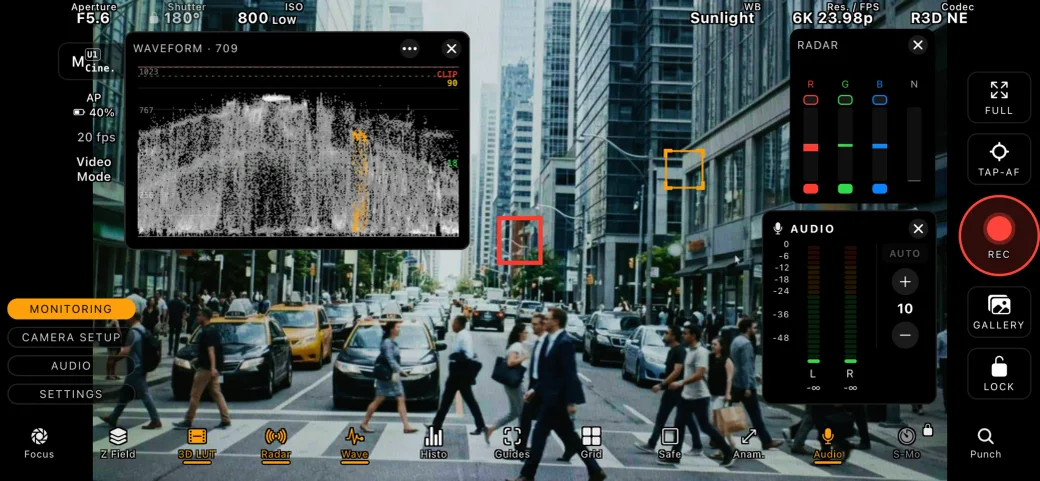
Your phone becomes the monitor you wished was on the camera: a big, bright live view with real scopes, LUT preview and full remote control of your Nikon Z — no cloud, no account, no subscription.
Z Assist connects directly to the camera over Wi-Fi (hotspot, Access Point or your studio network) or a USB-C cable and shows the body's own live-view feed. Every value you see — ISO, shutter, aperture, white balance, codec, timecode, battery, storage — is read from the camera itself, never guessed. Works with the ZR cinema camera, Z8, Z9, Zf, Z6III, Z5II and other current Z-series bodies.
SEE THE IMAGE PROPERLY
• Waveform, RGB Parade, Vectorscope and Histogram with Peak Hold — analysed natively, every frame, movable and resizable
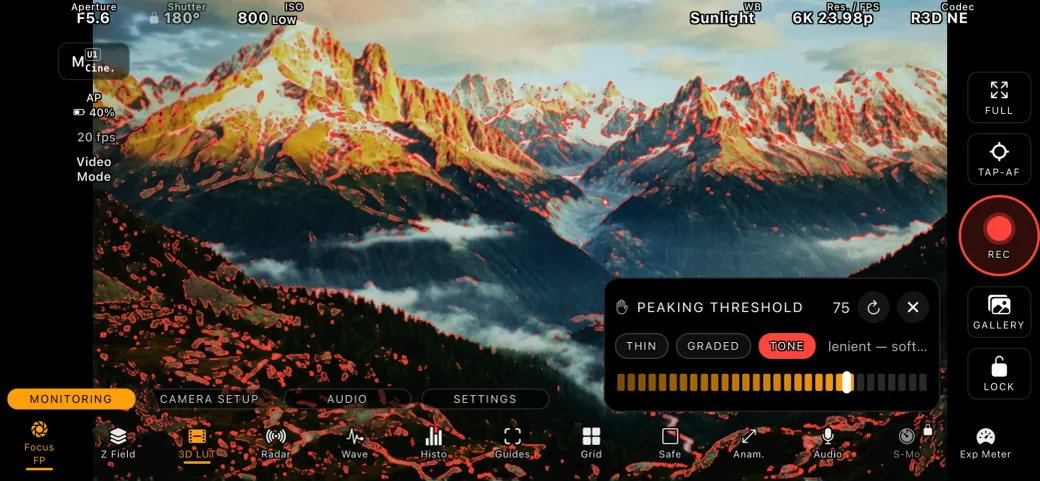
• False Color and Z Field exposure assist with codec-aware guides for R3D / Log3G10, N-Log, HLG and Rec.709
• Zebras, Focus Peaking, Spot Meter, Radar Lights exposure radar
• Preview your own 3D / 1D LUTs (.cube), compare A|B with a split
• Grid, frame guides, safe area, anamorphic de-squeeze, Virtual Horizon drawn exactly like the body's level
• Fill the screen between the tiers with Edge-to-Edge, or pinch to magnify
CONTROL THE CAMERA
• Shutter, ISO, aperture, white balance, ND, Picture Control, tone mode, codec and frame rate — live, two-way, with body locks respected
• Tap-AF with subject and eye detection; Focus Punch uses the body's own live-view zoom and snaps to the detected eye
• Power Zoom, MF focus pull between two marks, Non-CPU lens data
• REC start/stop, photo capture, self-timer; card slots named per model with free space, and the body's own card inserted / removed / full alerts
• Body Control: the full camera menu on your phone, kept in sync with the dials
WORK AS A CREW
• Multi View: up to four cameras on one screen with layouts per orientation, timecode jam, and Gang mode to set ISO, aperture, shutter or REC on all of them at once
• Remote Viewer: hand a second phone to the director or focus puller — it mirrors your live view and scopes over the same Wi-Fi, confirmed with a QR code and PIN
• Battery Saver for long viewing sessions
REVIEW ON SET
• Browse clips and photos on the camera, play while downloading, save to Photos with a LUT baked in
• Offline gallery for every body you have connected, RAW + proxy grouping (N-RAW, R3D NE, ProRes RAW), favourites and filters
BUILT FOR THE FIELD
• Fullscreen Quick Buttons A/B, favourites on every tool, layout presets per project
• Haptic feedback on every control, thermal warning, HUD lock against accidental taps
• Dark, glare-free interface with your choice of accent colour
• Available in 11 languages — camera and cinema terms stay in English, as on the body
FULL VERSION
Z Assist is free to download. One in-app purchase unlocks the connection to your cameras — pay once, use forever, on all your devices with the same App Store account. No subscription.
Z Assist is an independent product and is not affiliated with, endorsed or sponsored by Nikon Corporation. Nikon and the model names are trademarks of Nikon Corporation. Feature availability depends on the connected camera model and firmware.
What’s new
Version 1.0.355 · Nov 16, 2026
GALLERY
• SAVE sheet: ROTATE row — Off · 90° ↻ · 180° · 90° ↺ turns the exported clip or photo in quarter steps; pre-set from the window's Rotate Feed for that camera, change it per save
• SAVE sheet: CROP row — Off or any frame guide (2.39:1 · 2.35:1 · 2:1 · 1.85:1 · 16:9 · 4:3 · 1:1 · 4:5 · 9:16), cut centred from the turned picture; pre-set from the monitor's active guide (a camera-shaped guide on a turned feed is taken as the shape it has on screen)
• A line under the chips shows what will be written — "rotate 90° ↻ · crop 9:16 (centred) → 2160×3840" — using the first item's size
• Order of operations: LUT, then de-squeeze, then the turn, then the crop — a Vertiscope take (lens turned 90°, 9:16 guide) leaves the phone as a true vertical file with its grade and de-squeeze baked in
• Photos: the turn and crop are applied to the picture as you see it (the body's orientation is baked first), and the file is written upright with its EXIF kept; RAW (NEF) is always saved untouched
• Batch saves: the review step says which framing applies; with a de-squeeze set, the framing follows each item's de-squeeze tick, otherwise every JPG and clip gets it. "Keep original too" works alongside
• The option rows of the SAVE sheet scroll on a phone held in landscape; the LUT list keeps its own height
• An older app build without the new exporter says "Rotate / crop export needs a newer app build" instead of saving the wrong file
MONITORING
• Frame guides: "Guides follow phone screen" and "Magnify to fill" now work together — on a rotated feed a screen-shaped guide (e.g. 2.39:1 across a landscape phone) is magnified to the screen edge like any other
• Magnify to fill on a turned feed: the picture may now grow until the guide really meets the screen edge — a 16:9 or 9:16 guide on a 90° Rotate Feed used to stop about 5 % short
MULTI VIEW & REMOTE VIEWER
• Rotation badge: a window whose feed is turned shows ⟳ 90° / 180° / 270° in its name row, in your accent colour — the rig layout reads at a glance
CONNECTING
• When the app has been in the background for about 20 seconds the camera session is closed properly (live view off, session ended) instead of being frozen half-open — the body no longer times out a dead link on its own, and coming back reconnects at once with the remembered pairing, without the body asking for approval again. A quick switch to another app and back keeps the link hot as before
App privacy
What Daniel Banica declares on the App Store about how this app handles data.
-
Data not collected
The developer does not collect any data from this app.
Privacy practices may vary, for example with the features you use or your age.
Information
- Seller
- Daniel Banica
- Category
- Photo & Video
- Version
- 1.0.355
- Updated
- Nov 16, 2026
- Released
- Oct 15, 2026
- Size
- 111.9 MB
- Requires
- iOS 16.4 or later
- Age rating
- 4+
- Price
- Free
- In-app purchases
- Yes
- Languages
- English
- Copyright
- © 2026 Daniel Banica
You might also like
-
 ZineControlCinema Camera Control Pro
-
 Parallax MonitorCamera remote for Nikon & RED
-
 Director ModeMulti-camera monitor & control
-
 NX FieldPhoto & Video
-
 NX MobileAirPhoto & Video
-
 CamRanger 2 - Camera ControlFor Canon, Fuji, Nikon, Sony
-
 RED_CONTROLTake control of your RED®
-
 Cascable Studio: Camera TetherCapture, automate & backup
-
 HollyViewPhoto & Video
-
 White Balance Kelvin Meter CCTColor Temperature Measurement