173 PS
Szewcu72- 3 歳以上対象年齢
- カスタマイズカテゴリ
- 2022/4/9更新日
- ¥140価格
com.watchfacestudio.PS173のGoogle Play公式ページにリンクしています。最終確認:2026/11/24。
このアプリについて
Googleによる英語 (アメリカ合衆国)からの自動翻訳です。
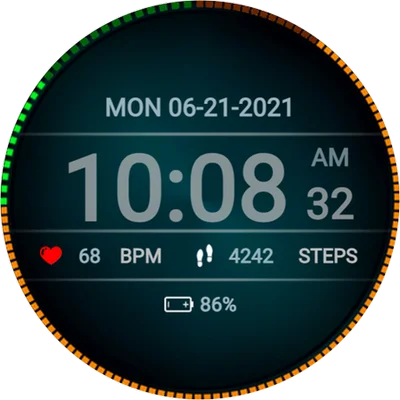
Wear OS搭載の時計用のデジタルウォッチフェイス(Samsung Galaxy Watch 4用)。
WearOSを搭載した時計のデジタルウォッチフェイス。 Galaxy Watch 4モデル用に設計されており、他のスマートウォッチをサポートしています。
追加で表示される情報:
- 日にち
- 曜日
-手順
-バッテリーレベル
- 心拍数
画面の端には、個別のグラフ、バッテリーの状態、および実行されたステップ数(10,000ステップのスケール)があります。
重要な注意点!
インストールすると、ウォッチフェイスは最新の心拍数の読み取り値を取得できますが、取得する必要はありません。
時計のモデルによっては、時計の文字盤が自動的に測定され、心拍数が自動的に表示される場合とされない場合があります。
ウォッチフェイスが心拍数を自動的に測定および表示しない場合は、手動で測定を行う必要があります。これを行うには、じっと座って数分待ってから、心拍数の表示領域をクリックします。数秒待ちます。ウォッチフェイスは現在の結果を測定して表示します。
現在の心拍数を確認するたびにこれを行ってください。
一部のメーカーのモデルでは、HR機能が正しく使用されていないか、サポートされていない場合があります。
覚えて。ウォッチフェイスのインストール後にプロンプトが表示されたら、顔がセンサーにアクセスできるようにします。
原文を表示
Digital watch face for watches with Wear OS. Designed for the Galaxy Watch 4 model, supporting other smart watches.
Additionally displayed information:
- date
- day of the week
- steps
- battery level
- heart rate
On the edges of the screen there are separate graphs, the battery status and the number of steps taken (scale for 10,000 steps).
Important note!
Once installed, the watch face can retrieve your latest heart rate reading, but it doesn't have to.
Depending on your watch model, the watch face may or may not measure automatically and display your heart rate automatically.
If your watch face does not measure and display your heart rate automatically, you need to do the measurement manually. To do this, sit still, wait a few minutes, and click the heart rate display area. Wait a few seconds. The watch face measures and displays the current result.
Do this every time you want to see your current heart rate.
Some manufacturers' models may not use the HR function correctly or may not support it.
Remember. If prompted after installing the watch face, allow your face access to the sensors.
データ セーフティ
このアプリが収集・共有するデータについて、Szewcu72がGoogle Playで申告している内容です。
- 第三者と共有されるデータはありません詳しくは、デベロッパーが共有を申告する方法についての説明をご覧ください
- データは収集されません詳しくは、デベロッパーが収集を申告する方法についての説明をご覧ください
開発元の連絡先
- ウェブサイトwatchfaces.art
- メールszewcu72@gmail.com
- プライバシーポリシーwatchfaces.art
- 住所Ołowiana 71 91-614 Łódź Poland
情報
- 提供元
- Szewcu72
- カテゴリ
- カスタマイズ
- バージョン
- 1.0.2
- 更新日
- 2022/4/9
- リリース
- 2021/10/5
- 必要条件
- Android 9以降
- 対象年齢
- 3 歳以上
- 価格
- ¥140
- パッケージ名
- com.watchfacestudio.PS173