302 PS
Szewcu72- 3 歳以上対象年齢
- カスタマイズカテゴリ
- 2023/4/20更新日
- ¥140価格
com.watchfacestudio.PS302のGoogle Play公式ページにリンクしています。最終確認:2026/11/25。
このアプリについて
Googleによる英語 (アメリカ合衆国)からの自動翻訳です。
Wear OS 搭載時計のウォッチフェイス /Samsung Galaxy Watch 4 & 5 にも対応/
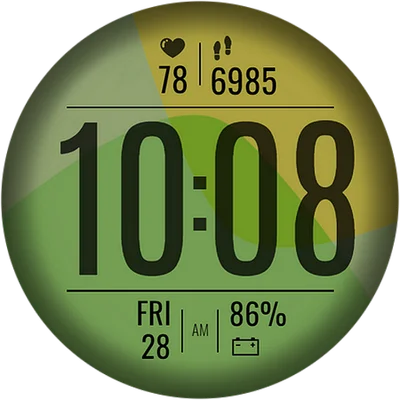
Wear OS を搭載した時計用のデジタル ウォッチフェイス。 Galaxy Watch 4および5モデル用に設計されており、他のスマートウォッチをサポートしています。
表示される情報: 時刻、日付、バッテリーの状態、歩数、心拍数 (脈拍)。
ウォッチフェイスの色/背景を変更するには、ウォッチまたは Galaxy Wearable アプリの「カスタマイズ」オプションを使用します。
重要な注意点!
インストールが完了すると、ウォッチフェイスは最新の心拍数の測定値を取得できますが、必須ではありません.
ウォッチのモデルによっては、ウォッチフェイスが自動的に測定して心拍数を自動的に表示する場合としない場合があります。
ウォッチフェイスが自動的に心拍数を測定して表示しない場合は、手動で測定する必要があります。これを行うには、じっと座って数分待ってから、心拍数表示領域をクリックします。数秒待ちます。ウォッチフェイスは、現在の結果を測定して表示します。
現在の心拍数を確認するたびにこれを行います。
原文を表示
Digital watch face for watches with Wear OS. Designed for the Galaxy Watch 4 & 5 models, supporting other smart watches.
Displayed information: time, date, battery status, steps and heart rate (pulse).
To change the color / background of the watch face, use the "Customize" option on the watch or in the Galaxy Wearable app.
Important note!
Once installed, the watch face can retrieve your latest heart rate reading, but it doesn't have to.
Depending on your watch model, the watch face may or may not measure automatically and display your heart rate automatically.
If your watch face does not measure and display your heart rate automatically, you need to do the measurement manually. To do this, sit still, wait a few minutes, and click the heart rate display area. Wait a few seconds. The watch face measures and displays the current result.
Do this every time you want to see your current heart rate.
データ セーフティ
このアプリが収集・共有するデータについて、Szewcu72がGoogle Playで申告している内容です。
- 第三者と共有されるデータはありません詳しくは、デベロッパーが共有を申告する方法についての説明をご覧ください
- データは収集されません詳しくは、デベロッパーが収集を申告する方法についての説明をご覧ください
新機能
バージョン 1.0.0 · 2023/4/20
Digital watch face for watches with Wear OS.
開発元の連絡先
- ウェブサイトwatchfaces.art
- メールszewcu72@gmail.com
- プライバシーポリシーwatchfaces.art
- 住所Ołowiana 71 91-614 Łódź Poland
情報
- 提供元
- Szewcu72
- カテゴリ
- カスタマイズ
- バージョン
- 1.0.0
- 更新日
- 2023/4/20
- リリース
- 2023/4/20
- 必要条件
- Android 9以降
- 対象年齢
- 3 歳以上
- 価格
- ¥140
- パッケージ名
- com.watchfacestudio.PS302