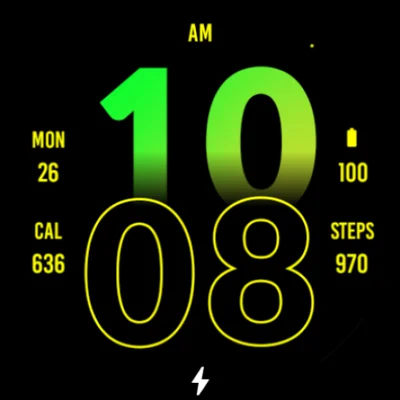
Active Mango Watch Face
zolawatchfaces- 3 歳以上対象年齢
- カスタマイズカテゴリ
- 2026/8/12更新日
- ¥280価格
wear.watchfaces.activemangowatchfaceのGoogle Play公式ページにリンクしています。最終確認:2026/11/13。
このアプリについて
Googleによる英語 (アメリカ合衆国)からの自動翻訳です。
Wear OS 用の美しいデジタルウォッチフェイス
Wear OS 対応の Active Mango ウォッチフェイスは、スマートウォッチにエレガントな雰囲気を添える、スタイリッシュでカスタマイズ可能なウォッチフェイスです。
主な機能:
- 見やすいデジタル時刻表示
- デバイス設定に基づいた 12/24 時間表示
- AM/PM マーカー
- バッテリー残量表示
- 日付
- カスタマイズ可能なウィジェットコンプリケーション: 歩数、心拍数、天気などを追加できます。
- カスタマイズ可能なアプリショートカット
- 低電力でも視認性を高める常時表示モード
- Wear OS スマートウォッチ向けに設計
カスタムウィジェットコンプリケーション:
- ショートテキストコンプリケーション
- スモールイメージコンプリケーション
その他のコンプリケーションアプリ:
- Google Fit による歩数、心拍数、カロリー、距離: https://play.google.com/store/apps/details?id=com.google.android.apps.fitness
- SimpleWeather による天気: https://play.google.com/store/apps/details?id=com.thewizrd.simpleweather
インストール:
- ウォッチデバイスがスマートフォンに接続されていることを確認してください
- Play ストアで、インストールのドロップダウンボタンからウォッチデバイスを選択し、「インストール」をタップしてください。
- 数分後、ウォッチフェイスがウォッチデバイスにインストールされます。
- または、ウォッチ上のPlayストアから、引用符で囲んだウォッチフェイス名を検索して、ウォッチフェイスを直接インストールすることもできます。
注:
アプリの説明に表示されるウィジェットコンプリケーションはプロモーション用です。カスタムウィジェットコンプリケーションのデータは、インストールされているアプリとウォッチメーカーのソフトウェアによって異なります。コンパニオンアプリは、Wear OSウォッチデバイスでウォッチフェイスを簡単に見つけてインストールできるようにするためのものです。
原文を表示
Active Mango Watch Face for Wear OS, a stylish and customizable watch face that adds a touch of elegance to your smartwatch.
Main Features:
- Easy to read digital time display
- 12/24 hours mode based on device settings
- AM/PM marker
- Battery level status
- Date
- Customizable widget complications: Add steps, heart rate, weather, and more.
- Customizable app shortcut
- Always on display mode for low-power visibility
- Built for Wear OS smartwatches
Custom Widget Complications:
- SHORT_TEXT complication
- SMALL_IMAGE complication
Additional Complication Apps:
- Steps, heart rate, calories & distance by Google Fit: https://play.google.com/store/apps/details?id=com.google.android.apps.fitness
- Weather by SimpleWeather: https://play.google.com/store/apps/details?id=com.thewizrd.simpleweather
Installation:
- Make sure the watch device is connected to the phone
- On the Play Store, select your watch device from the install drop-down button. Then tap install.
- After a few minutes the watch face will installed on your watch device
- Alternatively, you can install the watch face directly from on-watch Play Store by searching this watch face name between quotation marks.
Note:
Widget complications shown in the application description are for promotional only. Custom widget complications data depends on your installed applications and watch manufacturer software. The companion app is only to make it easier to find and install the watch face on your Wear OS watch device.
データ セーフティ
このアプリが収集・共有するデータについて、zolawatchfacesがGoogle Playで申告している内容です。
- 第三者と共有されるデータはありません詳しくは、デベロッパーが共有を申告する方法についての説明をご覧ください
- データは収集されません詳しくは、デベロッパーが収集を申告する方法についての説明をご覧ください
開発元の連絡先
- メールzolawatchfaces@gmail.com
- プライバシーポリシーsites.google.com
- 住所JL MELON NO 21 003/004 PERBON Tuban Jawa Timur 62310 Indonesia
情報
- 提供元
- zolawatchfaces
- カテゴリ
- カスタマイズ
- 更新日
- 2026/8/12
- リリース
- 2024/2/20
- 対象年齢
- 3 歳以上
- 価格
- ¥280
- パッケージ名
- wear.watchfaces.activemangowatchface