AI 3axis space
AIwatch- 3 歳以上対象年齢
- カスタマイズカテゴリ
- 2026/8/14更新日
- ¥190価格
com.watchfacestudio.ai_3axis_spaceのGoogle Play公式ページにリンクしています。最終確認:2026/11/23。
このアプリについて
Googleによる英語 (アメリカ合衆国)からの自動翻訳です。
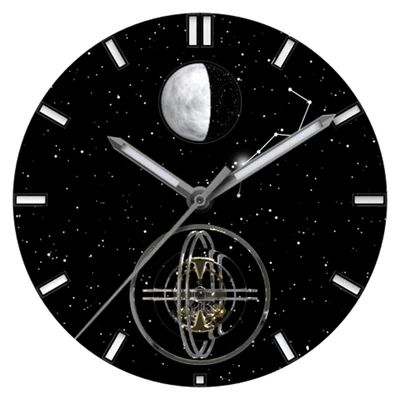
ジャイロスコープのアニメーション
AIwatchのアナログウォッチフェイス。
- Wear OSに対応
- スクエアスクリーンウォッチモードは非対応です。
カスタマイズ
進捗状況(バッテリー残量と歩数)のオン/オフ
曜日のオン/オフ
曜日のフォントカラー(白黒)
北斗七星は週を表します。
上部の赤色は日曜日
そこから下に向かって月曜日、火曜日、水曜日、木曜日、金曜日、土曜日の順に表示されます。
プロモーション画像をご参照ください。
- アプリショートカット×2
*** インストールガイド ***
モバイルアプリは、ウォッチアプリをインストールするためのヘルパーアプリです。
1. ウォッチとスマートフォンをBluetoothで接続する必要があります。
2. スマートフォンのコンパニオンアプリで「クリック」ボタンをタップします。
3. ウォッチの画面の指示に従って操作すると、数分でウォッチフェイスがインストールされます。
ウォッチのGoogleアプリでウォッチフェイスを直接検索してインストールすることもできます。
モバイルのウェブブラウザで検索してインストールすることもできます。
サポート:aiwatchdesign@gmail.com
* Wear OS に対応 *
原文を表示
AIwatch analog watch face.
- Support wear os
- Square screen watch mode is not supported.
Customizing
progress (battery & step percent) ON/OFF
day ON/OFF
day font color (black & white)
The Big Dipper indicates the week.
Red at the top = Sunday
From there, it indicates Monday, Tuesday, Wednesday, Thursday, Friday, and Saturday from the bottom.
Refer to the promotional image.
- 2 x Appshortcut
*** Installation Guide ***
The mobile app is a helper app for installing the watch app.
1. The watch and mobile phone must be connected via Bluetooth.
2. Tap the "CLICK" button on your phone's companion app.
3. Follow the screen of the watch to install the watch face in a few minutes.
You can also directly search for the watch face in the watch's Google app and install it.
You can search and install it in your mobile Mobile web browser.
support : aiwatchdesign@gmail.com
* Support Wear OS *
データ セーフティ
このアプリが収集・共有するデータについて、AIwatchがGoogle Playで申告している内容です。
- 第三者と共有されるデータはありません詳しくは、デベロッパーが共有を申告する方法についての説明をご覧ください
- データは収集されません詳しくは、デベロッパーが収集を申告する方法についての説明をご覧ください
開発元の連絡先
- ウェブサイトinstagram.com
- メールaiwatchdesign@gmail.com
- プライバシーポリシーsites.google.com
- 住所완정로65번안길 17 (마전동, 금호어울림아파트) 101동204호 검단구, 인천광역시 23469 South Korea
情報
- 提供元
- AIwatch
- カテゴリ
- カスタマイズ
- バージョン
- 1.0.0
- 更新日
- 2026/8/14
- リリース
- 2023/7/30
- 対象年齢
- 3 歳以上
- 価格
- ¥190
- パッケージ名
- com.watchfacestudio.ai_3axis_space