Amazon Seller Flex App
Amazon Mobile LLC- 3 歳以上対象年齢
- ビジネスカテゴリ
- 2026/11/26更新日
- 無料価格
com.amazon.sellerflexmobileのGoogle Play公式ページにリンクしています。最終確認:2026/11/27。

Amazon Seller Flex Appは現在Google Playで入手できない可能性があります
前回の確認時、ストアのページにアクセスできませんでした。リンク先は引き続きGoogle Playの公式ページです。
スクリーンショット


このアプリについて
Googleによる英語 (アメリカ合衆国)からの自動翻訳です。
このアプリを使用すると、携帯電話からセラーフレックスビジネスを管理できます。
Amazonセラーフレックスビジネスを管理するためのアプリをお探しですか?売り手フレックスモバイルアプリを使用すると、まさにそれを行うことができます。このアプリバージョンでは、次の操作を実行できます-インベントリの受信、インベントリの削除、選択リストの作成/アクティブ化、および選択リストの詳細へのアクセス。今後のバージョンでは、モバイルアプリを介して他の倉庫業務も段階的に有効にします。
セラーフレックスプログラムについて-セラーフレックスを使用すると、プライムタグ、ファストトラックプロミス(1日、2日配達)などのFBA(Fulfillment By Amazon)モデルの利点のほとんどを提供しながら、自社の倉庫の場所に基づいてフルフィルメントプロセスを管理できます。適格)など。
セラーフレックスアプリを使用すると、セラーフレックスサイトに在庫をすばやく簡単に受け取ることができます。たった3つのステップで簡単です。
•アプリをダウンロードする
•Amazonセラーフレックスログインクレデンシャルを使用してログインします
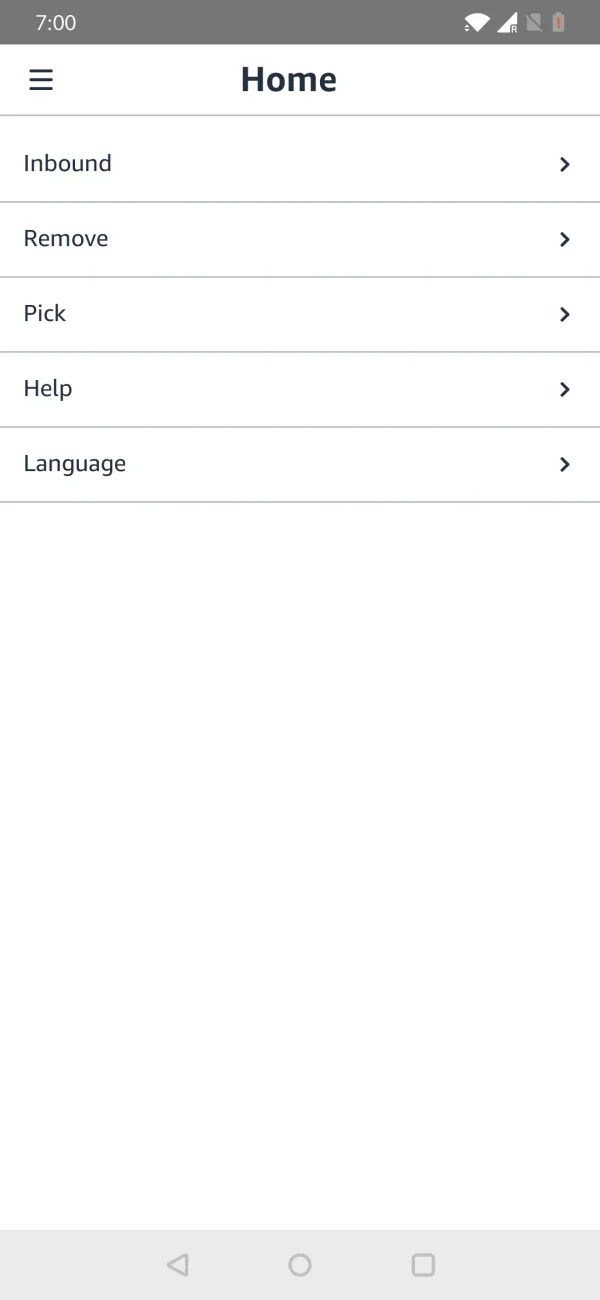
•ホームページで関連する機能を選択して、インベントリアクション(追加、削除)と選択の実行を開始します。
モバイルアプリを使用して在庫を追加/削除するにはどうすればよいですか?
3つの簡単なステップでモバイルアプリを使用して在庫を追加できます。
1.ログイン-セラーフレックスのクレデンシャルを使用してモバイルアプリにログインします
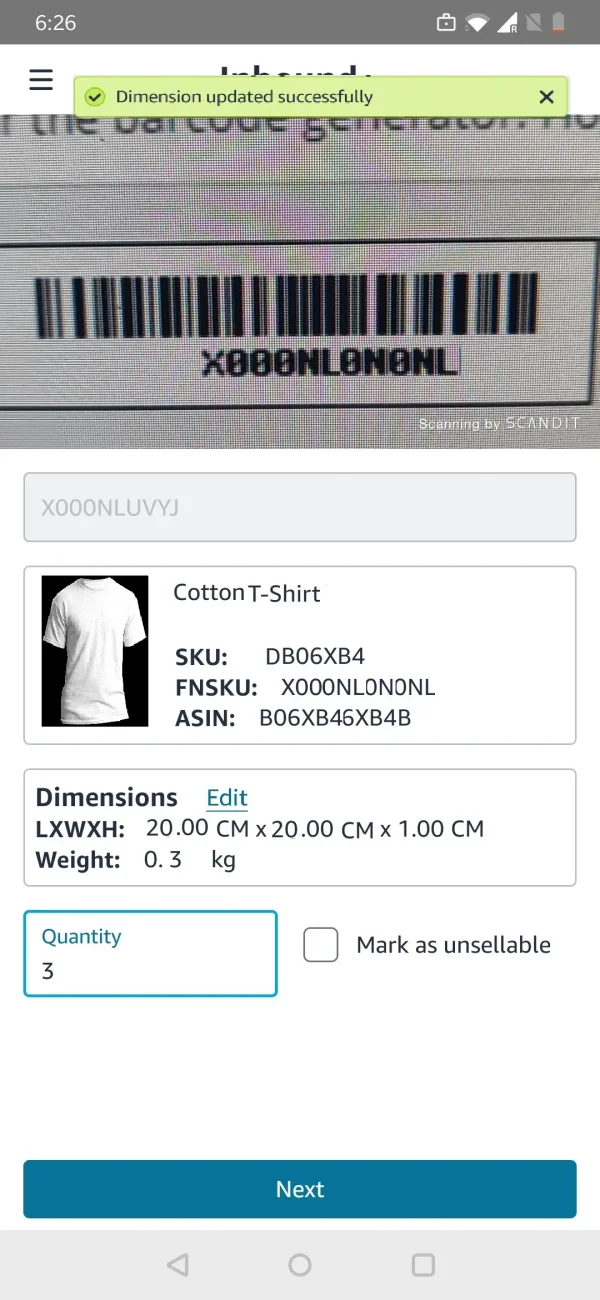
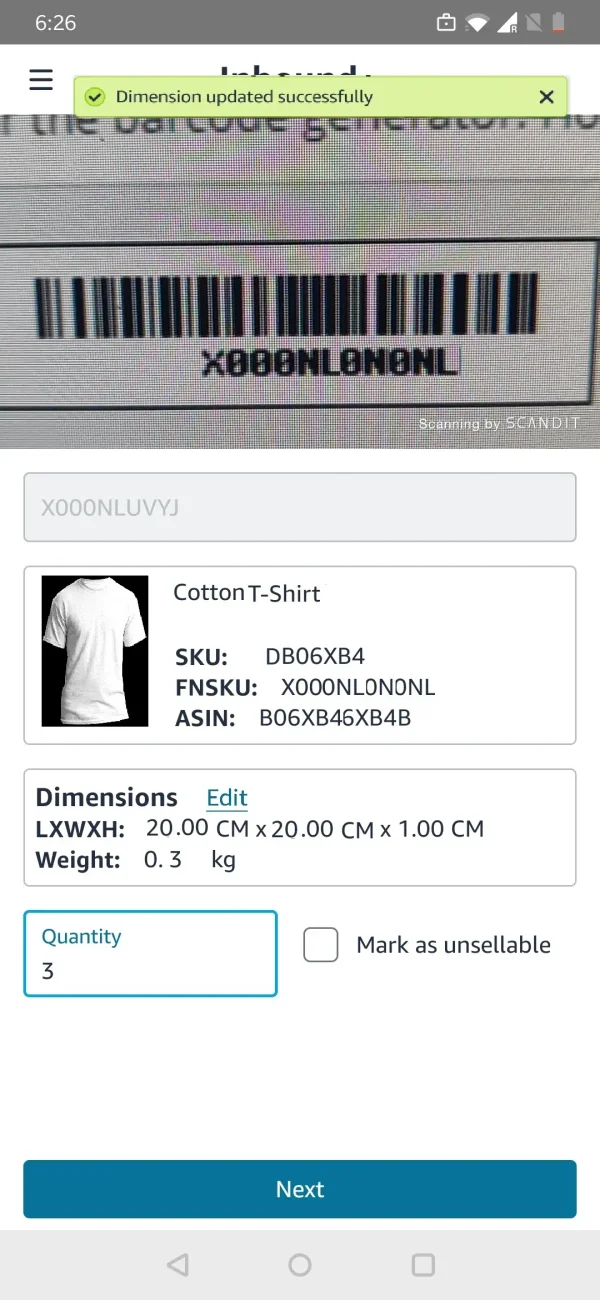
2.製品をスキャンします-ホームページで、[受信]または[削除](該当する場合)を選択し、SFサイトに追加する製品の製品IDをスキャンします。商品をスキャンするとすぐに、商品の詳細がモバイルアプリの画面に表示されます。
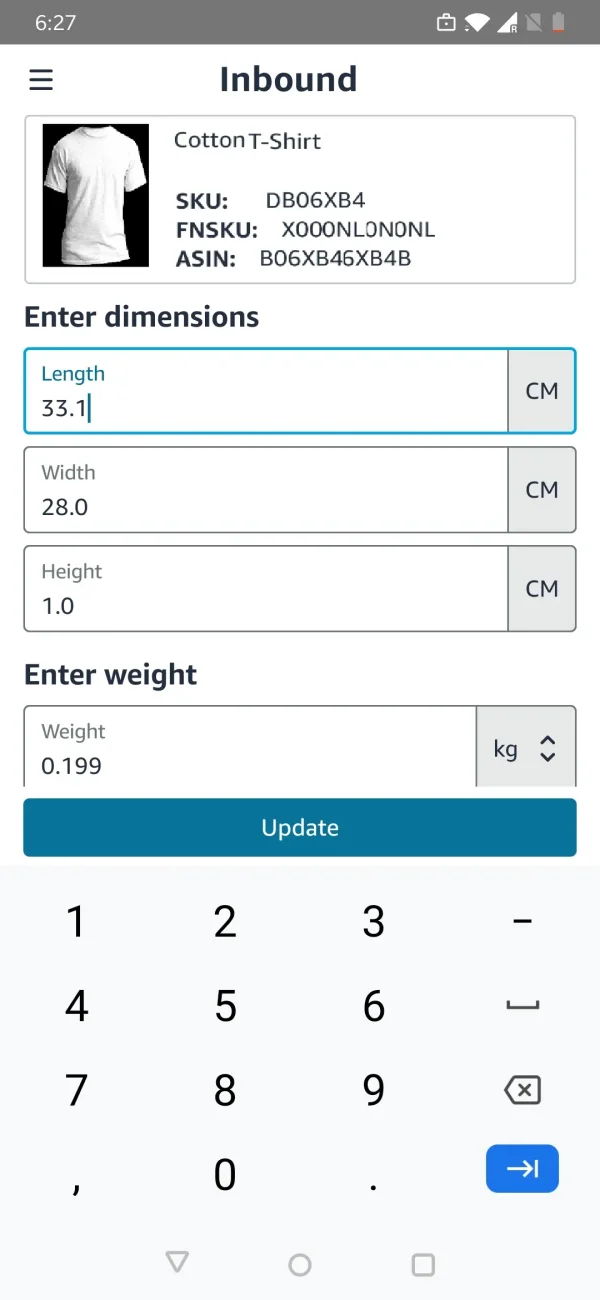
3.その他の詳細を追加します-たとえば、その他の詳細を提供します。インバウンド/削除操作に該当する製品の寸法、有効期限、数量など。
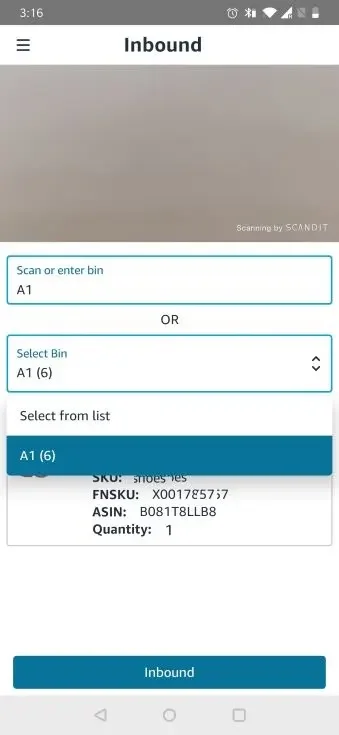
4. BINをスキャンまたは入力します-このインベントリを保存/削除するBINの場所をスキャンまたは入力し、送信を押します。
モバイルアプリを使用して選択する方法は?
1.アプリの[選択]セクションに移動して、選択リストをアクティブにします。
2.選択リストIDをクリックして、選択リストの詳細を表示します
3.選択リストの詳細ページのアイテムチェックリストに従ってアイテムを選択します。
よくある質問 :
•モバイルでこのセラーフレックスモバイルアプリを使用するために請求する追加料金はありますか?
•いいえ。モバイルアプリの使用に固有の追加料金はありません。
•アプリケーションをダウンロードできる倉庫内の従業員の数に制限はありますか?
•いいえ、現在、ウェアハウスでアプリケーションを使用できるユーザーの数に制限はありません。
•アソシエイトにセラーフレックスアプリへのアクセスを提供するにはどうすればよいですか?
•Webのセラーフレックスユーザー管理機能を使用して、アソシエイトにセラーフレックスポータルへのアクセスを許可できます。提供されると、SellerFlexモバイルアプリを自分のモバイルデバイスのGooglePlaystoreからダウンロードし、SellerFlexにアクセスするために作成されたクレデンシャルを使用してログインできます。
•SellerFlexモバイルアプリを実行するための特定のモバイル/ OS要件はありますか?
•あなたとあなたの倉庫の従業員は、日常の個人用Androidベースの携帯電話を使用して、SellerFlexモバイルアプリをダウンロードして実行できます。ただし、最良の結果を得るには、2 GB以上のRAM、6 MPカメラ、Android OS7.0以降を搭載した携帯電話を使用することをお勧めします。
•ヘルプとサポートについてはどうすれば連絡できますか?
•モバイルアプリで問題が発生した場合は、次のリンクにアクセスしてケースを作成できます-https://sellerflex.amazon.in/help
•セラーフレックスプログラムのメリットは何ですか?
•セラーフレックスプログラムの主な利点は次のとおりです。
1.自分の倉庫の場所から在庫を管理しているときでも、ASINの「プライムタグ」と「FBAタグ」にアクセスできます。これにより、製品の発見可能性が向上します。
2.ファストトラック配信の資格を取得します(対象となるPINコードを条件として、顧客への1日、2日の配達の約束)
3.予約の予約やAmazonフルフィルメントセンターへの在庫の送信とは対照的に、自分の場所からの操作(在庫更新、インバウンド、ピック&パック)の管理が容易です。
4.ピークセールイベント中に特に重要な、大量/広範囲の在庫の在庫を有効にします。
何を求めている?セラーフレックスモバイルアプリを使用して運用の管理を開始します
原文を表示
Are you looking for an app to manage your Amazon Seller Flex business? Seller Flex mobile app allows you to do exactly that. In this app version, you can perform following operations - Receive Inventory, Remove Inventory, Create/activate picklists and Access Picklist details. We will incrementally enable other warehouse operations as well via the mobile app in upcoming version.
About Seller Flex Program - Seller Flex enables you to manage the fulfillment process based out of own warehouse location while providing most of the advantages of FBA (Fulfillment By Amazon) model like Prime tag, Fast-Track promise (1 day, 2 day delivery wherever eligible) etc.
Now receiving inventory into your Seller Flex site is quick & easy with the Seller Flex App. It’s simple with just 3 steps:
• Download the app
• Login using your Amazon Seller Flex Login credential
• Start performing inventory actions (addition, removal) and picking by selecting relevant feature on home page.
How to add/remove inventory using the Mobile App?
You can add inventory using mobile app in 3 easy steps:
1. Login - Login into the mobile app using your Seller Flex credentials
2. Scan your product - In the home page, select 'Inbound' or 'Remove' (as applicable) and scan the Product Id of the product you are interested in adding to your SF site. As soon as you scan your product, product details show up on your mobile app screen.
3. Add other details - Provide other details for e.g. Product dimensions, Expiry date, Quantity, etc. as applicable for Inbound /Remove operation.
4. Scan or enter BIN - Scan or enter BIN location where you wish to store/remove this inventory and press submit.
How to pick using the Mobile App?
1. Activate your picklist by going to 'Pick' section of app.
2. Click on Picklist id to see picklist details
3. Pick items following the item checklist on picklist detail page.
Frequently asked questions :
• Is there any additional fees that we will charge for using this Seller Flex mobile app on mobile?
• No. There is no additional fees specific to using the mobile app.
• Is there any limit on # of associates in my warehouse who can download the application?
• No, currently there is no limit on the # of users who can use the application in your warehouse.
• How can I provide my associates access to the Seller Flex app?
• You can give your associates access to Seller Flex portal using Seller Flex User Management feature in the web. Once provided, they can download the Seller Flex mobile app from the Google Playstore on their own mobile devices, and log in using the credentials created for accessing Seller Flex.
• Is there any specific mobile /OS requirement to run the Seller Flex mobile App?
• You and your warehouse associates can use their day-to-day personal Android based mobile phones to download and run the Seller Flex Mobile App. However, for best results, we recommend using a mobile phone with at least 2 GB RAM, 6 MP camera and Android OS 7.0 and above.
• How can I reach out for Help & Support?
• If you face any issue in mobile app, you can create a case by visiting this link - https://sellerflex.amazon.in/help
• What are the benefits of Seller Flex Program?
• Some key advantages of the Seller Flex program are as follows:
1. Gain access to ‘Prime tag’ and ‘FBA tag’ for your ASINs even while managing the Inventory from your own warehouse location. This in turn leads to improved discoverability for your products.
2. Gain eligibility for Fast track delivery (1 day, 2 day delivery promise to the customer subject to eligible PIN codes)
3. Ease of managing operations (Inventory updates, inbounding, pick & pack) from your own location as against booking appointment and sending the stocks to Amazon Fulfillment Centre.
4. Enable stocking large volumes/large range of inventory which is especially critical during peak sale events.
So what are you waiting for? Start managing your operations using the Seller Flex Mobile App
データ セーフティ
このアプリが収集・共有するデータについて、Amazon Mobile LLCがGoogle Playで申告している内容です。
- 第三者と共有されるデータはありません詳しくは、デベロッパーが共有を申告する方法についての説明をご覧ください
- このアプリは以下の種類のデータを収集することがあります位置情報、個人情報、他 3 件
- データは送信中に暗号化されます
- データを削除するようリクエストできます
新機能
バージョン 13.5 · 2026/11/26
This app allows you to perform major Seller Flex operations using your mobile phone camera. This version includes security improvements
開発元の連絡先
- ウェブサイトsellerflex.amazon.in
- メールsellerflex-mobile@amazon.com
- プライバシーポリシーamazon.com
- 住所410 Terry Ave N Seattle, WA 98109-5210 United States
情報
- 提供元
- Amazon Mobile LLC
- カテゴリ
- ビジネス
- バージョン
- 13.5
- 更新日
- 2026/11/26
- リリース
- 2020/12/22
- 必要条件
- Android 8.0以降
- 対象年齢
- 3 歳以上
- 価格
- 無料
- パッケージ名
- com.amazon.sellerflexmobile
類似のアプリ
-
 Amazon A to Z
ビジネス
-
 Jomashop - Shop Luxury Fashion
ショッピング
-
 PatPat - Kids & Baby Clothing
ショッピング
-
 Amazon Seller
ビジネス
-
 SideChef: Recipes & Meal Plans
フード&ドリンク
-
 LightInTheBox Online Shopping
ショッピング
-
 Target Australia
ショッピング
-
 Personify Health
健康&フィットネス
-
 GOAT – Sneakers & Apparel
ショッピング
-
 Carina Wear
ショッピング
-
 CIDER − アパレル & ファッション
ショッピング
-
 Urban Outfitters
ショッピング