Analog watchface A4
VG Faces- 3 歳以上対象年齢
- カスタマイズカテゴリ
- 2026/8/5更新日
- ¥210価格
com.watchfacestudio.vg_a4のGoogle Play公式ページにリンクしています。最終確認:2026/11/27。
このアプリについて
Googleによる英語 (アメリカ合衆国)からの自動翻訳です。
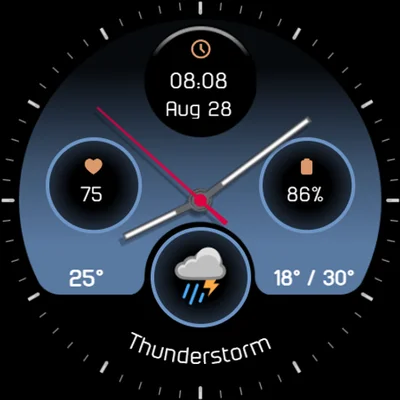
最新のWear OSアナログ文字盤:天気、3つのコンプリケーション、カラー、2つのAODモード
A4 アナログ ウォッチ フェイス for Wear OS
Wear OS 用の A4 アナログ ウォッチ フェイスでスマートウォッチをグレードアップしましょう。この洗練されたモダンなデザインは、クラシックなアナログ要素と詳細な天気追跡、そして高度なカスタマイズを組み合わせ、日常使いに最適です。
主な機能:
• 詳細な天気: 天気状況のテキストとともに、現在の気温、最低気温、最高気温を文字盤に直接表示します。
• 3 つのカスタマイズ可能なコンプリケーション: 最も重要なデータ用の 3 つの専用スロットで、ディスプレイをパーソナライズします。
• 秒針のコントロール: アナログ秒針を表示または非表示にして、すっきりとした、またはより伝統的な外観にします。
• 15 種類以上のカラーソリューション: 15 種類以上の鮮やかなカラーオプションで、スタイルに合わせてウォッチ フェイスをカスタマイズします。
• 2 つの常時表示モード: 最小限のダークモードまたは情報表示の薄暗いモードという 2 つの異なる AOD オプションでバッテリー寿命を管理します。
スマートショートカット システム:
スマートウォッチを簡単に操作します。
• 1 つのアプリショートカット: 天気アイコンをタップすると、割り当てられたカスタムアプリがすぐに起動します。
インストール:
1. ウォッチが Bluetooth で接続されていることを確認します。
2. Google Play ストアからダウンロードします。
3. ウォッチの画面を長押しし、一番下までスクロールして、適用するウォッチフェイスを選択します。
互換性:
以下を含む Wear OS 5+ デバイス専用に設計されています。
• Samsung Galaxy Watch 8 & Ultra
• Google Pixel Watch 4
•また、Wear OS 5以降を搭載したその他の新しいデバイスにも対応しています。
原文を表示
A4 Analog Watch Face for Wear OS
Elevate your smartwatch with the A4 Analog Watch Face for Wear OS. This sleek, modern design combines classic analog elements with detailed weather tracking and deep customization, perfect for daily wear.
Key Features:
• Detailed Weather: View current, minimum, and maximum temperatures directly on the dial alongside the weather condition text.
• 3 Customizable Complications: Personalize your display with three dedicated slots for your most essential data.
• Second Hand Control: Choose to show or hide the analog second hand for a cleaner or more traditional look.
• 15+ Color Solutions: Customize your watch face to match your style with over 15 vibrant color options.
• 2 Always On Display Modes: Manage your battery life with two distinct AOD options: a minimal dark mode or an informative dimmed mode.
Smart Shortcut System:
Navigate your smartwatch effortlessly:
• 1 App Shortcut: Tap the weather icon to instantly launch your custom assigned app.
Installation:
1. Ensure your watch is connected via Bluetooth.
2. Download from the Google Play Store.
3. Long-press your watch screen, scroll to the end, and select the watch face to apply.
Compatibility:
Designed exclusively for Wear OS 5+ devices, including:
• Samsung Galaxy Watch 8 & Ultra
• Google Pixel Watch 4
• And other newer devices running Wear OS 5 or higher.
データ セーフティ
このアプリが収集・共有するデータについて、VG FacesがGoogle Playで申告している内容です。
- 第三者と共有されるデータはありません詳しくは、デベロッパーが共有を申告する方法についての説明をご覧ください
- データは収集されません詳しくは、デベロッパーが収集を申告する方法についての説明をご覧ください
- Play ファミリー ポリシーの遵守に努めています
新機能
2026/8/5
開発元の連絡先
- メールvolder83@gmail.com
- プライバシーポリシーsites.google.com
- 住所W.-I.-Lenin-Straße 51 19370 Parchim Germany
情報
- 提供元
- VG Faces
- カテゴリ
- カスタマイズ
- 更新日
- 2026/8/5
- リリース
- 2025/5/19
- 対象年齢
- 3 歳以上
- 価格
- ¥210
- パッケージ名
- com.watchfacestudio.vg_a4