AR001 Watch Face
AppRerum広告を含む
- 3 歳以上対象年齢
- カスタマイズカテゴリ
- 2026/8/17更新日
- ¥240価格
com.djay.ar001watchfaceのGoogle Play公式ページにリンクしています。最終確認:2026/11/13。
このアプリについて
Googleによる英語 (アメリカ合衆国)からの自動翻訳です。
ライト/ダーク モードと 3 つのカスタマイズ可能なコンプリケーションを備えた洗練された Wear OS ウォッチフェイス!
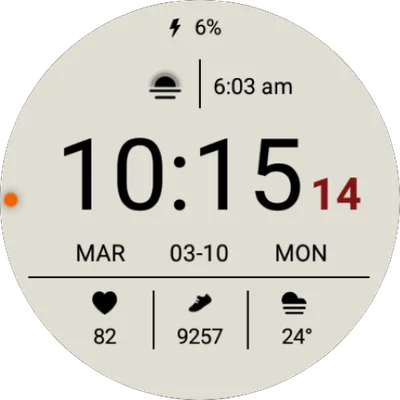
AR001 ウォッチフェイスの紹介 – Wear OS デバイス向けに作られた洗練されたモダンなデザイン。スタイル、機能、カスタマイズを完璧に融合させて、スマートウォッチのエクスペリエンスを向上させます。
🌟 主な機能:
✅ デュアルカラーモード: スタイルや気分に合わせて、明るいモードと暗いモードを簡単に切り替えます。
✅ 3 つのカスタマイズ可能なコンプリケーション: 歩数、心拍数、天気など、表示したい情報を選択して文字盤をカスタマイズします。
✅ ワンラインコンプリケーション: 専用ラインコンプリケーションでカスタマイズ層を追加します。
✅ ミニマルでモダンなデザイン: 一目で読みやすいすっきりとしたレイアウトで集中力を維持します。
✅ バッテリーステータス表示: バッテリーの割合を常に追跡します。
✅ 日付と時刻の表示: 現在の時刻、曜日、日付を明確に表示します。
✅ アンビエントモードのサポート: 低電力アンビエントディスプレイ用に設計されており、バッテリーを消耗させることなく読みやすさを確保します。
⚙️ カスタマイズオプション:
あなたにとって重要な合併症を選択してください。
明るいテーマと暗いテーマを切り替えます。
フィットネス、天気、健康などに合わせてコンプリケーションをカスタマイズします。
⚡ バッテリー使用量に関する注意:
ライトモードでは、平均より多くのバッテリーを消費する可能性があります。バッテリー性能を考慮してご使用ください。
📲 セットアップ方法:
AR001 ウォッチフェイスを Wear OS デバイスにインストールします。
文字盤をタップして押し続けると、カスタマイズ モードに入ります。
希望する合併症とスタイルを選択して設定します。
🔄互換性:
Wear OS デバイス専用に設計されています。
Tizen や HarmonyOS などの他のオペレーティング システムとは互換性がありません。
❗ 注意:
最適なパフォーマンスを得るために、デバイスが最新の Wear OS バージョンを実行していることを確認してください。
一部の機能は、デバイスの機能と権限に応じて異なる場合があります。
エレガントさと機能性が融合した AR001 ウォッチフェイスでスマートウォッチのスタイルをアップグレードしましょう。
原文を表示
Introducing the AR001 Watch Face – a sleek and modern design crafted for Wear OS devices. Elevate your smartwatch experience with a perfect blend of style, functionality, and customization.
🌟 Key Features:
✅ Dual Color Modes: Switch effortlessly between light and dark modes to match your style or mood.
✅ 3 Customizable Complications: Personalize your watch face by choosing the information you want to see, such as steps, heart rate, weather, or more.
✅ One Line Complication: Add an extra layer of customization with a dedicated line complication.
✅ Minimal and Modern Design: Stay focused with a clean layout that's easy to read at a glance.
✅ Battery Status Display: Always keep track of your battery percentage.
✅ Date and Time Display: Clearly shows the current time, day, and date.
✅ Ambient Mode Support: Designed for low-power ambient display, ensuring readability without draining the battery.
⚙️ Customization Options:
Select complications that matter to you.
Switch between light and dark themes.
Customize complications for fitness, weather, health, and more.
⚡ Battery Usage Note:
Light mode may consume more battery than average. Use it considering battery performance.
📲 How to Set Up:
Install the AR001 Watch Face on your Wear OS device.
Tap and hold the watch face to enter customization mode.
Choose and set your desired complications and style.
🔄 Compatibility:
Designed exclusively for Wear OS devices.
Not compatible with other operating systems like Tizen or HarmonyOS.
❗ Note:
Ensure your device is running the latest Wear OS version for optimal performance.
Some features may vary based on device capabilities and permissions.
Upgrade your smartwatch style with the AR001 Watch Face – where elegance meets functionality!
データ セーフティ
このアプリが収集・共有するデータについて、AppRerumがGoogle Playで申告している内容です。
- このアプリはサードパーティと以下の種類のデータを共有することがありますファイル、ドキュメント
- データは収集されません詳しくは、デベロッパーが収集を申告する方法についての説明をご覧ください
- データは送信中に暗号化されます
- データを削除できません
新機能
2026/8/17
- Targeting new Android SDK versions
- Updated UI
- Bug Fixes
開発元の連絡先
- ウェブサイトapprerum.com
- メールsupport@apprerum.com
- プライバシーポリシーapprerum.com
- 住所Behind Mahindra Service Center Hulas Vihar Colony Phase 2, Post office Beur Anisabad Patna, Bihar 800002 India
情報
- 提供元
- AppRerum
- カテゴリ
- カスタマイズ
- 更新日
- 2026/8/17
- リリース
- 2025/3/11
- 対象年齢
- 3 歳以上
- 価格
- ¥240
- パッケージ名
- com.djay.ar001watchface