Arcane : Classic Watch Face
Time Canvas- 3 歳以上対象年齢
- カスタマイズカテゴリ
- 2026/10/2更新日
- ¥240価格
com.analogousa02arcaneのGoogle Play公式ページにリンクしています。最終確認:2026/11/16。
このアプリについて
Googleによる英語 (アメリカ合衆国)からの自動翻訳です。
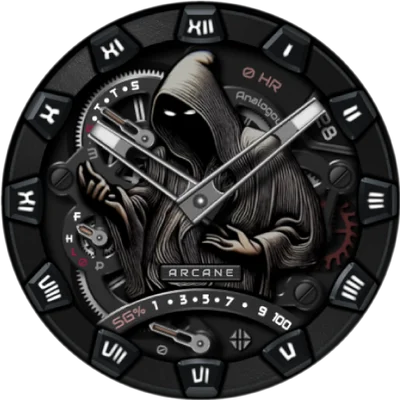
カスタマイズ可能なクラシックなスケルトンデザインを備えた超リアルなクラシックなウォッチフェイス。
リアルなクラシックウォッチフェイス「The Arcane」で、ラグジュアリーのダークサイドを解き放ちましょう。不気味な美学と洗練された職人技が完璧に融合し、まるで生きているかのようなスケルトンデザインが特徴です。ダークエレガンスの世界に足を踏み入れ、見るたびにスタイルをワンランクアップさせましょう。
機能
アナログ式歩数目標カウンター
デジタル式心拍数カウンター
アナログ式バッテリーレベルインジケーター
バッテリー残量警告
曜日と日付表示
常時表示:3段階の明るさ
カスタマイズオプション
インデックススタイル6種類
文字盤カラースタイル9種類
針カラーオプション7種類
カスタムコンプリケーション1種類
カスタムショートカット5種類
カスタマイズ方法:
ウォッチフェイスをカスタマイズするには、画面を長押しし、「カスタマイズ」(またはお使いのウォッチブランドの設定/編集アイコン)をタップします。左右にスワイプしてカスタマイズオプションを閲覧し、上下にスワイプして利用可能なカスタムオプションからスタイルを選択します。
カスタムコンプリケーションとショートカットの設定方法:
カスタムコンプリケーションとショートカットを設定するには、画面を長押しし、「カスタマイズ」(またはお使いのウォッチブランド固有の設定/編集アイコン)をタップします。左にスワイプして「コンプリケーション」まで移動し、設定したいコンプリケーションまたはショートカットのハイライト表示された領域をタップします。
互換性:
このウォッチフェイスは、Wear OS API 34以降を搭載したWear OSデバイス向けに設計されています。これには、Samsung Galaxy Watch 4、5、6、7、8、その他の対応Samsung Wear OSウォッチ、Pixel Watch、および様々なブランドのWear OS対応モデルが含まれます。
対応スマートウォッチをご利用であってもインストール中に問題が発生した場合は、コンパニオンアプリの詳細な手順を参照してください。さらにサポートが必要な場合は、support@timecanvaswatches.com または timecanvasapps@gmail.com までお気軽にお問い合わせください。
注:スマートフォンアプリは、Wear OSウォッチへのウォッチフェイスのインストールと場所の確認をサポートするコンパニオンアプリとして機能します。インストールのドロップダウンメニューからお使いのウォッチデバイスを選択し、ウォッチフェイスを直接ウォッチにインストールできます。コンパニオンアプリでは、ウォッチフェイスの機能やインストール手順に関する詳細情報も提供しています。不要になった場合は、いつでもスマートフォンからコンパニオンアプリをアンインストールできます。
当社のデザインが気に入ったら、ぜひ他のウォッチフェイスもご覧ください。Wear OS向けに近日中にさらに多くのウォッチフェイスが登場予定です。迅速なサポートが必要な場合は、お気軽にメールでお問い合わせください。Google Playストアでのフィードバックは私たちにとって大変貴重です。気に入っていただいた点、改善できる点、ご提案など、何でもお聞かせください。皆様のデザインアイデアをお待ちしております。
原文を表示
Unveil the Dark Side of Luxury with The Arcane – a realistic classic watch face. A perfect fusion of eerie aesthetics and refined craftsmanship, featuring a lifelike skeleton design. Step into the realm of dark elegance and elevate your style with every glance.
Features
Analog Daily Step Goal Counter
Digital Heart Rate Counter
Analog Battery Level Indicator
Low Battery Alert
Day of the Week and Date Display
Always-On Display: 3 Brightness Levels
Customizable Options
6 Index Styles
9 Dial Color Styles
7 Hand Color Options
1 Custom Complication
5 Custom Shortcuts
How to Customize:
To customize your watch face, touch and hold the screen, then tap Customize (or the settings/edit icon specific to your watch brand). Swipe left and right to browse customization options, and swipe up and down to select styles from the available custom options.
How to Set Custom Complications and Shortcuts:
To set custom complications and shortcuts, touch and hold the screen, then tap Customize (or the settings/edit icon specific to your watch brand). Swipe left until you reach "Complications," then tap on the highlighted area for the complication or shortcut you want to set up.
Compatibility:
This watch face is designed for Wear OS devices running on Wear OS API 34+, including the Samsung Galaxy Watch 4, 5, 6, 7 and 8 as well as other supported Samsung Wear OS watches, Pixel Watches, and other Wear OS-compatible models from various brands.
If you encounter any issues during installation, even with a compatible smartwatch, please refer to the detailed instructions in the companion app. For further assistance, feel free to reach out to us at support@timecanvaswatches.com or timecanvasapps@gmail.com.
Note: The phone app serves as a companion to assist you in installing and locating the watch face on your Wear OS watch. You can choose your watch device from the installation drop-down menu and install the watch face directly on your watch. The companion app also offers details about the watch face features and installation instructions. If you no longer need it, you can uninstall the companion app from your phone at any time.
If you like our designs, don’t forget to check out our other watch faces, with more coming soon to Wear OS! For quick help, feel free to email us. Your feedback on the Google Play Store means a lot to us—let us know what you love, what we can improve, or any suggestions you have. We’re always excited to hear your design ideas!
データ セーフティ
このアプリが収集・共有するデータについて、Time CanvasがGoogle Playで申告している内容です。
- 第三者と共有されるデータはありません詳しくは、デベロッパーが共有を申告する方法についての説明をご覧ください
- データは収集されません詳しくは、デベロッパーが収集を申告する方法についての説明をご覧ください
新機能
2026/10/2
General performance and stability enhancements for companion app.
開発元の連絡先
- ウェブサイトtimecanvasapps.com
- メールtimecanvasapps@gmail.com
- プライバシーポリシーsites.google.com
- 住所Plot No.16, Khasra No. 1858, Para, Alamnagar Lucknow, Uttar Pradesh 226017 India
情報
- 提供元
- Time Canvas
- カテゴリ
- カスタマイズ
- 更新日
- 2026/10/2
- リリース
- 2024/8/12
- 対象年齢
- 3 歳以上
- 価格
- ¥240
- パッケージ名
- com.analogousa02arcane