ARS Fighting Game
Arsanna Studio- 3 歳以上対象年齢
- カスタマイズカテゴリ
- 2026/10/16更新日
- ¥230価格
com.arsanna.arsfightinggameのGoogle Play公式ページにリンクしています。最終確認:2026/11/21。
このアプリについて
Googleによる英語 (アメリカ合衆国)からの自動翻訳です。
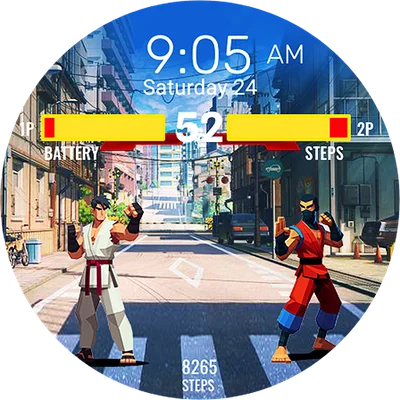
レトロな格闘ゲームの雰囲気を備えたWear OS用のダイナミックなデジタルウォッチフェイス
このウォッチフェイスは、大胆なデザイン要素とノスタルジックなアーケードの美学を組み合わせ、クラシックな格闘ゲームのダイナミックな精神を手首にもたらします。戦闘準備の整ったピクセルアートのキャラクターを特徴とするインターフェースは、エネルギーとアクションに満ちています。ハイコントラストのカラーと微妙なアニメーション効果がドラマチックな魅力を高め、スマートウォッチを競争力のある戦闘の本質を捉えたデジタルアリーナに変えます。
ウォッチフェイスには時間を表示するだけでなく、バッテリー寿命や歩数インジケーターなどのインタラクティブな機能が統合されており、ゲーム内の試合の雰囲気を呼び起こすヘルスバーとして巧みにスタイル化されています。レトロゲームや格闘ジャンルのファンに最適なこのウォッチフェイスは、日常の機能を完全に維持しながら、ユニークな視覚体験を提供します。時間を確認するたびに、戦闘のスリルを感じてください。
AR格闘ゲーム。 API 30+ を備えた Galaxy Watch 7 シリーズおよび Wear OS ウォッチをサポートします。 [その他のデバイスで利用可能] セクションで、リスト上のウォッチの横にあるボタンをタップして、このウォッチフェイスをインストールします。
特徴 :
- 7 背景
- 20色以上のスタイルを変更
- アニメーション機能
- 時刻と日付のオン/オフ
- 1 つの合併症
- 12/24時間サポート
- 常時表示
ウォッチフェイスをインストールしたら、次の手順でウォッチフェイスをアクティブ化します。
1. ウォッチフェイスの選択を開きます (現在のウォッチフェイスをタップして押し続けます)
2. 右にスクロールして「ウォッチフェイスを追加」をタップします
3. ダウンロードしたセクションを下にスクロールします。
4.新しくインストールしたウォッチフェイスをタップします
原文を表示
This watchface brings the dynamic spirit of classic fighting games to your wrist, combining bold design elements with nostalgic arcade aesthetics. Featuring pixel art characters in battle-ready stances, the interface bursts with energy and action. High-contrast colors and subtle animated effects enhance the dramatic appeal, transforming your smartwatch into a digital arena that captures the essence of competitive combat.
Beyond telling time, the watchface integrates interactive features such as battery life and step count indicators, cleverly styled as health bars to evoke the feel of an in-game match. Perfect for fans of retro gaming and fighting genres, this watchface delivers a unique visual experience while maintaining full everyday functionality. Feel the thrill of the fight every time you check the time.
ARS Fighting Game. Supports Galaxy Watch 7 Series and Wear OS watches with API 30+. On the "Available on more devices" section, tap the button beside your watch on the list to install this watch face.
Features :
- 7 Background
- Change 20+ Colors Styles
- Animation Feature
- Time & Date On / Off
- 1 Complication
- 12/24 Hours Support
- Always on Display
After the watch face is installed, activate the watch face by these steps :
1. Open watch face selections (tap and hold the current watch face)
2. Scroll to the right and tap "add watch face"
3. Scroll down on the downloaded section
4. Tap the newly installed watch face
データ セーフティ
このアプリが収集・共有するデータについて、Arsanna StudioがGoogle Playで申告している内容です。
- 第三者と共有されるデータはありません詳しくは、デベロッパーが共有を申告する方法についての説明をご覧ください
- データは収集されません詳しくは、デベロッパーが収集を申告する方法についての説明をご覧ください
新機能
2026/10/16
API Update
開発元の連絡先
- メールarsanna.id@gmail.com
- プライバシーポリシーsites.google.com
- 住所Perum Villa Bunga Blok C No 6 RT 02 RW 006 Kel. Kalimulya, Kec Cilodong Depok Jawa Barat 16471 Indonesia
情報
- 提供元
- Arsanna Studio
- カテゴリ
- カスタマイズ
- 更新日
- 2026/10/16
- リリース
- 2025/5/6
- 対象年齢
- 3 歳以上
- 価格
- ¥230
- パッケージ名
- com.arsanna.arsfightinggame