ARS HelloDay Time
Arsanna Studio- 3 歳以上対象年齢
- カスタマイズカテゴリ
- 2026/10/17更新日
- ¥140価格
com.watchfacestudio.arshellodaytimeのGoogle Play公式ページにリンクしています。最終確認:2026/11/23。
このアプリについて
Googleによる英語 (アメリカ合衆国)からの自動翻訳です。
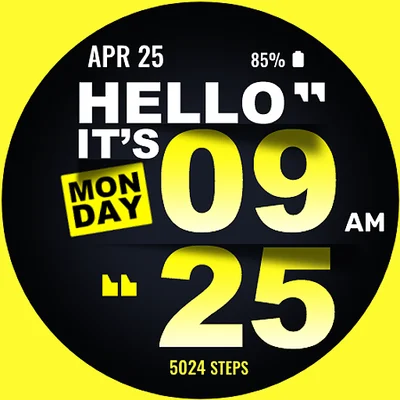
スタイリッシュなデジタルリマインダーで日時をお知らせ、Wear OS ウォッチに最適
今日が何の日かもう忘れないでください! Hello Day は、時計をチェックするたびに、シンプルでスタイリッシュなメッセージでその日と時刻を思い出させます。外出中でも、簡単なリマインダーが必要な場合でも、この洗練されたモダンなデザインで常に最新情報を把握できます。整理整頓をして、予定通りに進み、時計が今日の一日を毎日リマインドしてくれるようにしましょう。
あなたの時計のための ARS HelloDay Time デジタル。 API 30+ を備えた Galaxy Watch 7 シリーズおよび Wear OS ウォッチをサポートします。
[その他のデバイスで利用可能] セクションで、リスト上のウォッチの横にあるボタンをタップして、このウォッチフェイスをインストールします。
特徴 :
- 色のスタイルを変更する
- 4 つの合併症
- 12/24時間サポート
- 常時表示
ウォッチフェイスをインストールしたら、次の手順でウォッチフェイスをアクティブ化します。
1. ウォッチフェイスの選択を開きます (現在のウォッチフェイスをタップして押し続けます)
2. 右にスクロールして「ウォッチフェイスを追加」をタップします
3. ダウンロードしたセクションを下にスクロールします。
4.新しくインストールしたウォッチフェイスをタップします
原文を表示
Never forget what day it is again! Hello Day reminds you of the day and time with a simple, stylish message every time you check your watch. Whether you're on the go or need a quick reminder, this sleek and modern design keeps you in the loop. Stay organized, stay on track, and let your watch greet you with a daily reminder of today’s day!
ARS HelloDay Time Digital for Your Watch. Supports Galaxy Watch 7 Series and Wear OS watches with API 30+.
On the "Available on more devices" section, tap the button beside your watch on the list to install this watch face.
Features :
- Change Colors Styles
- Four Complications
- 12/24 Hours Support
- Always on Display
After the watch face is installed, activate the watch face by these steps :
1. Open watch face selections (tap and hold the current watch face)
2. Scroll to the right and tap "add watch face"
3. Scroll down on the downloaded section
4. Tap the newly installed watch face
データ セーフティ
このアプリが収集・共有するデータについて、Arsanna StudioがGoogle Playで申告している内容です。
- 第三者と共有されるデータはありません詳しくは、デベロッパーが共有を申告する方法についての説明をご覧ください
- データは収集されません詳しくは、デベロッパーが収集を申告する方法についての説明をご覧ください
新機能
2026/10/17
API Update
開発元の連絡先
- メールarsanna.id@gmail.com
- プライバシーポリシーsites.google.com
- 住所Perum Villa Bunga Blok C No 6 RT 02 RW 006 Kel. Kalimulya, Kec Cilodong Depok Jawa Barat 16471 Indonesia
情報
- 提供元
- Arsanna Studio
- カテゴリ
- カスタマイズ
- 更新日
- 2026/10/17
- リリース
- 2025/1/15
- 対象年齢
- 3 歳以上
- 価格
- ¥140
- パッケージ名
- com.watchfacestudio.arshellodaytime