Autumn Magic
StarWatchfaces- 3 歳以上対象年齢
- カスタマイズカテゴリ
- 2026/8/20更新日
- ¥80価格
com.starwatchfaces.autumnmagicのGoogle Play公式ページにリンクしています。最終確認:2026/11/25。
このアプリについて
Googleによる英語 (アメリカ合衆国)からの自動翻訳です。
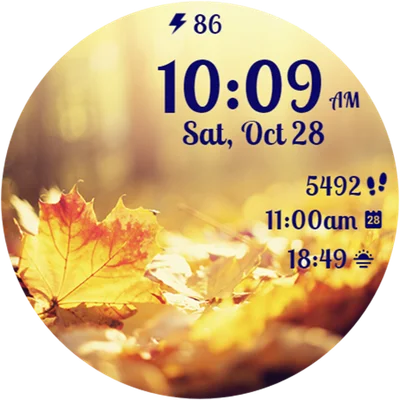
オータム マジック ウォッチフェイスで息をのむような秋の美しさを満喫してください。
秋の魅力的な美しさを細部にまで凝縮した、Wear OS 用のデジタル ウォッチフェイス、Autumn Magic をご紹介します。この文字盤を使用すると、スケジュールを管理するだけでなく、秋の魅惑的な雰囲気に浸ることができます。
🍂 10 秋の自然の背景画像 🍂
自然をイメージした 10 種類の見事な背景のコレクションで、秋の魅惑的な色彩に浸ってください。燃えるような赤い葉から黄金の森、穏やかな景色まで、それぞれの背景が季節のユニークで絵のように美しい景色を提供します。
🍂 カスタマイズ可能なカラーテーマ 🍂
20 以上のカラーテーマを使用して、気分や服装に合わせて文字盤の外観をカスタマイズできます。時刻、日付、合併症のテキストの色を一致させて、選択した背景とシームレスにブレンドし、調和のとれたスタイリッシュな外観を作成します。
🍂 健康データの合併症 🍂
心拍数、消費カロリーなどのさまざまな健康データを表示できる 2 つのカスタマイズ可能なコンプリケーションを使用して、フィットネスの目標を常に把握できます。秋の美しさを楽しみながら、手首で健康状態をチェックしましょう。
🍂 ショートカット機能 🍂
3 つのカスタマイズ可能なショートカットを使用して、お気に入りのアプリに簡単にアクセスできます。フィットネス トラッカー、音楽プレーヤー、メッセージング アプリのいずれであっても、ワンタップで起動できるため、時間を節約し、スマートウォッチのエクスペリエンスを向上させることができます。
🍂 デバイス言語の時刻形式と日付 🍂
時刻はデバイスの設定に基づいて 12 時間形式または 24 時間形式で表示でき、日付はデバイスの言語で自動的に表示されるため、利便性と使いやすさが保証されます。
🍂 AOD 画面の最適化 🍂
低バッテリー使用量に合わせて最適化されたウォッチフェイスを活用し、スマートウォッチの電源が 1 日中持続するようにします。 Always-On Display (AOD) 画面は、バッテリー寿命を節約しながら、Autumn Magic の優雅さを維持します。
オータム マジックを使用すると、あなたの手首が秋の比類のない美しさを示すキャンバスになり、シームレスでパーソナライズされたスマートウォッチ体験に必要な機能とカスタマイズ オプションが組み合わされます。オータム マジックの世界に足を踏み入れて、季節のあらゆる瞬間を本当に魅惑的にしましょう。
ウォッチフェイスをカスタマイズするには:
1. ディスプレイを長押しします。
2. [カスタマイズ] ボタンをタップして、背景画像、時間、日付、統計の色、表示するコンプリケーションのデータ、カスタム ショートカットで起動するアプリを変更します。
希望に応じてウォッチフェイスをカスタマイズします。最も好きな背景を選択し、時間、日付、統計情報に最も適したカラーテーマを選択し、2 つのカスタマイズ可能なコンプリケーションに必要なデータを選択し、3 つのカスタマイズ可能なショートカットを使用して起動する希望のアプリを選択します。ウォッチフェイスの使用をお楽しみください。ストアの掲載情報のスクリーンショットを確認して、ショートカットがどこに配置されているかをよく理解してください。
ウォッチフェイスのインストールで問題が発生した場合は、Samsung がここで詳細なチュートリアルを提供しています: https://developer.samsung.com/sdp/blog/en-us/2022/11/15/install-watch-faces-for-galaxy-watch5 -and-one-ui-watch-45
合併症は以下を表示する可能性があります*:
- 天気
- 一時的な感じ
- バロメーター
- ビクスビー
- カレンダー
- 通話履歴
- リマインダー
- ステップ
- 日付と天気
- 日の出日の入り
- 警報
- ストップウォッチ
- 世界時計
- バッテリー
- 未読通知
必要なデータを表示するには、ディスプレイを長押しし、カスタマイズ ボタンを押して、2 つの合併症に必要なデータを選択します。
* これらの機能はデバイスに依存するため、すべての時計で利用できるわけではありません
希望のショートカットを表示するには、ディスプレイを長押しし、カスタマイズ ボタンを押して、3 つのカスタマイズ可能なショートカット スロットから希望のショートカットを選択します。
その他のウォッチフェイスについては、当社の Web サイトをご覧ください。
楽しむ!
原文を表示
Introducing Autumn Magic, a digital watchface for Wear OS that encapsulates the enchanting beauty of the fall season in every detail. With this watchface, you'll not only stay on top of your schedule but also immerse yourself in the captivating ambiance of autumn.
🍂 10 Autumn Nature Background Images 🍂
Immerse yourself in the mesmerizing colors of autumn with a collection of 10 stunning nature-inspired backgrounds. From fiery red leaves to golden forests and serene views, each background offers a unique and picturesque view of the season.
🍂 Customizable Color Themes 🍂
Tailor the appearance of your watchface to match your mood and outfit with over 20 color themes. Match the time, date, and complications text colors to seamlessly blend with the chosen background, creating a harmonious and stylish look.
🍂 Health Data Complications 🍂
Stay on top of your fitness goals with two customizable complications that can display a range of health data, including heart rate, calories burned, and more. Monitor your well-being right on your wrist, all while enjoying the beauty of autumn.
🍂 Shortcut Functionality 🍂
Effortlessly access your favorite apps with three customizable shortcuts. Whether it's your fitness tracker, music player, or messaging app, you can launch them with a single tap, saving you time and enhancing your smartwatch experience.
🍂 Time Format and Date in Device Language 🍂
The time can be displayed in 12-hour or 24-hour time format, based on your device settings and the date will be automatically displayed in your device's language, ensuring convenience and ease of use.
🍂 AOD Screen Optimization 🍂
Enjoy a watchface that's optimized for low battery usage, ensuring your smartwatch remains powered throughout the day. The Always-On Display (AOD) screen maintains the elegance of Autumn Magic while conserving battery life.
With Autumn Magic, your wrist becomes a canvas showcasing the unparalleled beauty of autumn, combined with the functionality and customization options you need for a seamless and personalized smartwatch experience. Step into the world of Autumn Magic and make every moment of the season truly enchanting!
To customize the watchface:
1. Press and hold on the display
2. Tap the Customize button to change the background image, the colors for time, date and stats, data for complications to display and the apps to launch with the custom shortcuts.
Customize the watchface as you wish: choose the background you like the most, choose the best looking color theme for time, date and stats, select the data you want for the 2 customizable complications, select your desired apps to launch using the 3 customizable shortcuts and enjoy using the watchface! Check the screenshots from the store listing to better understand where the shortcuts are placed.
If you have issues installing the watchface, Samsung provided a detailed tutorial here: https://developer.samsung.com/sdp/blog/en-us/2022/11/15/install-watch-faces-for-galaxy-watch5-and-one-ui-watch-45
The complications can display*:
- Weather
- Feels like temp
- Barometer
- Bixby
- Calendar
- Call History
- Reminder
- Steps
- Date and weather
- Sunrise/sunset
- Alarm
- Stopwatch
- World Clock
- Battery
- Unread notifications
To display the data you want, tap and hold on the display, then press the Customize button and choose the data you want for the 2 complications.
* these functions are device dependent and might not be available on all watches
To display the shortcut you want, tap and hold on the display, then press the Customize button and choose the shortcut you want for the 3 customizable shortcut slots.
For more watchfaces, visit our website.
Enjoy!
データ セーフティ
このアプリが収集・共有するデータについて、StarWatchfacesがGoogle Playで申告している内容です。
- 第三者と共有されるデータはありません詳しくは、デベロッパーが共有を申告する方法についての説明をご覧ください
- データは収集されません詳しくは、デベロッパーが収集を申告する方法についての説明をご覧ください
開発元の連絡先
- ウェブサイトstarwatchfaces.com
- メールwearos@starwatchfaces.com
- プライバシーポリシーstarwatchfaces.com
- 住所Strada Carol Davila 8 bloc 118A sc A et 1 ap 5 100462 Ploiești Romania
情報
- 提供元
- StarWatchfaces
- カテゴリ
- カスタマイズ
- バージョン
- 1.0.0
- 更新日
- 2026/8/20
- リリース
- 2023/10/10
- 対象年齢
- 3 歳以上
- 価格
- ¥80
- パッケージ名
- com.starwatchfaces.autumnmagic