AWD Basic C Watchface
AIwatch- 3 歳以上対象年齢
- カスタマイズカテゴリ
- 2026/8/5更新日
- ¥200価格
com.watchfacestudio.awd_basic_c_watchfaceのGoogle Play公式ページにリンクしています。最終確認:2026/11/13。
このアプリについて
Googleによる英語 (アメリカ合衆国)からの自動翻訳です。
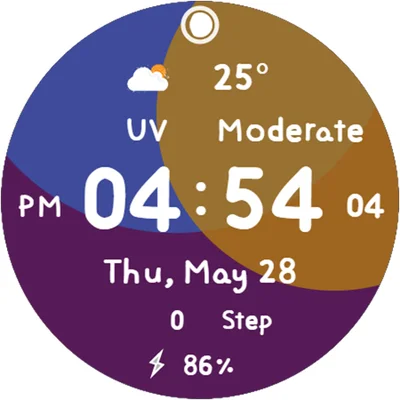
ユニークなカラーブロックとリアルタイム天気予報を備えた、見やすいデジタル時計の文字盤。
AWD Basic C:すっきりとしたレイアウトと必要な天気情報
AWD Basic Cは、Wear OS向けのデジタルウォッチフェイスです。高い視認性とユニークな幾何学模様の背景が特徴です。日々の利便性を追求したデザインで、時間、フィットネス、天気といった必要な情報を一目で確認でき、余計な情報は一切表示しません。
【主な機能】
高い視認性:大きく見やすいデジタル時計と、使いやすく親しみやすいフォントを採用。
天気とUV指数:現在の気温、天気アイコン、UVレベル(例:中程度)をリアルタイムで表示。
毎日のフィットネストラッキング:歩数計で簡単に歩数を記録。
重要なインジケーター:バッテリー残量、日付、午前/午後表示を常に表示。
幾何学模様デザイン:スタイリッシュで重なり合うカラーブロックの背景が、モダンな印象を与えます。
バッテリー効率:低消費電力で、日常使いに最適化。
機能
• 天気アイコン(アニメーション)
• 多言語対応(一部言語は非対応)
• 月相表示
• UV指数表示
• リアルタイム歩数計
• バッテリー残量表示
• デジタル時刻(12時間/24時間表示)と日付表示
カスタマイズ
• 23種類のカラースタイル
• アプリショートカット2種類
• コンプリケーション2種類(アイコンのみ)
- Wear OS対応
- スクエア画面モードは非対応
***インストールガイド***
モバイルアプリがウォッチフェイスのインストール手順をご案内します。
ウォッチフェイスのインストールが完了したら、モバイルアプリを削除できます。
1. ウォッチとスマートフォンをBluetoothで接続してください。
2. モバイルガイドアプリの「インストール」ボタンをタップしてください。
3. 画面の指示に従ってウォッチフェイスをインストールしてください。数分で完了します。
ウォッチのGoogleアプリから直接ウォッチフェイスを検索してインストールすることもできます。
モバイルウェブブラウザからもウォッチフェイスを検索してインストールできます。フィードバックはこちらまで:aiwatchdesign@gmail.com
原文を表示
AWD Basic C: Clean Layout & Essential Weather Info
AWD Basic C is a digital watch face for Wear OS that combines high readability with a unique geometric background. Designed for everyday convenience, it presents essential time, fitness, and weather data at a glance without any unnecessary clutter.
[Key Features]
High Readability: Large, clear digital clock with a distinct, friendly font.
Weather & UV Index: Displays current temperature, weather icons, and UV levels (e.g., Moderate) in real time.
Daily Fitness Tracking: Monitor your steps easily with an integrated counter.
Essential Indicators: Keeps track of battery percentage, full date, and AM/PM status.
Geometric Design: Features a stylish, overlapping color-block background that adds a modern touch.
Battery Efficiency: Optimized for daily wear with lower power consumption.
Features
• Weather condition icon (Animated)
• Multilingual support (some languages unsupported)
• Moonphase
• UV Index
• Real-time Step Counter
• Battery %
• Digital Time (12H/24H) & Full Date
Customizing
• 23 Color style change
• 2 App shortcut
• 2 Complication (Only Icon)
- Support wear OS
- Square screen watch mode is not supported.
***Installation Guide***
The mobile app guides you through the watch face installation process.
You can delete the mobile app once the watch face installation is complete.
1. Your watch and phone must be connected via Bluetooth.
2. Tap the "Install" button in the mobile guide app.
3. Follow the instructions to install the watch face. It will take only a few minutes.
You can also search for and install watch faces directly from the Google app on your watch.
You can also search for and install watch faces from a mobile web browser.
Send feedback : aiwatchdesign@gmail.com
データ セーフティ
このアプリが収集・共有するデータについて、AIwatchがGoogle Playで申告している内容です。
- 第三者と共有されるデータはありません詳しくは、デベロッパーが共有を申告する方法についての説明をご覧ください
- データは収集されません詳しくは、デベロッパーが収集を申告する方法についての説明をご覧ください
開発元の連絡先
- ウェブサイトinstagram.com
- メールaiwatchdesign@gmail.com
- プライバシーポリシーsites.google.com
- 住所완정로65번안길 17 (마전동, 금호어울림아파트) 101동204호 검단구, 인천광역시 23469 South Korea
情報
- 提供元
- AIwatch
- カテゴリ
- カスタマイズ
- 更新日
- 2026/8/5
- リリース
- 2026/5/20
- 対象年齢
- 3 歳以上
- 価格
- ¥200
- パッケージ名
- com.watchfacestudio.awd_basic_c_watchface