AWD Eclipse Weather Watchface
AIwatch- 3 歳以上対象年齢
- カスタマイズカテゴリ
- 2026/8/4更新日
- ¥300価格
com.watchfacestudio.awd_eclipse_weather_watchfaceのGoogle Play公式ページにリンクしています。最終確認:2026/11/13。
このアプリについて
Googleによる英語 (アメリカ合衆国)からの自動翻訳です。
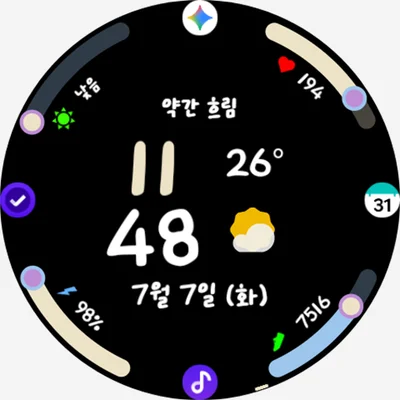
可愛らしい手書き風フォントに、ダイナミックな天気アイコンと必須のフィットネストラッキング機能を搭載。
可愛らしい手書き風ウォッチフェイスで、手首に温かみと明瞭さをプラスしましょう!
温かみのある手書き風フォントとダイナミックな天気イラストが特徴のこのウォッチフェイスは、感情に訴えかけるデザインとパワフルな機能性を完璧に融合させています。直感的な円形プログレスバーで、毎日のルーティンや環境の変化を一目で把握できます。
【主な機能】
魅力的な手書きフォント:すっきりと読みやすく、愛らしいデジタル時計表示。
ダイナミックな天気アイコン:現在の天気(晴れ、曇り、雨、雪、霧など)に合わせて美しく変化するイラスト。
オールインワン円形プログレスバー:
健康トラッキング:リアルタイムの心拍数(BPM)と毎日の歩数目標の進捗状況を表示。
環境とユーティリティ:バッテリー残量、リアルタイムの気温、紫外線指数(中程度、高、極度など)を表示。
多言語対応:スマートフォンのシステム設定に基づいて、テキスト言語(英語、韓国語など)を自動的に切り替えます。
常時表示ディスプレイ(AOD)対応:バッテリー消費を最小限に抑えながら、時間と重要なデータを常に表示します。
毎日必要な情報を確認しながら、あなただけのスタイルを表現しましょう!
機能
• 天気アイコン(アニメーション表示)
• UV指数とリスクレベルアラート
• 心拍数
• リアルタイム歩数計
• バッテリー残量(%)
• デジタル時刻(12時間/24時間表示)と日付表示
カスタマイズ
• 27種類のカラースタイル
• 3種類のフォントスタイル
• 4種類のアプリショートカット
- Wear OS対応
- スクエア画面モードはサポートされていません。
***インストールガイド***
モバイルアプリがウォッチフェイスのインストール手順をご案内します。
ウォッチフェイスのインストールが完了したら、モバイルアプリを削除できます。
1. ウォッチとスマートフォンをBluetoothで接続してください。
2. モバイルガイドアプリの「インストール」ボタンをタップします。
3. 画面の指示に従ってウォッチフェイスをインストールしてください。数分で完了します。
スマートウォッチのGoogleアプリから直接ウォッチフェイスを検索してインストールすることもできます。
また、モバイルウェブブラウザからもウォッチフェイスを検索してインストールできます。
ご意見・ご感想はこちらまで:aiwatchdesign@gmail.com
原文を表示
Bring warmth and clarity to your wrist with this cute, handwritten-style watch face!
Featuring a cozy, handcrafted font and dynamic weather illustrations, this watch face perfectly balances emotional design with powerful functionality. Keep track of your daily routine and environmental changes at a glance through the intuitive circular progress bars.
[Key Features]
Charming Handwritten Font: Clean, legible, and adorable digital clock display.
Dynamic Weather Icons: Beautifully changing illustrations based on current weather conditions (Sunny, Cloudy, Rainy, Snowy, Foggy, and more!).
All-in-One Circle Progress Bars:
Health Tracking: Real-time Heart Rate (BPM) and Daily Step Goal progress.
Environment & Utility: Battery status, Live Weather Temperature, and UV Index (Moderate, High, Extreme, etc.).
Multi-language Support: Automatically switches text language (e.g., English, Korean) based on your smartphone system settings.
Always-On Display (AOD) Supported: Keeps time and essential data visible with minimal battery consumption.
Express your unique style while staying informed every single day!
Features
• Weather condition icon (Animated)
• UV Index & Risk Level Alerts
• Heart Rate
• Real-time Step Counter
• Battery %
• Digital Time (12H/24H) & Full Date
Customizing
• 27 Color style
• 3 Font style
• 4 App shortcut
- Support wear OS
- Square screen watch mode is not supported.
***Installation Guide***
The mobile app guides you through the watch face installation process.
You can delete the mobile app once the watch face installation is complete.
1. Your watch and phone must be connected via Bluetooth.
2. Tap the "Install" button in the mobile guide app.
3. Follow the instructions to install the watch face. It will take only a few minutes.
You can also search for and install watch faces directly from the Google app on your watch.
You can also search for and install watch faces from a mobile web browser.
Send feedback : aiwatchdesign@gmail.com
データ セーフティ
このアプリが収集・共有するデータについて、AIwatchがGoogle Playで申告している内容です。
- 第三者と共有されるデータはありません詳しくは、デベロッパーが共有を申告する方法についての説明をご覧ください
- データは収集されません詳しくは、デベロッパーが収集を申告する方法についての説明をご覧ください
新機能
2026/8/4
sdk 36
開発元の連絡先
- ウェブサイトinstagram.com
- メールaiwatchdesign@gmail.com
- プライバシーポリシーsites.google.com
- 住所완정로65번안길 17 (마전동, 금호어울림아파트) 101동204호 검단구, 인천광역시 23469 South Korea
情報
- 提供元
- AIwatch
- カテゴリ
- カスタマイズ
- 更新日
- 2026/8/4
- リリース
- 2026/7/10
- 対象年齢
- 3 歳以上
- 価格
- ¥300
- パッケージ名
- com.watchfacestudio.awd_eclipse_weather_watchface