BFF8- Animation Technology Map
BFF-KING STORM- 3 歳以上対象年齢
- カスタマイズカテゴリ
- 2026/9/28更新日
- ¥340価格
com.BFF.watchfacestudio.bff8_animationbfftechnology_hudのGoogle Play公式ページにリンクしています。最終確認:2026/11/21。
このアプリについて
Googleによる英語 (アメリカ合衆国)からの自動翻訳です。
BFF-StormによるWear OSのアニメーション技術(四角い文字盤を除く)
注 : 携帯電話と時計の Google Play アカウントが同じであることを確認する必要があります。 「お使いのデバイスには互換性がありません」という状況を回避するには。
注: Play ストアで BFF-Storm によって販売されているウォッチフェイスは、現在、Samsung の新しい Wear Os Google / One UI オペレーティング システムに基づいて機能の完成の過程にあります。そのため、新しい機能が完成した場合には、できるだけ早くウォッチフェイスを更新することに取り組んでいます。使用に問題がある場合は、Gmail 経由でご連絡ください。
support@bffstormwatchface.com
24時間年中無休でサポートし、ご質問にお答えいたします。
注: [設定] -> [アプリケーション] ですべての権限が有効になっていることを確認してください。
注: ウォッチフェイスをインストールするにはどうすればよいですか?
1 - 時計が Bluetooth 経由で電気に接続されていることを確認し、時計の文字盤アプリのページを開いてインストールします。
「他のデバイスにインストール」オプションを開きます(無料インストールまたは購入ボタンの右側にある三角形のアイコン)。
時計に設定する場合のみ、携帯電話の設定をオフにしてください。そしてインストールを実行します。
インストールが成功すると、ウォッチに通知が表示され、ウォッチでアプリケーションを検索できます。
アプリがウォッチに表示されない場合は、携帯電話で Galaxy Wearable アプリを開き、ウォッチフェイスを選択してダウンロードしたアプリセクションまで下にスクロールし、ウォッチフェイスを選択してウォッチに表示します。
2 - 誤って携帯電話にコンパニオン アプリをインストールした場合は、ウォッチフェイスをインストールした後でそれらのアプリを削除できます。
3 - 携帯電話、Play ストア、ウォッチ間の同期に問題がある場合は、ウォッチフェイスをウォッチから直接インストールするか、PC の Web ブラウザから試すか、当社の Web サイトにアクセスして製品を検索してください。
このウォッチフェイスは、API レベル 30 以上のすべての Wear OS デバイスをサポートしています。
注: [カスタマイズ] ボタン:
- タップしてアプリのショートカットを選択します
- タップしてアプリのショートカットを開きます
注 : メニューをタップして開くことができます。戻りたい場合はもう一度タップします。メニューは、インストールしたショートカットを使用するのに役立ちます。 (説明は画像セクションで確認できます)
注: 一部の時計では一部の機能が利用できない場合があります。この文字盤は四角い文字盤の時計には適用されません。
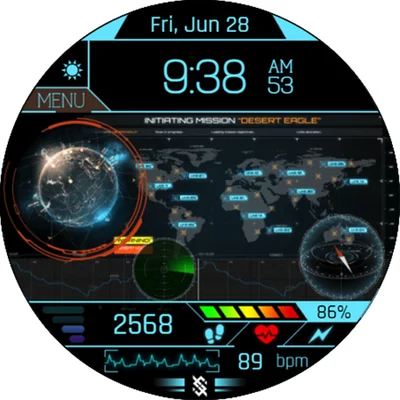
BFF-Storm による BFF8 - アニメーション テクノロジー マップ。
ウォッチフェイスの機能: (画像の説明で確認できます)
- 電話の設定に基づいて 12/24 時間対応
- 時間情報: 日、月。
- 健康情報: 歩数、心拍数。
- バッテリー
その他のカスタマイズ情報
- オプションの停止アニメーション
- オプションカラー*16
常時表示は以下をサポートします。
- AOD 画面は、インストールした通常の画面と同じように完全に表示されます。
アプリのショートカット:
-7 アプリのショートカットをカスタマイズします。 (7 つのボタンの位置については、画像の説明を参照してください。)
画像の説明で詳細をご覧いただけます。
カスタマイズ:
1 - 画面を長押しします
2 - カスタマイズオプションをタップします
ビデオチュートリアルとウォッチフェイスの説明:
https://www.youtube.com/watch?v=koiiZEM0r90
下記にアクセスしてください:
フェイスブック: https://www.facebook.com/BFFKINGSTORM
インスタグラム:https://www.instagram.com/bffstormer/
ウェブページ: https://bffstormwatchface.com/
ありがとう !!
原文を表示
NOTE : You need to make sure the Google Play account on your phone and watch is the same. To avoid the situation: "Your devices are not compatible".
NOTE: The Watch faces sold by BFF-Storm on the Play Store are currently in the process of feature completion based on Samsung's new Wear Os Google / One UI operating system. So we are committed to update the watch face as soon as possible if a new function is completed. And when you have problems using it, you can contact us via gmail:
support@bffstormwatchface.com
We will support and answer questions 24/7.
NOTE: Make sure you have enabled all permissions from settings -> Applications.
NOTE: How to install watch face?
1 - Make sure the watch is connected to the electricity via bluetooth, open the watch face app page to install.
Open the "Install on more device" option (Triangle icon to the right of the free install or purchase button).
Turn off the settings on the phone just to set it on the watch. And do the installation.
After successful installation, a notification will be displayed on the watch, you can search the application on the watch.
If the app doesn't appear on the watch, open the Galaxy Wearable app on your phone, select watch faces and scroll down to the downloaded apps section and select watch faces to have them show up on the watch.
2 - If you have installed companion apps on your phone by mistake, you can delete them once the watch face has been installed.
3 - If you have sync problems between your phone, Play Store and watch, install watch face directly from your watch, or you can try from your PC web browser or visit our website to Search product.
This watch face supports all Wear OS devices with API Level 30+.
NOTE : Customize button:
-Tap to select app shortcut
-Tap to open the app shortcut
NOTE : You can tap the menu to open it. And tap again if you want to back. The menu will assist you to use the shortcuts we have installed. (You can see the instructions in the picture section)
NOTE : Some features may not be available on some watches. This watch face will not apply to square face watches.
The BFF8- Animation Technology Map by BFF-Storm.
Watch Face Features: (You can see them on the picture description)
- 12/24Hr based on phone settings
- Time information: Day, Month.
- Health information: Step counts, Heart rate.
- Battery
Other customized information
- Optional Stop Animation
- Optional color *16
Always on display supports:
- The AOD screen will be fully displayed as the normal screen you have installed.
App shortcuts :
-7 customize app shortcuts. (You can see in the image description for where the 7 buttons are.)
You can see more details on our image description.
Customize :
1 - Touch and hold the screen
2 - Tap on customize option
Video tutorial and description of watch face:
https://www.youtube.com/watch?v=koiiZEM0r90
Please visit us at:
Facebook: https://www.facebook.com/BFFKINGSTORM
Instagram: https://www.instagram.com/bffstormer/
Webpage: https://bffstormwatchface.com/
Thank You !!
データ セーフティ
このアプリが収集・共有するデータについて、BFF-KING STORMがGoogle Playで申告している内容です。
- 第三者と共有されるデータはありません詳しくは、デベロッパーが共有を申告する方法についての説明をご覧ください
- データは収集されません詳しくは、デベロッパーが収集を申告する方法についての説明をご覧ください
新機能
2026/9/28
BFF8- Animation Technology Map
開発元の連絡先
- ウェブサイトbffstormwatchface.com
- メール13kdollarmonth@gmail.com
- プライバシーポリシーbffstormwatchface.com
- 住所T. Dong Vien - X. Phu Dong - H. Gia Lam - TP. Ha Noi Hà Nội 10000 Vietnam
情報
- 提供元
- BFF-KING STORM
- カテゴリ
- カスタマイズ
- 更新日
- 2026/9/28
- リリース
- 2023/3/30
- 対象年齢
- 3 歳以上
- 価格
- ¥340
- パッケージ名
- com.BFF.watchfacestudio.bff8_animationbfftechnology_hud