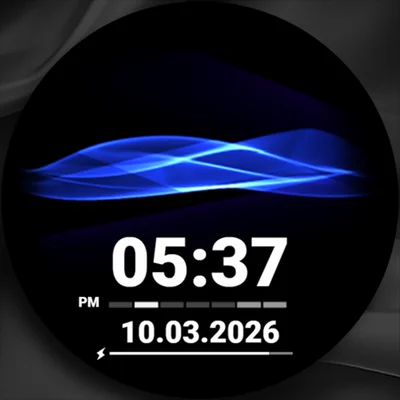
Blue animation
Freiberg watches- 3 歳以上対象年齢
- カスタマイズカテゴリ
- 2026/8/9更新日
- ¥160価格
com.watchfacestudio.BlueAnimationのGoogle Play公式ページにリンクしています。最終確認:2026/11/20。
このアプリについて
Googleによる英語 (インド)からの自動翻訳です。
アニメーション化されたWear OSウォッチフェイス
携帯電話用の Wear OS ウォッチ画面コンパニオン アプリ:
モバイル アプリケーションをインストールした直後、アプリケーションを開くとメッセージが表示されます。
ウォッチフェイスの画像をタップして、ウォッチにウォッチフェイスをインストールするプロセスを開始する必要があります (接続と読み込みを高速化するには、GALAXY WEARABLE アプリまたはその他の時計管理プログラムを開きます。ウォッチへのダウンロードはすぐに開始されます)。
インストールプロセスが完了したら、コンパニオンアプリを削除できます。
インストール後、ウォッチフェイス ライブラリを参照してスクリーンフェイスを見つけます。
インストール後の重要 - インストール後、携帯電話で払い戻しリンクが開き、時計に表示されます。ウォッチフェイスを見つけるには、返金を押さずにウォッチフェイスライブラリを参照してウォッチフェイスを見つけてください。
主な特徴:
- アニメーション表示描画
- AM/PM マーカー (12 時間形式の場合)。
- デジタル時計の文字盤は電話設定で 12/24 時間に切り替え可能。
- 日付。
- バッテリーレベルのステータス。
- 曜日のインデックス。
- 変更可能な色(タップ&ホールドして色をカスタマイズおよび変更します)。(タップ&ホールドして調整および変更します)
- アラームへのクイックアクセス。
- カレンダーへの素早いアクセス。
- バッテリーに素早くアクセスできます。
- 1 つのカスタム ショートカットへのクイック アクセス (長押ししてカスタマイズし、選択したアクションへのショートカットを変更します)。
- 常に表示されます。
注記:
フィードバックや提案についてはメールでお問い合わせください ===> freiberg Clockfaces@gmail.com
原文を表示
Wear OS watch screen companion app for Phone:
Immediately after installing the mobile application, a message will appear when you open the application.
You need to tap on the watch face image to start the process of installing the watch face on your watch (To speed up connection and loading, open the GALAXY WEARABLE app or other clock management program. Downloading to your watch will begin immediately.).
Once the installation process is complete, the companion app can be deleted.
After installation, browse the watch face library to find the screen face.
IMPORTANT AFTER INSTALLATION - after installation, the phone will open a refund link that will be visible on the watch. To find a watch face don't press refund and browse the watch face library to find a watch face.
Main Features:
- Animated display drawing
- AM/PM marker (For 12-hour time format).
- Digital watch face switchable to 12/24 hour via Phone Settings.
- Date.
- Battery level status.
- Index of days of the week.
- Changeable colors (tap & hold to customize & change colors).(tap and hold to adjust and change)
- Quick access to Alarm.
- Quick access to the calendar.
- Quick access to the battery.
- Quick access to 1 custom shortcut (Tap and hold to customize and change shortcut to your chosen action).
- Always on display.
Note:
Email for feedback and suggestions ===> freibergclockfaces@gmail.com
データ セーフティ
このアプリが収集・共有するデータについて、Freiberg watchesがGoogle Playで申告している内容です。
- 第三者と共有されるデータはありません詳しくは、デベロッパーが共有を申告する方法についての説明をご覧ください
- データは収集されません詳しくは、デベロッパーが収集を申告する方法についての説明をご覧ください
- Play ファミリー ポリシーの遵守に努めています
開発元の連絡先
- メールfreibergclockfaces@gmail.com
- プライバシーポリシーsites.google.com
- 住所Kokneses pagasts, Burtnieki Aizkraukles novads, Latvija, LV-5113 Latvia
情報
- 提供元
- Freiberg watches
- カテゴリ
- カスタマイズ
- 更新日
- 2026/8/9
- リリース
- 2023/11/12
- 対象年齢
- 3 歳以上
- 価格
- ¥160
- パッケージ名
- com.watchfacestudio.BlueAnimation